
Utilities Windows
Safing Portmaster
See which apps connect to the internet, block unwanted connections and apply system-wide tracker filters with Portmaster, a free, open-source Windows application firewall.
- Operating system
- Windows; Softonic lists Windows 11
- Architecture
- x64 (AMD64)
- Download package
- EXE installer
Publisher-linked Windows x64 package. Official v2 guide supports 64-bit CPUs only; minimum Windows version/build is not specified there. Installation was not tested.
Link checked · Download guidance
What is Safing Portmaster?
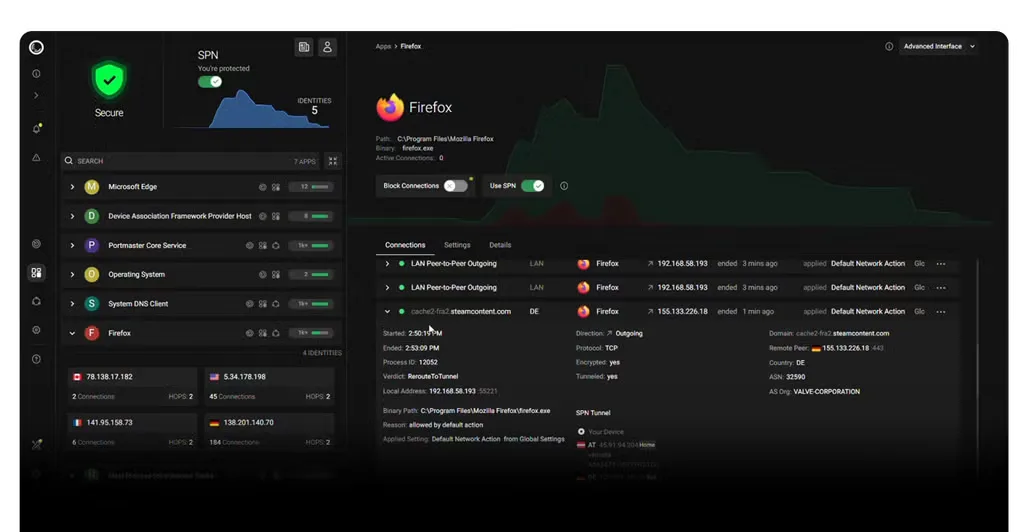
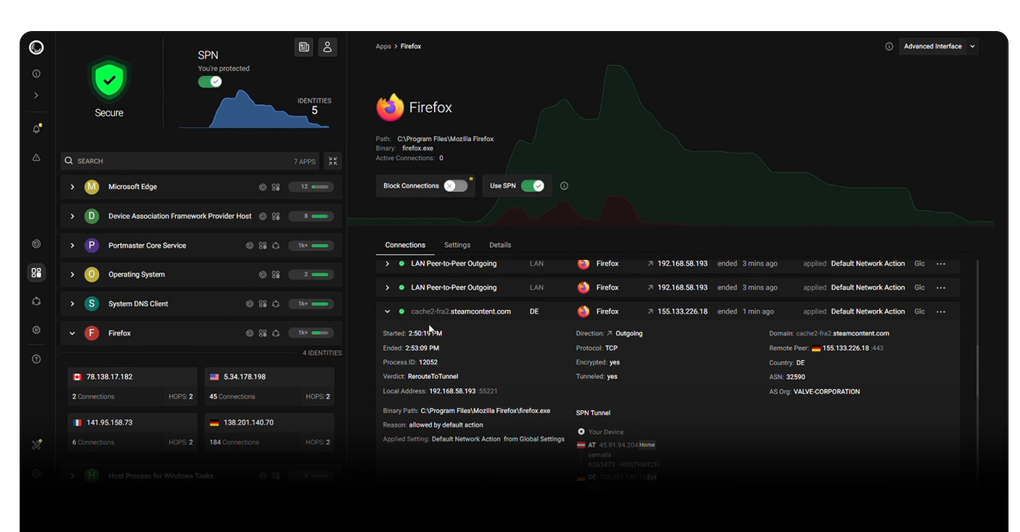
Portmaster shows network connections by application so you can investigate where your Windows programs connect and decide what to allow. It combines a connection monitor with configurable filtering: block an individual connection, restrict an application's internet access, or define rules globally instead of repeating them for every program. Domain, IP and country-based rules help narrow the traffic you want to permit.
The local privacy features include filter lists for ads, trackers and malware hosts, plus encrypted DNS through configurable resolvers. This is useful when you want filtering beyond a browser extension, including background applications. Network history, bandwidth visibility and the Safing Privacy Network (SPN) are paid features; the free firewall should not be confused with a free IP-hiding service. The screenshot shows an interface with SPN enabled, not the entitlement of the free download.
This entry links to the publisher's Windows x64 EXE named Portmaster_2.2.8_x64-setup.exe. Safing's v2 installation guide says the installer is for initial installation, subsequent updates are automatic, and Portmaster does not start automatically immediately after installation. The Core service is configured to start on boot. The same guide supports only 64-bit CPUs; it does not specify a minimum Windows build. To remove Portmaster, use Windows system settings or its installed uninstaller; the guide recommends rebooting afterward.
What it offers
- Inspect application network connections in real time and block connections individually or with rules.
- Set global defaults and per-application rules, including domain, IP and country restrictions.
- Filter ad, tracker and malware-host domains across applications using configurable filter lists.
- Use encrypted DNS with configurable DNS-over-TLS or DNS-over-HTTPS resolvers.
- Manage Windows Store applications and system services through application-aware filtering.
Good to know
- Network history, bandwidth visibility and SPN routing require paid features; SPN shown in the screenshot is not included as a free service.
- The selected installer is Windows x64. The official v2 installation guide supports only 64-bit CPUs and does not state a minimum Windows build.
- Portmaster does not start automatically immediately after installation; the Core service is configured to start automatically on subsequent boots.
Product images
Sources
References used for this listing. Retrieval dates do not indicate hands-on testing.
- Portmaster - Application Firewall by Safing ↗Retrieved
- Safing Portmaster - Features ↗Retrieved
- safing/portmaster — official repository and README ↗Retrieved
- Install on Windows | Safing Community Wiki — v2 ↗Retrieved
- Safing Portmaster - Pricing ↗Retrieved
- Safing Portmaster - Download — normal browser observation ↗Retrieved
More in utilities
View category ↗Custom Resolution Utility (CRU) 1.5.3
Edit monitor resolutions, refresh-rate timings and FreeSync ranges with CRU, a free Windows EDID editor that saves software overrides rather than changing monitor hardware.
Puran Utilities 3.2.1
Clean unwanted files, manage startup items and run selected maintenance tools from one Windows utility suite. Puran Utilities also includes disk checking and file recovery tools.

Safe Exam Browser 3.10.2
Use Safe Exam Browser for institution-configured online exams on Windows, with kiosk restrictions, encrypted exam settings and support for learning management systems.

Midori Browser 11.9.1
Browse the web with Midori, a free, Firefox-derived Windows browser with ad blocking, workspaces and a customizable sidebar.

Opera Browser
Browse the web with built-in ad blocking, sidebar messengers and tab organization in Opera, a free browser for Windows.