

Utilities Windows
Sane Break for Windows
Take computer breaks with Sane Break, a free Windows reminder that starts with a small flashing window and expands to a full-screen break when you stop working or reach a configured limit.
- Operating system
- Windows 10 or newer
- Architecture
- Intel/AMD Windows build; publisher labels it x86, exact bitness not independently verified
- Download package
- EXE installer
Selected asset: sane-break-windows-installer.exe. Separate ARM installer and portable ZIP assets are available. Older Windows support is uncertain.
Link checked · Download guidance
What is Sane Break?
Sane Break reminds you to pause computer work without immediately covering your screen. Its two-phase approach starts with a small flashing reminder so you can finish the task in front of you. The actual break begins when you stop using the computer, or when you continue working past the configurable reminder limit. At that point, the reminder expands to full screen.
The app deliberately avoids prominent skip and postpone buttons. You can delay a break through the tray or menu, but this takes a more intentional action than dismissing a large on-screen button. That design suits people who routinely ignore ordinary break notifications; it is less suitable if you want reminders that never interrupt active work.
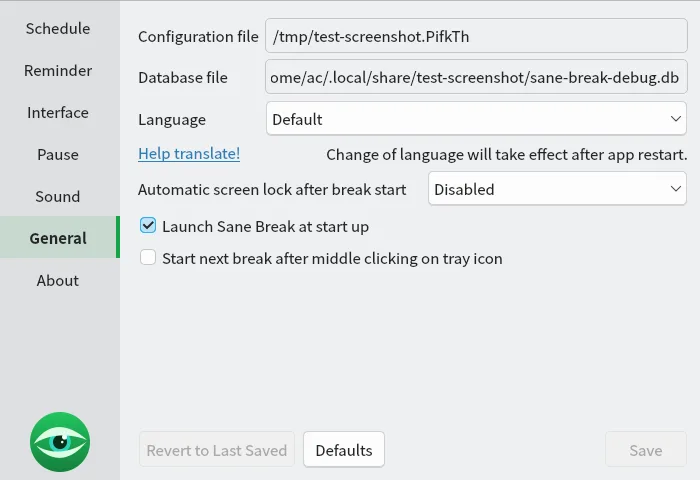
This entry links to the publisher's version 0.10.6 Windows EXE installer. A portable ZIP and a separate Windows ARM build are also listed on the release page. The publisher specifies Windows 10 or newer; support for older versions is uncertain. The screenshot shows the publisher's cross-platform General preferences interface, not a verified Windows installation or a version-specific capture.
What it offers
- Start a break reminder with a small flashing window before switching to a full-screen break.
- Begin the break when computer activity stops, or after a configurable period of continued work.
- Delay breaks intentionally through tray or menu controls rather than prominent skip buttons.
- Choose a Windows installer or a separate portable ZIP from the publisher's release assets.
Good to know
- Ignoring the initial reminder can still lead to a full-screen interruption after the configured limit.
- There are no prominent skip or postpone buttons; delaying a break requires tray or menu controls.
- Windows versions older than Windows 10 are not confirmed supported by the publisher.
Product images
Sources
References used for this listing. Retrieval dates do not indicate hands-on testing.
- Sane Break — publisher repository and README ↗Retrieved
- Sane Break — publisher product website ↗Retrieved
- Sane Break v0.10.6 — publisher release notes ↗Retrieved
- Sane Break v0.10.6 — exact publisher release assets ↗Retrieved
- Sane Break — publisher license and third-party notices ↗Retrieved
- Sane Break — publisher screenshot directory ↗Retrieved
More in utilities
View category ↗
1.1.1.1 with WARP 2026.8.2115.0
Encrypt traffic from your Mac to Cloudflare’s network with WARP, or use DNS-only mode for encrypted DNS queries to the 1.1.1.1 resolver.
1.1.1.1 with WARP 2026.8.2115.0
Encrypt traffic between your Windows PC and Cloudflare, or use encrypted DNS only, with the free 1.1.1.1 with WARP app.

3uTools 9.12.005
Manage iPhone and iPad photos, music, apps and backups from Windows with 3uTools, a free utility that also includes device checks and firmware flashing tools.