
Utilities macOS
Scroll Reverser
Set a different scrolling direction for each Mac mouse and trackpad with Scroll Reverser, a free, open-source utility with wheel step-size controls.
- Operating system
- macOS 13.5 or later
- Architecture
- Intel and Apple silicon
- Download package
- ZIP archive containing Scroll Reverser.app
Move the extracted app to Applications. Accessibility permission is required; Input Monitoring is not required by version 2.
Link checked · Download guidance
What is Scroll Reverser?
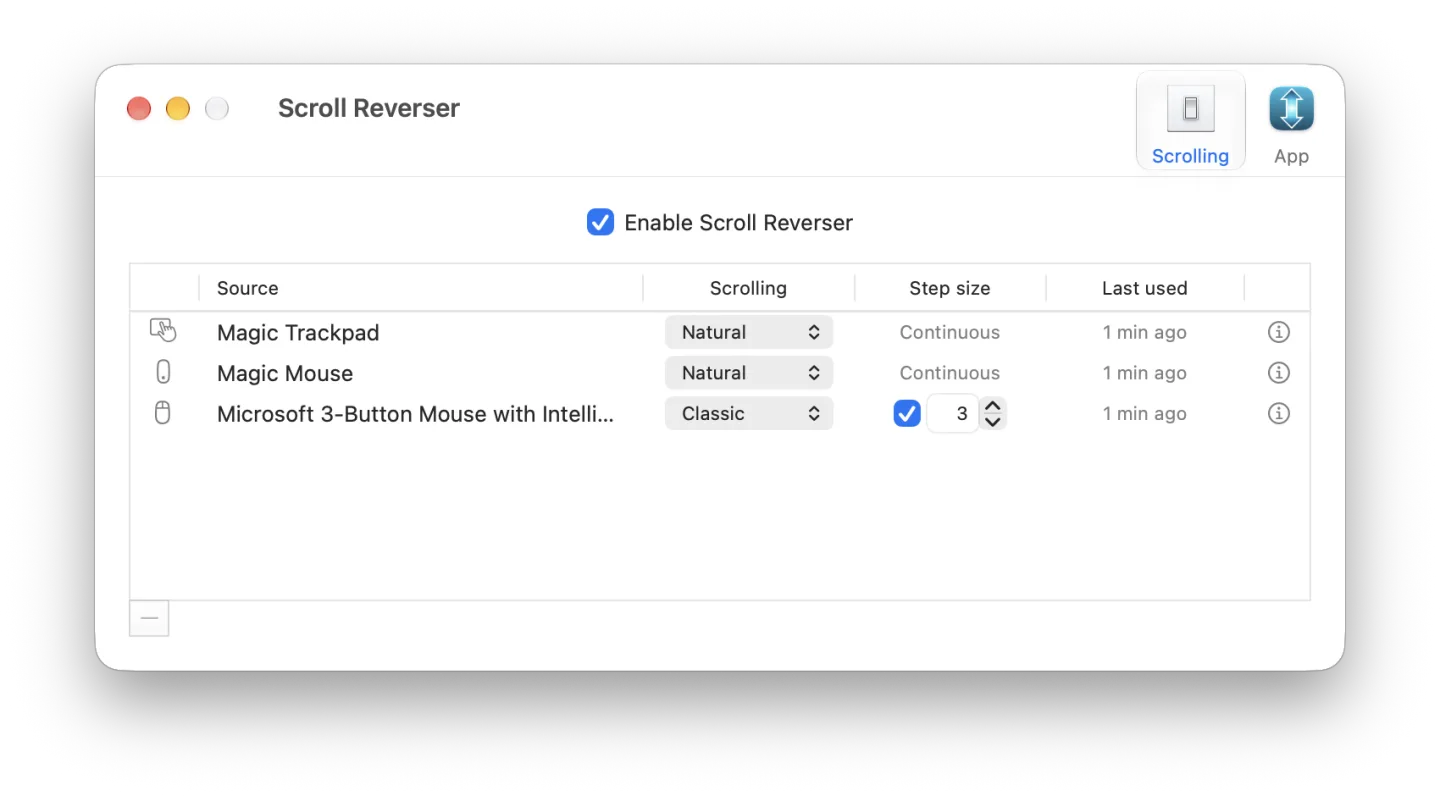
Scroll Reverser separates scrolling preferences for individual mice and trackpads on a Mac. It suits a setup where you want natural scrolling on a trackpad but classic scrolling on a wheel mouse, without using one direction for every device. Each device appears in Settings › Scrolling after you use it, with Natural, Classic and Unchanged options for directly connected devices.
Wheel mice with discrete scrolling also get a step-size control: choose a fixed number of lines per wheel click instead of macOS scroll acceleration. Horizontal scrolling can be configured separately in each device's information popover; it stays unchanged by default. The app requires Accessibility permission. Version 2 no longer requires Input Monitoring permission.
This is a scroll-event utility, not a gesture remapper. The publisher says it cannot reverse swipe gestures or scrolling in iPhone Mirroring and Calendar, which use gesture-based interfaces. Scrolling supplied by another app, such as remote-access software, offers only Reversed or Unchanged because the underlying direction cannot be detected. The linked ZIP contains version 2.0.2 for macOS 13.5 or later on Intel and Apple silicon; unzip it and move Scroll Reverser.app to Applications.
What it offers
- Choose Natural, Classic or Unchanged scrolling separately for each directly connected mouse and trackpad.
- Configure horizontal scrolling per device without changing the vertical preference.
- Set a fixed line count per wheel click for devices with discrete scrolling.
- Toggle the utility through its AppleScript enabled property.
Good to know
- Cannot reverse swipe gestures or gesture-based scrolling in iPhone Mirroring and Calendar.
- App-supplied and unidentified scrolling sources offer Reversed or Unchanged rather than Natural or Classic.
- Version 2.0.2 requires macOS 13.5 or later and Accessibility permission.
Product images
Sources
References used for this listing. Retrieval dates do not indicate hands-on testing.
- Scroll Reverser for Mac - Download ↗Retrieved
- Scroll Reverser for macOS ↗Retrieved
More in utilities
View category ↗
1.1.1.1 with WARP 2026.8.2115.0
Encrypt traffic from your Mac to Cloudflare’s network with WARP, or use DNS-only mode for encrypted DNS queries to the 1.1.1.1 resolver.
1.1.1.1 with WARP 2026.8.2115.0
Encrypt traffic between your Windows PC and Cloudflare, or use encrypted DNS only, with the free 1.1.1.1 with WARP app.

3uTools 9.12.005
Manage iPhone and iPad photos, music, apps and backups from Windows with 3uTools, a free utility that also includes device checks and firmware flashing tools.