
Utilities Windows
SecurAble
Check a processor's 64-bit capability, hardware DEP and hardware virtualization support with SecurAble, a free stand-alone Windows diagnostic utility.
- Operating system
- Legacy Windows; publisher discusses Windows NT, 2000, XP and Vista
- Architecture
- 32-bit Windows kernel-mode module; checks processor 64-bit capability
- Download package
- Stand-alone EXE; no setup required
Kernel-mode checks require administrator privileges on 32-bit Windows NT, 2000, XP or Vista and do not work on 64-bit operating systems. Windows 10/11 compatibility is not established by the cited publisher documentation.
Link checked · Download guidance
What is SecurAble?
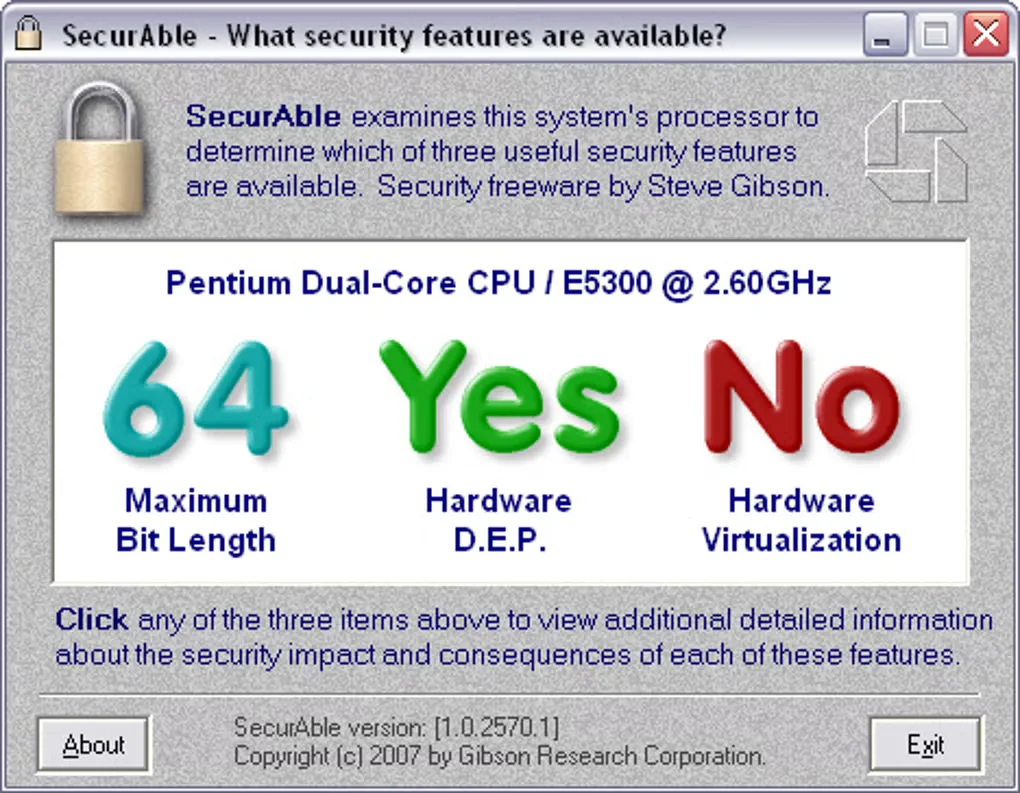
SecurAble reports three processor capabilities in one window: maximum instruction bit length, hardware support for Data Execution Prevention (DEP), and hardware virtualization. It is useful for checking what an older PC's processor can support before investigating operating-system or BIOS settings. Each result can be clicked for an explanation of the finding.
Gibson Research Corporation supplies SecurAble as a stand-alone executable with no setup required. It reports capabilities rather than enabling DEP or virtualization. Some findings can remain uncertain when processor features are hidden by firmware or the operating system.
This is a legacy utility: the publisher's version history identifies 1.0.2570.1 as the January 18, 2007 initial release. Its additional kernel-mode checks require administrative privileges on supported 32-bit Windows systems and cannot run under a 64-bit operating system. The available publisher documentation does not establish Windows 10 or Windows 11 compatibility; the screenshot is a source-provided example, not a test of your hardware.
What it offers
- Report whether the processor supports 32-bit or 64-bit instructions.
- Check hardware DEP capability, including Intel XD and AMD NX support.
- Report hardware virtualization capability and its observed status.
- Open context-sensitive explanations by clicking the three result areas.
- Use a stand-alone executable without a setup process.
Good to know
- The kernel-mode module cannot run on 64-bit operating systems; additional checks require administrator privileges on supported 32-bit Windows systems.
- Hidden or suppressed processor features can leave results uncertain, including an OFF? hardware DEP result.
- SecurAble reports processor capabilities; it does not configure DEP or enable virtualization.
- The cited documentation is legacy material and does not establish Windows 10 or Windows 11 compatibility.
Product images
Sources
References used for this listing. Retrieval dates do not indicate hands-on testing.
More in utilities
View category ↗
1.1.1.1 with WARP 2026.8.2115.0
Encrypt traffic from your Mac to Cloudflare’s network with WARP, or use DNS-only mode for encrypted DNS queries to the 1.1.1.1 resolver.
1.1.1.1 with WARP 2026.8.2115.0
Encrypt traffic between your Windows PC and Cloudflare, or use encrypted DNS only, with the free 1.1.1.1 with WARP app.

3uTools 9.12.005
Manage iPhone and iPad photos, music, apps and backups from Windows with 3uTools, a free utility that also includes device checks and firmware flashing tools.