
Development Windows
Serial Port Utility
Send commands to COM-port devices, inspect text or Hex traffic and debug TCP/UDP links with Serial Port Utility for Windows. Free covers local debugging; advanced tools have Pro allowances.
- Operating system
- Windows; minimum version not provided by the current publisher catalog
- Architecture
- x64
- Download package
- Standalone EXE installer
Publisher guide identifies the Windows build as x64. Install the adapter manufacturer’s USB-to-serial driver if the device is missing; do not infer current Vista support from the historical Softonic listing.
Link checked · Download guidance
What is Serial Port Utility?
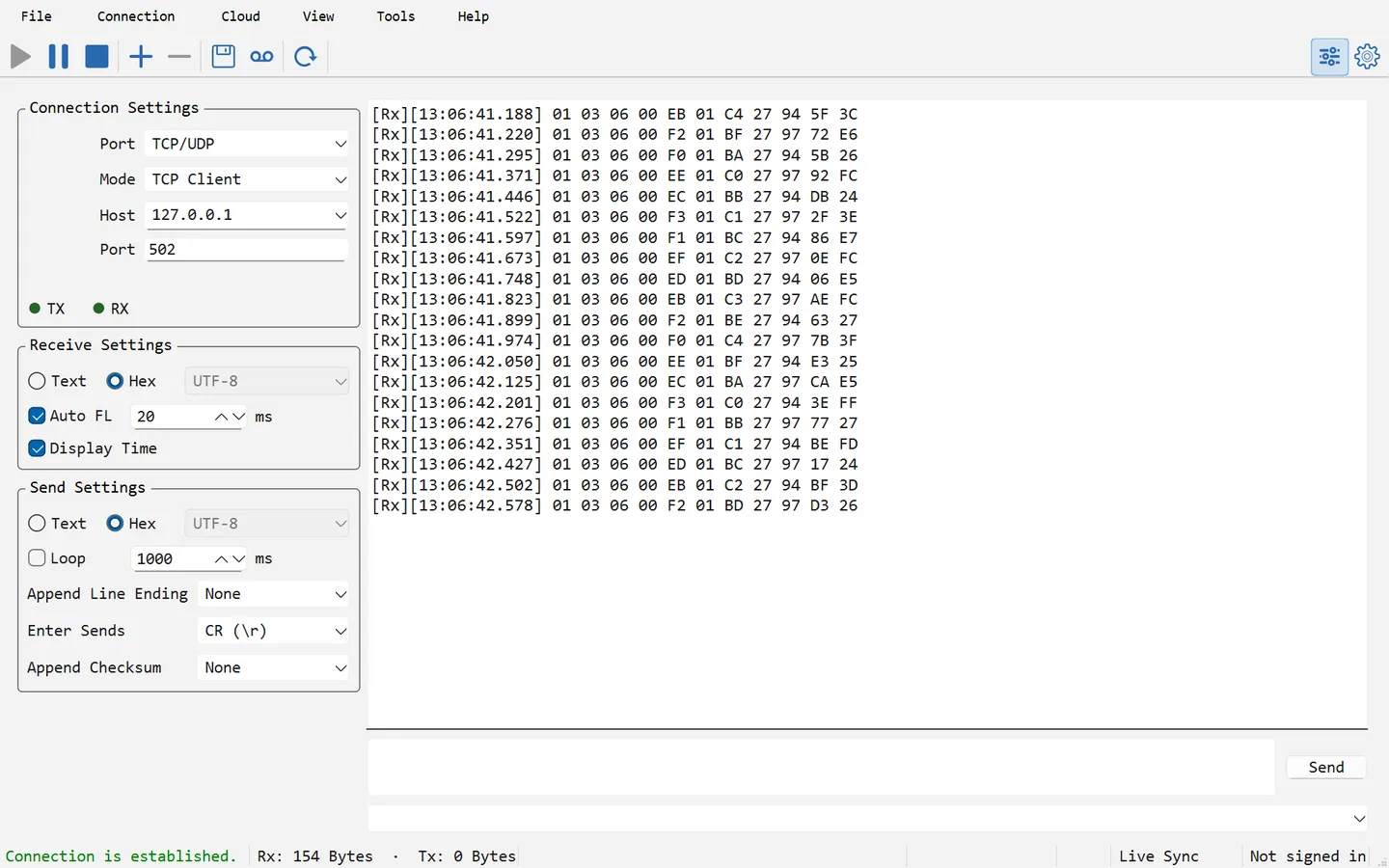
Serial Port Utility is a Windows serial-communication workspace for developers and technicians working with boards, instruments and industrial devices. Select a COM port, match the device’s communication settings, send a known command and inspect the reply as text or hexadecimal bytes. TCP and UDP connections make it useful when the same investigation involves a network endpoint rather than a physical serial cable.
The Free edition supports up to 16 connections, bridges, checksums and local logs without a paid license or an account for local debugging. A command library keeps repeated messages together, while Modbus frame tools, protocol decoding and session recording help examine more structured exchanges. Saved projects keep the workflow together between sessions.
Free is not a new 30-day Pro trial. In version 6.6.8 it runs without a time limit, but advanced tools have per-launch allowances: the Modbus builder inserts or copies five frames, X/YMODEM permits three transfers of files up to 128 KB, and protocol decoding has 120 seconds of active decoding. Receiving data continues when an advanced allowance is exhausted. Pro removes those allowances; cloud features separately require an account and available traffic.
This entry links to the publisher’s standalone Windows x64 installer. The current catalog does not provide a minimum Windows version, so the older Softonic listing’s Vista label is not treated as compatibility proof for this release. A missing USB-to-serial driver must be resolved with the adapter manufacturer; buying a software license does not make an unrecognized device appear.
What it offers
- Open up to 16 serial, TCP or UDP connections in Free and arrange multiple connections in one workspace.
- Send readable text or Hex bytes, apply checksums and retain local communication logs.
- Keep repeated commands in a project command library and use sequences for send, wait and reply checks.
- Build Modbus frames and decode protocol traffic, subject to Free-edition allowances.
- Record sessions for later replay and share ports through RFC 2217 or account-based Live Sync services.
Good to know
- Free advanced tools have per-launch limits, including five Modbus frame insert/copy operations, three X/YMODEM transfers of files up to 128 KB, and 120 seconds of active protocol decoding.
- Free replays only the first 10 minutes of each recording; Pro is required for the whole recording.
- Cloud services require online permission, an account and available traffic; local debugging does not require an account.
- The published Windows build targets x64. Minimum Windows version is not provided by the current catalog; other architectures are not established.
Product images
Sources
References used for this listing. Retrieval dates do not indicate hands-on testing.
- Serialport Utility - Download ↗Retrieved
- Serial Port Utility | Alithon Official Site ↗Retrieved
- Download Serial Port Utility | Alithon ↗Retrieved
- Serial Port Utility Pricing | Alithon ↗Retrieved
- Quick start | Alithon ↗Retrieved
More in development
View category ↗

010 Editor 17.0
Inspect and edit binary files on Mac with 010 Editor, a paid text and hex editor with Binary Templates, file comparison and a 30-day trial.
010 Editor 17.0
Inspect and edit binary files with 010 Editor for Windows, a text and hex editor with Binary Templates, file comparison and scripting. Includes a 30-day trial.
10x Editor
Edit and navigate C++ projects on Windows with a built-in parser, workspace search and Visual Studio project support. A paid license is required after the 30-day trial.