

Utilities Windows
Shutdown Timer Classic for Windows
Set a countdown to shut down, restart, sleep, hibernate or lock a Windows PC with Shutdown Timer Classic, a free, open-source utility.
- Operating system
- Windows 10 recommended by publisher; Windows 11 listed by Softonic
- Architecture
- Not specified for this installer archive in the cited publisher notes
- Download package
- ZIP containing a Windows installer
Publisher minimum-version wording is internally inconsistent; no exact minimum build is claimed. Older Windows versions are not guaranteed to support every feature.
Link checked · Download guidance
What is Shutdown Timer Classic?
Shutdown Timer Classic schedules a power action for your Windows PC. Choose shutdown, restart, sleep, hibernate or lock, then set how long the countdown should run. It suits a timed power-off after a task or a reminder to end a computer session. The countdown can stay visible above other windows or run in the background with controls in the notification-area menu.
The publisher also documents command-line options for setting the time and action, including a time-of-day mode in version 1.3.2. The linked download is the publisher-hosted ZIP containing the Windows installer, not the separate portable archive or the Microsoft Store edition. Only the Store edition receives automatic updates through Microsoft Store.
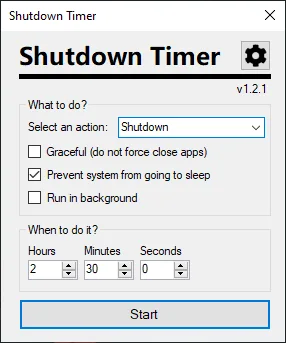
Save your work before the timer expires. The default forced shutdown can close applications with unsaved data. Graceful mode avoids forcing applications to close, but an application waiting for input can interrupt the shutdown. The accompanying publisher screenshot shows the older v1.2.1 interface; it illustrates the action selector and countdown controls, not the exact appearance of v1.3.2.
What it offers
- Choose a timed shutdown, restart, sleep, hibernate or screen lock.
- Keep the countdown visible or run it in the background.
- Stop, restart or display the countdown from the notification-area menu.
- Select graceful shutdown when applications should be allowed to finish closing.
- Set time and action through command-line arguments; version 1.3.2 adds a CLI time-of-day mode.
Good to know
- Forced shutdown can discard unsaved work; graceful mode can instead be interrupted by applications that do not close.
- The linked non-Store package does not receive the Microsoft Store edition's automatic updates.
- The publisher's minimum-Windows recommendation mixes inconsistent update names, version numbers and build numbers; an exact minimum build is not established here.
Product images
Sources
References used for this listing. Retrieval dates do not indicate hands-on testing.
More in utilities
View category ↗
1.1.1.1 with WARP 2026.8.2115.0
Encrypt traffic from your Mac to Cloudflare’s network with WARP, or use DNS-only mode for encrypted DNS queries to the 1.1.1.1 resolver.
1.1.1.1 with WARP 2026.8.2115.0
Encrypt traffic between your Windows PC and Cloudflare, or use encrypted DNS only, with the free 1.1.1.1 with WARP app.


3uTools 9.12.005
Manage iPhone and iPad photos, music, apps and backups from Windows with 3uTools, a free utility that also includes device checks and firmware flashing tools.