

Utilities Windows
Signal for Windows
Send encrypted messages, share files and make voice or video calls with Signal for Windows. Link the free desktop app to Signal on your Android phone or iPhone.
- Operating system
- Windows 10 or 11
- Architecture
- x64
- Download package
- EXE installer
Selected explicit x64 installer from the publisher’s Windows release metadata. Signal on Android or iPhone is required for desktop linking.
Link checked · Download guidance
What is Signal?
Signal for Windows brings Signal conversations to your computer. Use it to send messages and files, take part in group chats, or make voice and video calls to other Signal users. End-to-end encryption is built into Signal communications rather than offered as an optional chat mode, and the service is free with no ads.
The desktop app is a linked device, not a standalone way to start using Signal: you need Signal installed and working on an Android phone or iPhone before linking the computer. Your contacts also need Signal for Signal-to-Signal conversations. The selected download is the publisher’s Windows x64 EXE installer; Windows 10 and 11 are listed in its installation guidance.
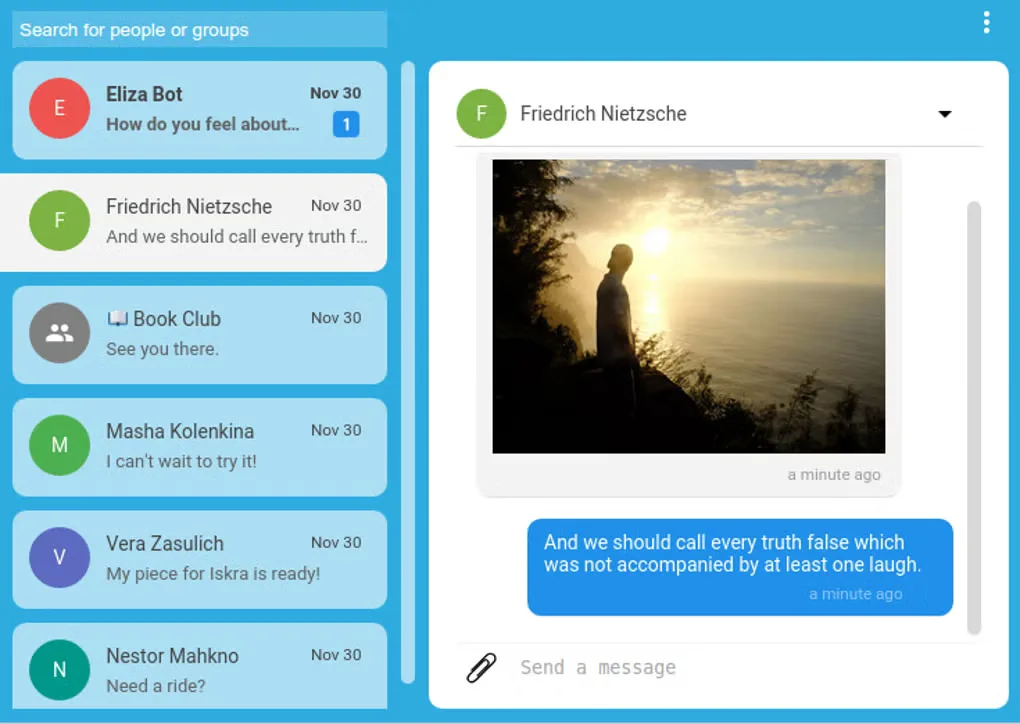
The screenshot shows an older interface from the source’s Signal for Windows gallery. It illustrates the conversation list, shared media and message composer, not a verified view of version 8.33.0.
What it offers
- Send and receive Signal messages from a linked Windows computer.
- Share photos, videos, voice messages and files.
- Make voice and video calls to other Signal users.
- Use group chats with end-to-end encrypted communications.
- Use the free messaging service without ads.
Good to know
- Signal Desktop must be linked to Signal on an Android phone or iPhone before use.
- Signal-to-Signal messages and calls require the other person to use Signal.
Product images
Sources
References used for this listing. Retrieval dates do not indicate hands-on testing.
- Signal - Download — Windows product page and historical gallery ↗Retrieved
- Signal >> Download Signal ↗Retrieved
- Signal Desktop — publisher Windows release metadata ↗Retrieved
- Signal >> Home ↗Retrieved
- Installing Signal – Signal Support ↗Retrieved
- Signal · GitHub — publisher desktop source repository ↗Retrieved
More in utilities
View category ↗
1.1.1.1 with WARP 2026.8.2115.0
Encrypt traffic from your Mac to Cloudflare’s network with WARP, or use DNS-only mode for encrypted DNS queries to the 1.1.1.1 resolver.
1.1.1.1 with WARP 2026.8.2115.0
Encrypt traffic between your Windows PC and Cloudflare, or use encrypted DNS only, with the free 1.1.1.1 with WARP app.

3uTools 9.12.005
Manage iPhone and iPad photos, music, apps and backups from Windows with 3uTools, a free utility that also includes device checks and firmware flashing tools.