

Utilities Windows
simplewall for Windows
Control which Windows applications can access the network with simplewall, a free, open-source Windows Filtering Platform utility with custom rules and packet logging.
- Operating system
- Windows 7 SP1, 8, 8.1, 10 and 11
- Architecture
- x86, x64 and ARM64 listed in the publisher's 3.8.7 requirements
- Download package
- EXE installer; portable archive available separately
Administrator rights and an SSE2-capable CPU are listed as requirements. Windows 7 requires KB3063858. Architecture support is from the release README; installer contents were not inspected.
Link checked · Download guidance
What is simplewall?
simplewall lets you manage application network access through Windows Filtering Platform (WFP). Use its application list to allow programs, create global or application-specific rules, and inspect dropped-packet information. It also supports Windows services, Store applications and IPv6. It is not a front end for Windows Firewall: the publisher describes the two as independent.
This is a tool for users prepared to manage network rules. Administrator rights are required, and the default configuration blocks applications until you allow them. Filters continue working when the simplewall window is closed. Uninstalling the program does not remove its configured filters; the publisher instructs users to select Disable filters in simplewall to remove them.
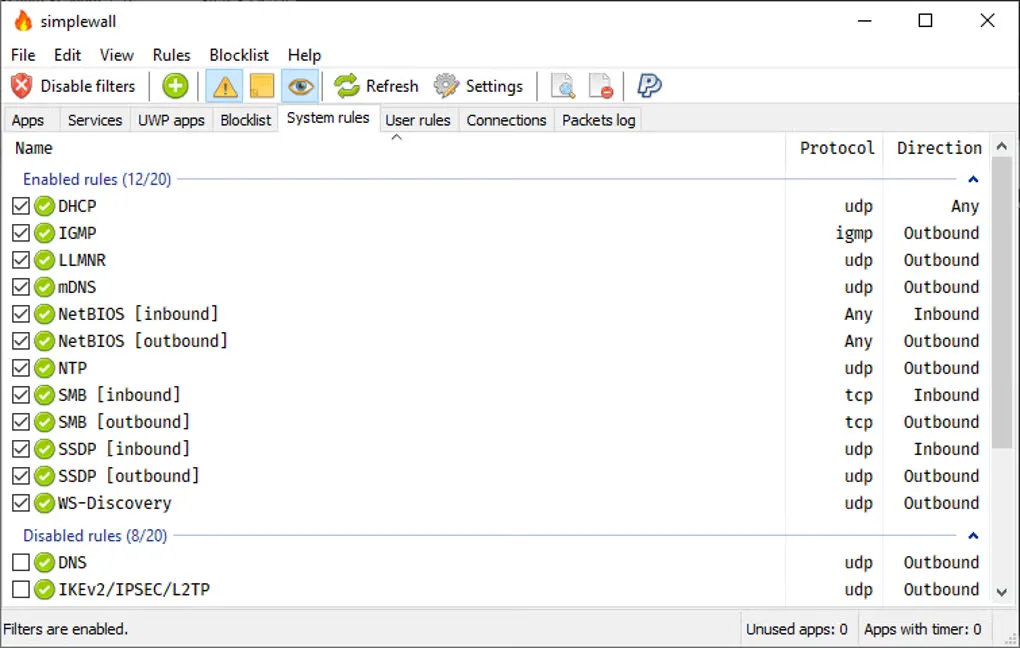
The linked download is the publisher's simplewall 3.8.7 EXE installer. A separate portable archive is also listed by the publisher. The screenshot shows the Windows system-rules interface; it is not evidence that the linked installer has been installed or tested.
What it offers
- Manage application network access using Windows Filtering Platform rather than the Windows Firewall interface.
- Create custom global rules or rules assigned to selected applications, using addresses, ports and ranges.
- View dropped-packet information and log it to a file; allowed-packet logging requires Windows 8 or later.
- Use an internal blocklist and support for Windows services, Store applications and IPv6.
Good to know
- Administrator rights are required; the publisher explicitly targets advanced users.
- The default configuration blocks applications, so programs that need network access must be allowed.
- Configured filters remain active after closing or uninstalling the application. Use Disable filters in simplewall to remove them.
Product images
Sources
References used for this listing. Retrieval dates do not indicate hands-on testing.
More in utilities
View category ↗
1.1.1.1 with WARP 2026.8.2115.0
Encrypt traffic from your Mac to Cloudflare’s network with WARP, or use DNS-only mode for encrypted DNS queries to the 1.1.1.1 resolver.
1.1.1.1 with WARP 2026.8.2115.0
Encrypt traffic between your Windows PC and Cloudflare, or use encrypted DNS only, with the free 1.1.1.1 with WARP app.

3uTools 9.12.005
Manage iPhone and iPad photos, music, apps and backups from Windows with 3uTools, a free utility that also includes device checks and firmware flashing tools.