

Utilities Windows
SmartSniff for Windows
Capture TCP/IP traffic and inspect client-server conversations in ASCII or hexadecimal with SmartSniff, a freeware Windows network utility.
- Operating system
- Windows; publisher requirements list Windows 98 through Windows 8, with Windows 10 fixes in version history
- Architecture
- x64 (selected download)
- Download package
- ZIP archive containing a standalone executable
SmartSniff itself needs no installation. Capture-driver and adapter compatibility vary by method. Current Windows 11 support has not been established from the publisher's requirements.
Link checked · Download guidance
What is SmartSniff?
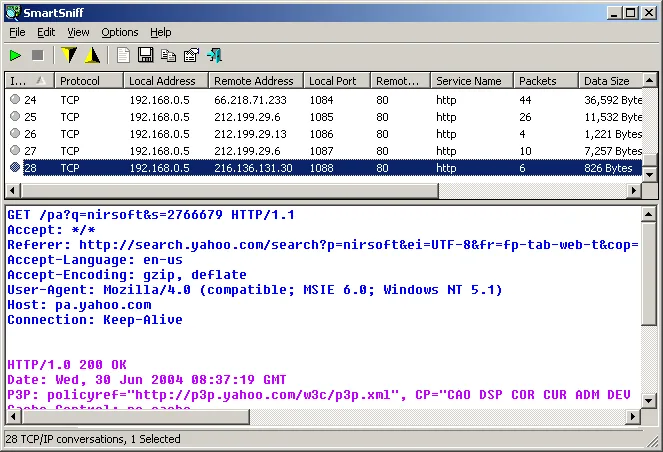
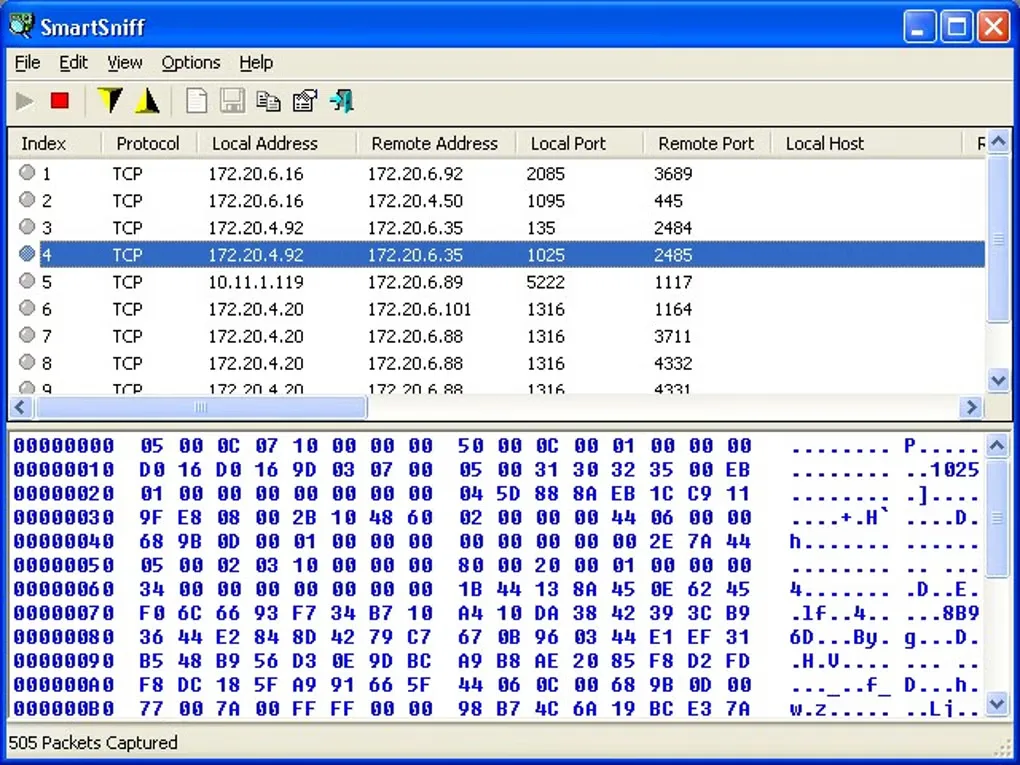
SmartSniff groups captured network traffic into conversations between clients and servers. Select a conversation in the upper pane to inspect its data below, using ASCII for text-based protocols or a hexadecimal dump for binary content. This makes it useful for examining traffic passing through a network adapter without working through individual packets alone.
Capture and display filters narrow the view by protocol, address or port. You can save captured packets for later inspection, export conversation summaries to CSV and other formats, or export selected streams as text, HTML or raw data. SmartSniff itself runs from an extracted executable without installation; this entry links to the publisher's separate 64-bit ZIP package.
Capture results depend on the selected method and adapter. The publisher documents raw-socket restrictions, including missing outgoing UDP and ICMP packets, and lists capture-driver alternatives. Its requirements section names older Windows versions, while the version history mentions Windows 10 fixes; that is not a verified compatibility statement for every current Windows release.
What it offers
- Inspect captured TCP/IP conversations in ASCII, hexadecimal or automatic display mode.
- Filter captured or displayed traffic by protocol, IP address range and port range.
- Save packet data for later inspection and open supported tcpdump/libpcap capture files.
- Export packet summaries to CSV, text, HTML or XML and conversation streams to text, HTML or raw data.
- Use a standalone executable, with a separate 64-bit ZIP package available from the publisher.
Good to know
- The raw-socket capture method does not capture outgoing UDP or ICMP packets and has additional Windows-specific restrictions.
- Driver-based capture depends on a compatible capture driver and network adapter; the publisher's requirements list is largely legacy and does not establish Windows 11 compatibility.
- Optional process information is available only for TCP traffic and may miss short-lived connections.
Product images
Sources
References used for this listing. Retrieval dates do not indicate hands-on testing.
More in utilities
View category ↗
1.1.1.1 with WARP 2026.8.2115.0
Encrypt traffic from your Mac to Cloudflare’s network with WARP, or use DNS-only mode for encrypted DNS queries to the 1.1.1.1 resolver.
1.1.1.1 with WARP 2026.8.2115.0
Encrypt traffic between your Windows PC and Cloudflare, or use encrypted DNS only, with the free 1.1.1.1 with WARP app.

3uTools 9.12.005
Manage iPhone and iPad photos, music, apps and backups from Windows with 3uTools, a free utility that also includes device checks and firmware flashing tools.