

Utilities macOS
Snagit for macOS
Capture scrolling pages, annotate screenshots and record screen walkthroughs with Snagit for Mac, TechSmith’s paid capture tool with a trial.
Version 2026.4.3 · Direct publisher file
Link checked · Download guidance
What is Snagit?
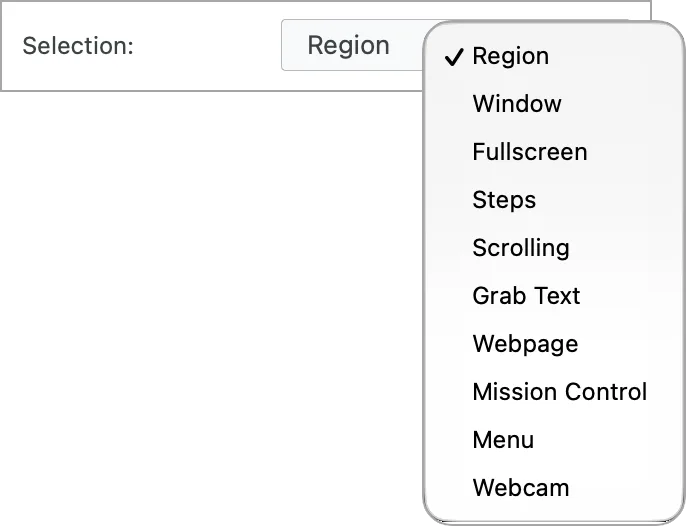
Snagit for Mac captures images and screen recordings for instructions, support replies and visual documentation. Select an area or capture a scrolling page, then open the result in Snagit Editor. Add arrows, callouts and text to images, or trim unwanted sections from a recording. The capture library keeps earlier work available for reuse.
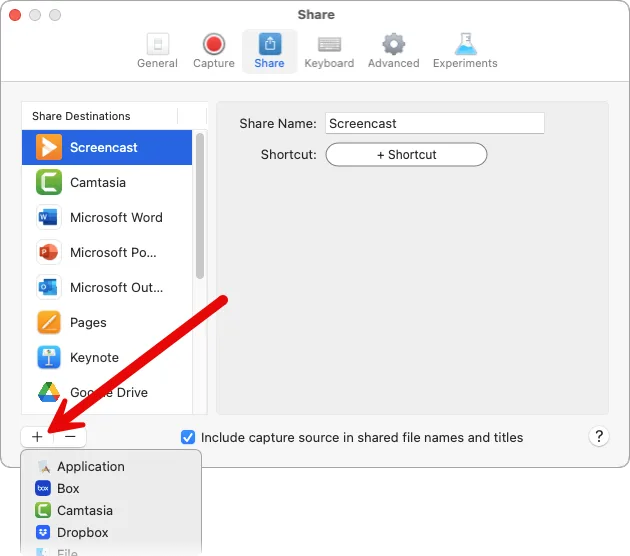
Sharing options include copying a capture, saving it to a file and uploading it to Screencast for a shareable link. Mac destinations also include Pages and Keynote. The screenshots here are TechSmith tutorial images of Mac capture and sharing settings; they are illustrations, not proof of the exact appearance of the linked release.
Snagit is subscription software, not a permanently free screen recorder. TechSmith requires an account for the trial and limits that trial to evaluation and review, excluding commercial use and training. Image annotation tools do not edit already-recorded video; TechSmith directs users to Camtasia Editor for that task.
What it offers
- Capture selected screen areas and scrolling pages for visual instructions.
- Annotate images with arrows, callouts, text and other editing tools.
- Record screen walkthroughs, then trim or cut unwanted video segments.
- Find previous images and recordings in the capture library.
- Copy or save captures, share through Screencast, or send supported files to Mac applications such as Pages and Keynote.
Good to know
- The trial requires a TechSmith account and is restricted to evaluation and review, not commercial use or training. Continued use requires a paid license.
- Snagit’s image annotation tools cannot add annotations to already-recorded video; that workflow requires a separate editor such as Camtasia Editor.
- Some sharing destinations require a separate account, sign-in and permission to access that service.
Product images
Sources
References used for this listing. Retrieval dates do not indicate hands-on testing.
- Snagit for Mac - Download ↗Retrieved
- Snagit Download – Install the Latest Version | TechSmith ↗Retrieved
- Previous Release Download Locations — Snagit (Mac) ↗Retrieved
- Snagit Mac 2026 Version History ↗Retrieved
- Capture an Image | Snagit Tutorial ↗Retrieved
- Explore Snagit Editor | Snagit Tutorial ↗Retrieved
- Share Captures | Snagit Tutorial ↗Retrieved
- TechSmith Snagit | Screen capture and screen recording ↗Retrieved
- TechSmith software subscription notice ↗Retrieved
More in utilities
View category ↗
1.1.1.1 with WARP 2026.8.2115.0
Encrypt traffic from your Mac to Cloudflare’s network with WARP, or use DNS-only mode for encrypted DNS queries to the 1.1.1.1 resolver.
1.1.1.1 with WARP 2026.8.2115.0
Encrypt traffic between your Windows PC and Cloudflare, or use encrypted DNS only, with the free 1.1.1.1 with WARP app.

3uTools 9.12.005
Manage iPhone and iPad photos, music, apps and backups from Windows with 3uTools, a free utility that also includes device checks and firmware flashing tools.