

Utilities Windows
Snagit for Windows
Capture scrolling pages, annotate screenshots and turn on-screen steps into visual guides with Snagit for Windows, a paid application with an evaluation trial.
- Operating system
- Windows 11; Windows 11 on ARM 23H2+; Windows 10 20H2+; Windows Server 2016, 2019 or 2022
- Architecture
- 64-bit Windows; Windows 11 on ARM also listed by publisher
- Download package
- EXE installer
Publisher Windows installer; Mac download is separate. Trial requires an account and is evaluation-only. Snagit Printer is unavailable on ARM.
Link checked · Download guidance
What is Snagit?
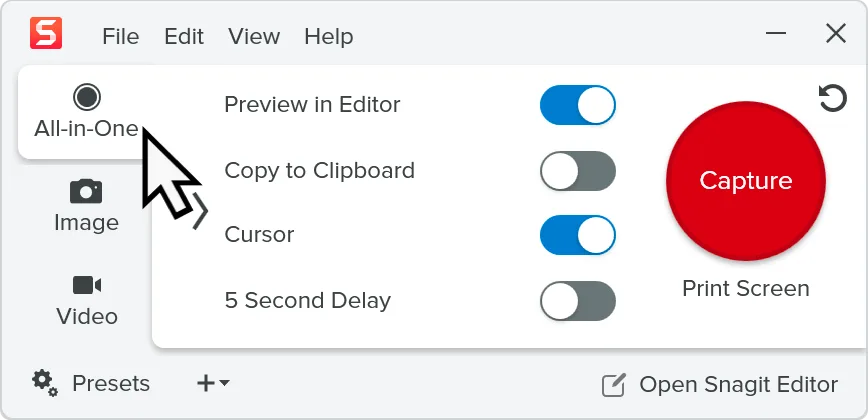
Snagit combines screen capture with image editing for documenting a process or explaining a problem. Capture a long webpage, document or spreadsheet in one scrolling image, then add arrows, callouts and text to show what matters. Step Capture turns clicks through a workflow into a reusable visual guide; Themes help keep annotations consistent across a team's documentation. Screen and camera recording provide another way to demonstrate a task.
This entry links to TechSmith's Windows EXE installer, not the separate Mac download. Snagit requires 64-bit Windows; the publisher also lists Windows 11 on ARM, where Snagit Printer is unavailable. A TechSmith account is required for the trial. The trial is for evaluation and review only, not commercial work or training, and its license ends when the trial expires or a standard license is purchased. Paid subscription licensing is offered for continued use.
What it offers
- Capture long webpages, documents and spreadsheets as a single scrolling image.
- Add arrows, callouts, text and other markup in the built-in image editor.
- Create visual workflow guides with Step Capture.
- Apply consistent annotation colors, fonts and styles with Themes.
- Capture screen and camera recordings for visual explanations.
Good to know
- The evaluation trial requires a TechSmith account and cannot be used for commercial work or training; continued use requires a paid license.
- 32-bit Windows is not supported. Snagit Printer is unavailable on Windows on ARM.
Product images
Sources
References used for this listing. Retrieval dates do not indicate hands-on testing.
- TechSmith Snagit — screen capture, annotation and guides ↗Retrieved
- TechSmith — Snagit Windows download and recording introduction ↗Retrieved
- TechSmith — Snagit evaluation download and license terms ↗Retrieved
- TechSmith — Snagit Windows system requirements ↗Retrieved
- TechSmith Support — Snagit Windows 2026 version history ↗Retrieved
- TechSmith — Snagit paid licensing ↗Retrieved
More in utilities
View category ↗
1.1.1.1 with WARP 2026.8.2115.0
Encrypt traffic from your Mac to Cloudflare’s network with WARP, or use DNS-only mode for encrypted DNS queries to the 1.1.1.1 resolver.
1.1.1.1 with WARP 2026.8.2115.0
Encrypt traffic between your Windows PC and Cloudflare, or use encrypted DNS only, with the free 1.1.1.1 with WARP app.

3uTools 9.12.005
Manage iPhone and iPad photos, music, apps and backups from Windows with 3uTools, a free utility that also includes device checks and firmware flashing tools.