
Utilities macOS
Sniffnet
See which programs and network hosts use your Mac’s connection with Sniffnet, a free, open-source traffic monitor. This download is the Apple silicon DMG.
- Operating system
- macOS; minimum version not established by the cited documentation
- Architecture
- Apple silicon (ARM64)
- Download package
- DMG disk image
This download is for Apple silicon. A separate Intel DMG is linked in the publisher repository. macOS includes the required dependencies; capturing traffic requires administrator privileges.
Link checked · Download guidance
What is Sniffnet?
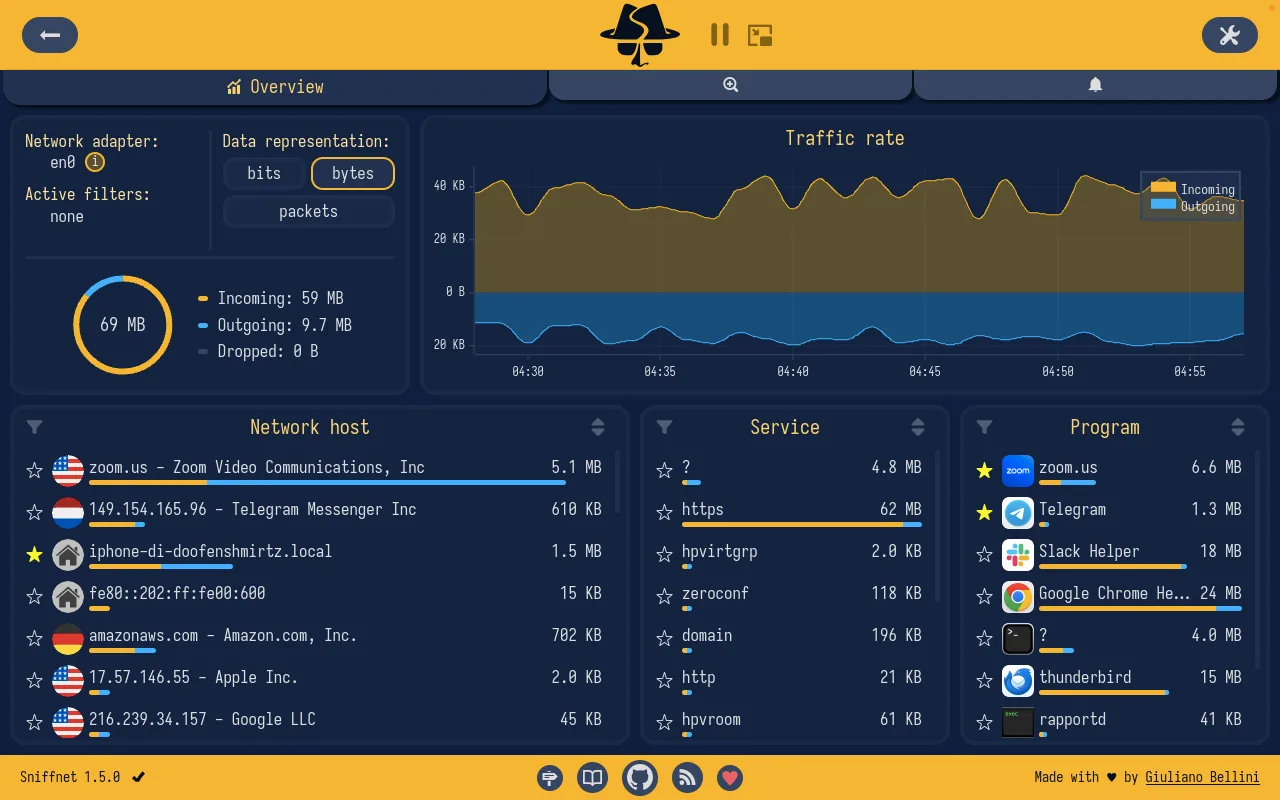
Sniffnet helps you understand the network traffic of the Mac it runs on. Select a network adapter, apply display filters and watch incoming and outgoing traffic in real-time charts. Its overview groups activity by network host, service and program, so you can investigate which applications are using bandwidth and which hosts they contact. Host details include domain names, autonomous system numbers and geographical information.
For closer investigation, search and inspect connections, set event notifications or import a saved capture. Sniffnet imports PCAP, PCAPNG and CAP files and exports PCAP files for use with other analysis tools. The publisher screenshot below shows the 1.5.0 overview; the checked Apple silicon download resolved to version 1.5.1.
Sniffnet observes traffic rather than blocking it: display filters do not make it a firewall. It also does not show packet payloads inside the app; export a capture to a tool such as Wireshark when you need that detail. Capture requires administrator privileges on macOS. The selected DMG is for Apple silicon; the publisher provides a separate Intel package.
What it offers
- View real-time incoming and outgoing traffic charts for a selected network adapter.
- Group traffic by network host, service and application to investigate bandwidth use.
- Inspect connections with domain, ASN and geographical host information.
- Import PCAP, PCAPNG and CAP captures; export captures in PCAP format.
- Apply display filters and configure notifications for network events.
Good to know
- Cannot block traffic or act as a firewall; filters change the displayed traffic only.
- Packet payloads cannot be inspected in-app; export a capture for a tool such as Wireshark.
- Monitors the machine it runs on, not a remote host; macOS capture requires administrator privileges.
Product images
Sources
References used for this listing. Retrieval dates do not indicate hands-on testing.
More in utilities
View category ↗
1.1.1.1 with WARP 2026.8.2115.0
Encrypt traffic from your Mac to Cloudflare’s network with WARP, or use DNS-only mode for encrypted DNS queries to the 1.1.1.1 resolver.
1.1.1.1 with WARP 2026.8.2115.0
Encrypt traffic between your Windows PC and Cloudflare, or use encrypted DNS only, with the free 1.1.1.1 with WARP app.

3uTools 9.12.005
Manage iPhone and iPad photos, music, apps and backups from Windows with 3uTools, a free utility that also includes device checks and firmware flashing tools.