

Utilities Windows
SoundVolumeView for Windows
View and change Windows app and device volume, mute individual sound components, and save audio profiles with NirSoft’s free SoundVolumeView utility.
- Operating system
- Windows Vista, 7, 8, 2008, 10 and 11
- Architecture
- x64 (64-bit download)
- Download package
- ZIP archive; executable requires no installation
Publisher also offers a separate 32-bit ZIP. Windows XP and earlier are not supported.
Link checked · Download guidance
What is SoundVolumeView?
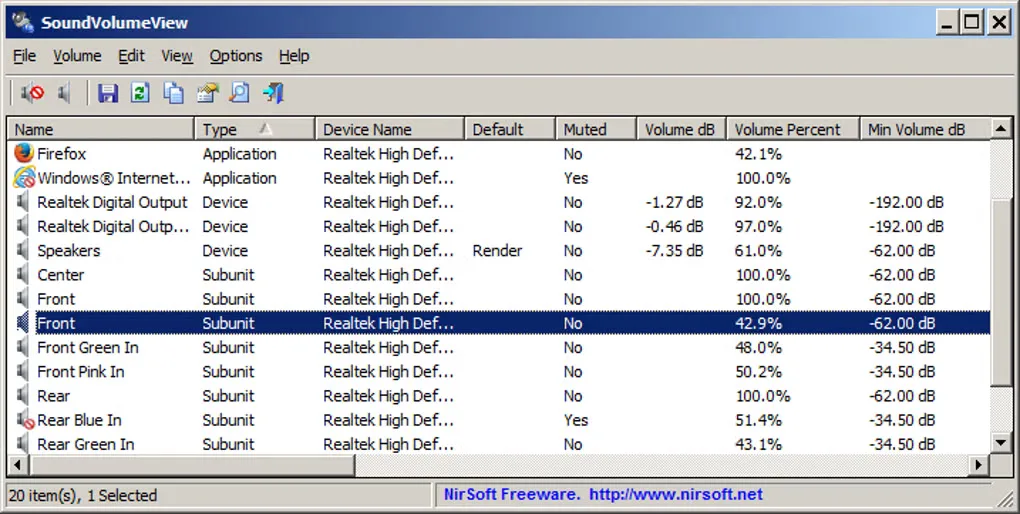
SoundVolumeView puts Windows audio devices, subunits and application volume entries in one table. Select an item to mute it or change its volume, set a default sound device, or create a desktop shortcut for an audio action. Its command-line options also let you control volume and mute states without opening the interface.
Save a sound profile when you want to restore a particular set of volume levels, mute states and default playback or recording devices on the same PC. Profiles are tied to that computer and its devices: they are not a way to transfer an audio setup to another computer.
The linked download is the publisher’s 64-bit ZIP package. SoundVolumeView runs from its executable without an installation process; the publisher offers a separate 32-bit package.
What it offers
- View application, device and subunit audio entries with volume and mute information.
- Mute or unmute selected items and adjust volume through the interface or command line.
- Save and load sound profiles containing volume levels, mute states and default sound devices.
- Create desktop shortcuts for audio actions such as mute/unmute, volume changes and setting a default device.
Good to know
- Sound profiles are tied to the original computer and its devices; they cannot be transferred to another PC.
- Windows XP and older systems are not supported.
Product images
Sources
References used for this listing. Retrieval dates do not indicate hands-on testing.
More in utilities
View category ↗
1.1.1.1 with WARP 2026.8.2115.0
Encrypt traffic from your Mac to Cloudflare’s network with WARP, or use DNS-only mode for encrypted DNS queries to the 1.1.1.1 resolver.
1.1.1.1 with WARP 2026.8.2115.0
Encrypt traffic between your Windows PC and Cloudflare, or use encrypted DNS only, with the free 1.1.1.1 with WARP app.

3uTools 9.12.005
Manage iPhone and iPad photos, music, apps and backups from Windows with 3uTools, a free utility that also includes device checks and firmware flashing tools.