
Development macOS
Sourcetree
Review code changes, stage files and manage Git branches with Sourcetree, Atlassian's free graphical client for Mac.
- Operating system
- macOS 10.15 or later
- Architecture
- Not specified in the consulted publisher sources
- Download package
- ZIP archive
Publisher-linked Mac package. CPU architecture and native Apple silicon support were not established; no installation or runtime compatibility test was performed.
Link checked · Download guidance
What is Sourcetree?
Sourcetree gives Git repositories a graphical workspace on your Mac. Inspect changes before committing, follow branch and commit history, and clone remote repositories without entering Git commands for each operation. It suits developers who want to see repository state and choose which changes belong in a commit.
The client supports staging by file, hunk or line, plus stashing, cherry-picking and interactive rebase. Git LFS support helps teams track large assets alongside their project. The publisher also documents Mercurial support.
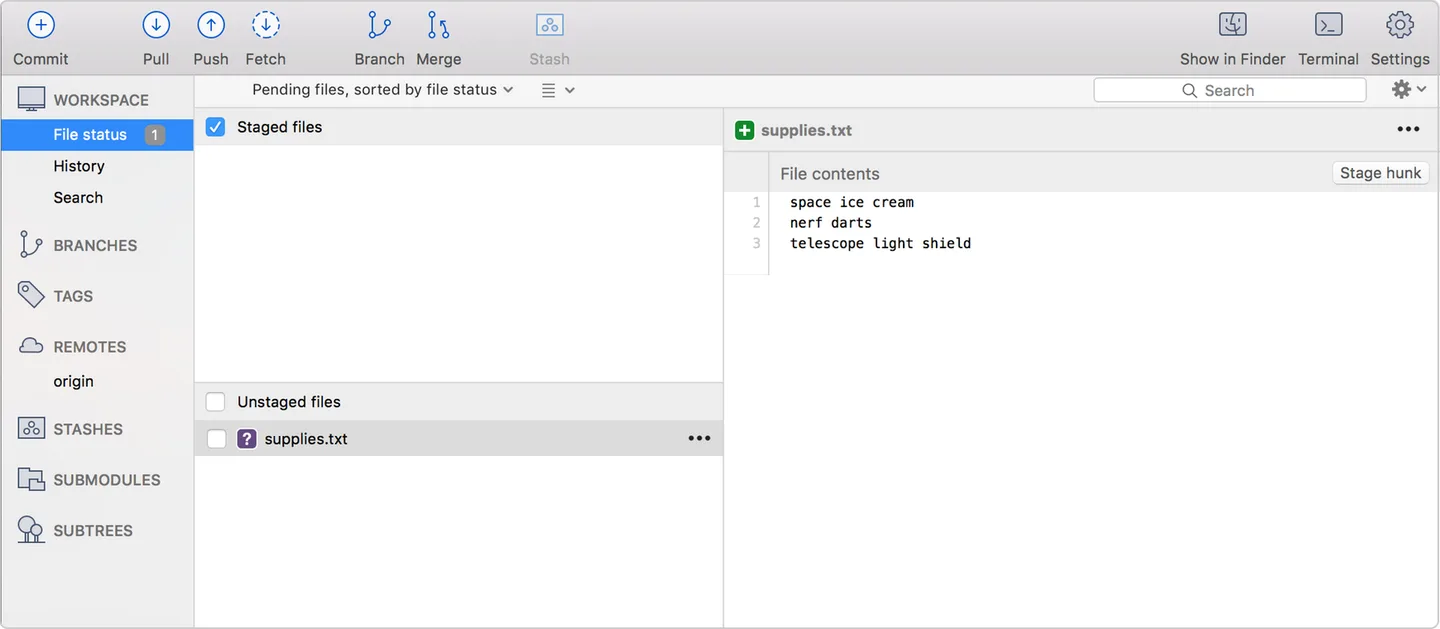
This entry links to the publisher's Mac ZIP for version 4.2.19. Its release notes require macOS 10.15 or later, so older macOS releases do not meet the published requirement. The documentation screenshot illustrates the Mac file-status workspace; it is not a capture of this release running in our environment.
What it offers
- Inspect repository history, branches and commits in a graphical interface.
- Stage or discard changes by file, hunk or line before committing.
- Stash changes, cherry-pick commits and use interactive rebase.
- Search for and clone remote repositories from the application.
- Work with Git LFS and Mercurial as documented by the publisher.
Good to know
- Version 4.2.19 requires macOS 10.15 or later; older macOS releases do not meet its published requirement.
Product images
Sources
References used for this listing. Retrieval dates do not indicate hands-on testing.
More in development
View category ↗
010 Editor 17.0
Inspect and edit binary files on Mac with 010 Editor, a paid text and hex editor with Binary Templates, file comparison and a 30-day trial.
010 Editor 17.0
Inspect and edit binary files with 010 Editor for Windows, a text and hex editor with Binary Templates, file comparison and scripting. Includes a 30-day trial.
10x Editor
Edit and navigate C++ projects on Windows with a built-in parser, workspace search and Visual Studio project support. A paid license is required after the 30-day trial.