

Utilities Windows
SpaceSharp for Windows
Find large files with SpaceSharp, a free Windows disk space analyzer that maps folders as a zoomable treemap and compares saved scans.
- Operating system
- Windows 10 and Windows 11
- Architecture
- x64; Windows on ARM through x64 emulation
- Download package
- EXE installer
Selected Setup.exe installs per user and supports in-app updates. The publisher also offers x86, MSI and portable builds; this installer includes its .NET runtime.
Link checked · Download guidance
What is SpaceSharp?
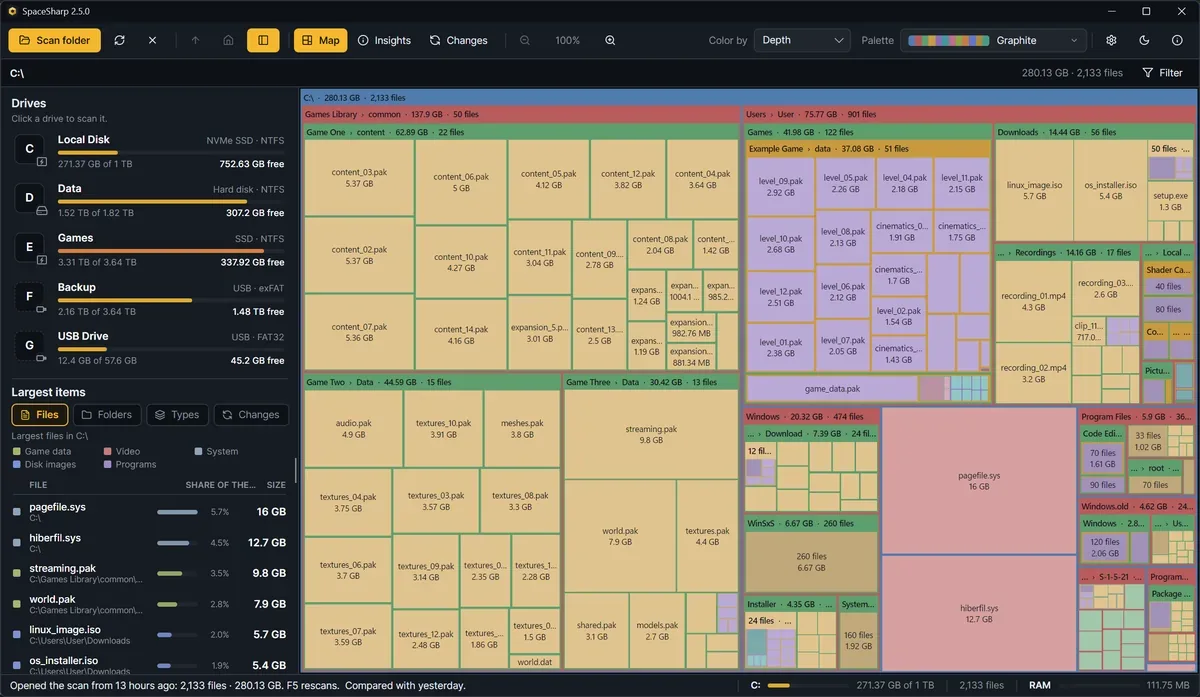
SpaceSharp shows which files and folders occupy a drive by drawing them as boxes sized to their contents. Zoom into a folder to investigate large items, filter by file type, size or age, or switch to Insights for a numerical breakdown. Saved scans and the Changes view help identify which folders have grown since the previous scan.
The Windows version can read an NTFS drive's master file table through an administrator-approved helper. Declining that prompt uses a normal folder scan instead. Its cleanup controls can send selected files to the Recycle Bin, but the publisher's suggested cleanup locations are identified by names rather than a guarantee that their contents are unnecessary. Review selections before removing anything.
This entry links to the publisher's x64 Setup.exe for Windows 10 and 11. Separate portable and MSI packages are available from the publisher. The illustrated interface is the publisher's 2.5.0 sample-drive screenshot; the verified download resolved to release 2.5.1, whose release notes describe translation-layout fixes.
What it offers
- Explore disk usage through a zoomable treemap with file and folder sizes.
- Filter the map using plain-language queries or file-type, size and age controls.
- Use Insights for space breakdowns and Changes to compare saved scans folder by folder.
- Read NTFS file-table data through an elevated helper, with folder scanning as an alternative.
- Send selected files to the Recycle Bin from the map.
Good to know
- The NTFS file-table scan requires administrator permission; declining it uses a normal folder scan.
- Cleanup suggestions identify locations by name, not whether each file is expendable. Review the selected contents before recycling them.
- Map totals count file contents and can differ from Explorer's used-space figure, which includes filesystem structures, shadow copies and Windows reservations.
Product images
Sources
References used for this listing. Retrieval dates do not indicate hands-on testing.
More in utilities
View category ↗
1.1.1.1 with WARP 2026.8.2115.0
Encrypt traffic from your Mac to Cloudflare’s network with WARP, or use DNS-only mode for encrypted DNS queries to the 1.1.1.1 resolver.
1.1.1.1 with WARP 2026.8.2115.0
Encrypt traffic between your Windows PC and Cloudflare, or use encrypted DNS only, with the free 1.1.1.1 with WARP app.


3uTools 9.12.005
Manage iPhone and iPad photos, music, apps and backups from Windows with 3uTools, a free utility that also includes device checks and firmware flashing tools.