
Utilities Windows
Speccy Emulator for Windows
Run Sinclair ZX Spectrum programs on Windows with Speccy, Marat Fayzullin’s emulator with tape and snapshot loading, save states and a built-in debugger.
- Operating system
- Windows; publisher describes the package as for all Windows versions
- Architecture
- Not specified by the publisher
- Download package
- ZIP archive
Publisher compatibility wording is not a test result. No Windows version or CPU architecture was independently tested.
Link checked · Download guidance
What is Speccy Emulator?
Speccy emulates Sinclair ZX Spectrum computers so you can load compatible programs from tape images, snapshots and supported disk images on Windows. It covers the 16 KB, 48 KB and 128 KB Spectrum models, the +2, +2A and +3, and Timex Sinclair variants. This is Marat Fayzullin’s emulator, not the similarly named PC system-information utility.
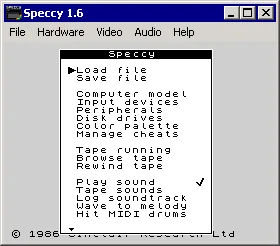
The built-in configuration menu lets you select emulated hardware and input devices. Save and reload emulation states, inspect execution with the debugger, or fast-forward lengthy tape loading. Audio options include AY8910 sound and MIDI soundtrack logging. The linked Windows package is the publisher’s version 5.9 ZIP, released on March 17, 2021.
Device support is not complete: the documentation marks Sam Coupe and AMX mouse emulation as unfinished, and the homepage warns that some disk-interface menu entries are not implemented. Use software images you are entitled to use; the emulator’s availability does not establish rights to third-party programs. The screenshot shows the publisher’s historical Speccy 1.6 configuration window, not the current 5.9 interface.
What it offers
- Emulate ZX Spectrum 16 KB, 48 KB and 128 KB models, +2/+2A/+3, and Timex Sinclair variants.
- Load .Z80 and .SNA snapshots, .TAP and .TZX tapes, and supported disk-image formats including .FDI, .TRD and .SCL.
- Save and reload emulation states, configure hardware through the built-in menu, and inspect programs with the debugger.
- Use supported Spectrum joystick modes and Kempston mouse emulation.
- Emulate AY8910 audio, log MIDI soundtracks and fast-forward emulation during lengthy operations.
Good to know
- Sam Coupe and AMX mouse support are marked unfinished in the publisher’s documentation.
- The homepage identifies BetaDisk/TR-DOS as the supported disk interface and warns that other disk, wafer or microdrive entries may appear in menus without working support.
- The documented free-use terms exclude commercial use; commercial source licensing must be arranged with the developer.
Product images
Sources
References used for this listing. Retrieval dates do not indicate hands-on testing.
More in utilities
View category ↗
1.1.1.1 with WARP 2026.8.2115.0
Encrypt traffic from your Mac to Cloudflare’s network with WARP, or use DNS-only mode for encrypted DNS queries to the 1.1.1.1 resolver.
1.1.1.1 with WARP 2026.8.2115.0
Encrypt traffic between your Windows PC and Cloudflare, or use encrypted DNS only, with the free 1.1.1.1 with WARP app.

3uTools 9.12.005
Manage iPhone and iPad photos, music, apps and backups from Windows with 3uTools, a free utility that also includes device checks and firmware flashing tools.