
Utilities macOS
Splashtop Streamer
Make your Mac available for remote access with Splashtop Streamer. This download is the Personal/Classroom streamer; Personal use is free on a home network, with a subscription needed for access from outside it.
Version 3.8.6.3 · Direct publisher file
Link checked · Download guidance
What is Splashtop Streamer?
Splashtop Streamer runs on the Mac you want to access from another device. Install the separate Splashtop Personal app on the computer, phone or tablet you will connect from, and sign in to the same Splashtop account. The remote connection gives you access to the Mac's applications and files rather than requiring you to move them to the viewing device.
The linked DMG is the publisher's Personal/Classroom streamer, not a business deployment download. Splashtop Personal permits non-commercial access to up to two computers on your local home network. Connecting from an outside network requires the Anywhere Access Pack; commercial use, including working from home, requires a business trial or subscription. Business subscribers should obtain their matching streamer through the publisher's signed-in download flow instead.
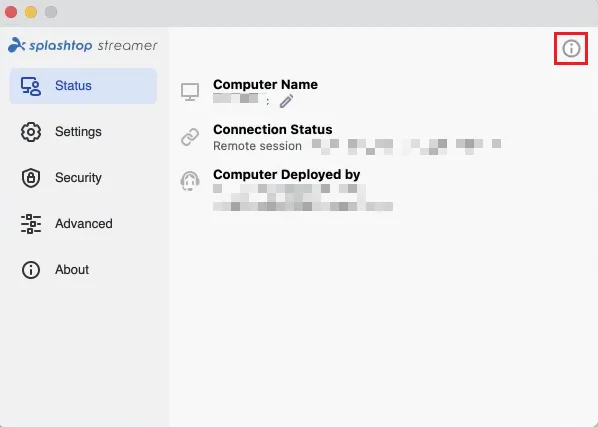
macOS also requires local permission setup before remote access can work. Follow the publisher's instructions for your macOS version and user account. The screenshot illustrates the Mac Streamer status screen and its permissions helper in a business deployment; it is not a screenshot of the Personal sign-in screen or proof that this download was installed or tested.
What it offers
- Run the host component on the Mac you want to remotely view and control.
- Connect through the separate Splashtop Personal app on a supported computer or mobile device.
- Access applications and files on the host computer through a remote session.
- Use Personal on a local home network for non-commercial access to up to two computers.
Good to know
- Personal access from outside your local home network requires the paid Anywhere Access Pack.
- Personal is restricted to non-commercial use and a maximum of two computers; work use requires a business trial or subscription.
- The Personal/Classroom streamer is not compatible with the publisher's business plans; those require the corresponding business streamer.
- macOS permissions must be granted locally before a remote session; most permissions must be granted separately for each user account.
Product images
Sources
References used for this listing. Retrieval dates do not indicate hands-on testing.
- Splashtop Streamer for Mac - Download ↗Retrieved
- Splashtop Personal App and Streamer Download Links ↗Retrieved
- Splashtop Streamer Direct Downloads ↗Retrieved
- Splashtop Personal: Remote Access Desktop Software ↗Retrieved
- Splashtop Personal Installation Tutorial ↗Retrieved
- How to allow remote access on macOS ↗Retrieved
More in utilities
View category ↗
1.1.1.1 with WARP 2026.8.2115.0
Encrypt traffic from your Mac to Cloudflare’s network with WARP, or use DNS-only mode for encrypted DNS queries to the 1.1.1.1 resolver.
1.1.1.1 with WARP 2026.8.2115.0
Encrypt traffic between your Windows PC and Cloudflare, or use encrypted DNS only, with the free 1.1.1.1 with WARP app.

3uTools 9.12.005
Manage iPhone and iPad photos, music, apps and backups from Windows with 3uTools, a free utility that also includes device checks and firmware flashing tools.