
Utilities Windows
Stardock Curtains for Windows
Apply and edit Windows 10 appearance styles beyond Light and Dark mode, with controls for title bars, buttons, colors and shadows.
- Operating system
- Windows 10 version 1809 or later; Windows 11 not supported
- Architecture
- 64-bit Intel/AMD; ARM not supported
- Download package
- Publisher purchase/trial options; separate Steam distribution
Official Steam listing expressly excludes Windows 11 and ARM. The action opens the official product page; no installer body was fetched or tested.
This opens the official acquisition page, not a verified installer file.
Publisher page reviewed · Download guidance
What is Stardock Curtains?
Stardock Curtains adds appearance styles to Windows 10 using the same general scope as Light and Dark modes. It can change title-bar colors and buttons, the Start button and finer visual elements such as gradients and shadow opacity. Applications that already support Windows light and dark modes are the intended beneficiaries; this is not a promise to reskin every application.
Use a supplied modern or classic-looking style, or create and share your own with the built-in editor. A Windows XP-style appearance changes visual presentation, not your installed operating system. High-DPI support is listed by the publisher’s official store entry.
Curtains requires 64-bit Windows 10 version 1809 or later. The official Steam listing expressly excludes Windows 11 and ARM processors. The publisher offers commercial purchase and a free-trial route; no current price or trial duration is asserted. The action here opens the official product page, not a verified installer.
What it offers
- Apply additional Windows 10 appearance modes and included styles.
- Customize Start and title-bar buttons, title-bar colors, gradients and shadow opacity.
- Create and share styles with the built-in editor.
- Use publisher-listed high-DPI style support.
Good to know
- Windows 11 and ARM processors are explicitly unsupported by the official Steam listing.
- Designed for Windows UI and apps that support Light and Dark modes, not universal application reskinning.
- Steam distribution lists one concurrent machine activation and a Stardock account for uploading custom styles.
What Curtains changes
Curtains extends the Windows 10 Light and Dark-mode idea with additional visual styles. The publisher names Start-button appearance, title-bar buttons and title-bar coloring, together with finer adjustments such as gradients and shadow opacity. This is useful when you want a coordinated Windows appearance rather than independent desktop widgets.
Its supported-application boundary is important: Stardock says apps that already support Light and Dark modes benefit from Curtains. That is narrower than a promise that every program receives a complete custom skin. A specialized application with its own interface is not guaranteed to behave like a standard Windows mode-aware window.
Choose a supplied style or edit one
The official product page lists styles including Crystal, Sky and Midnight, and shows examples resembling older Windows versions or other operating systems. These change the look of the current desktop; selecting an XP-like style does not install Windows XP or restore that system’s application behavior.
The built-in editor is the other major part of Curtains. It provides a way to create and share styles instead of treating each style as a fixed download. The publisher specifically calls out font faces and sizes, detailed color selection, gradients and shadow controls as customization options.
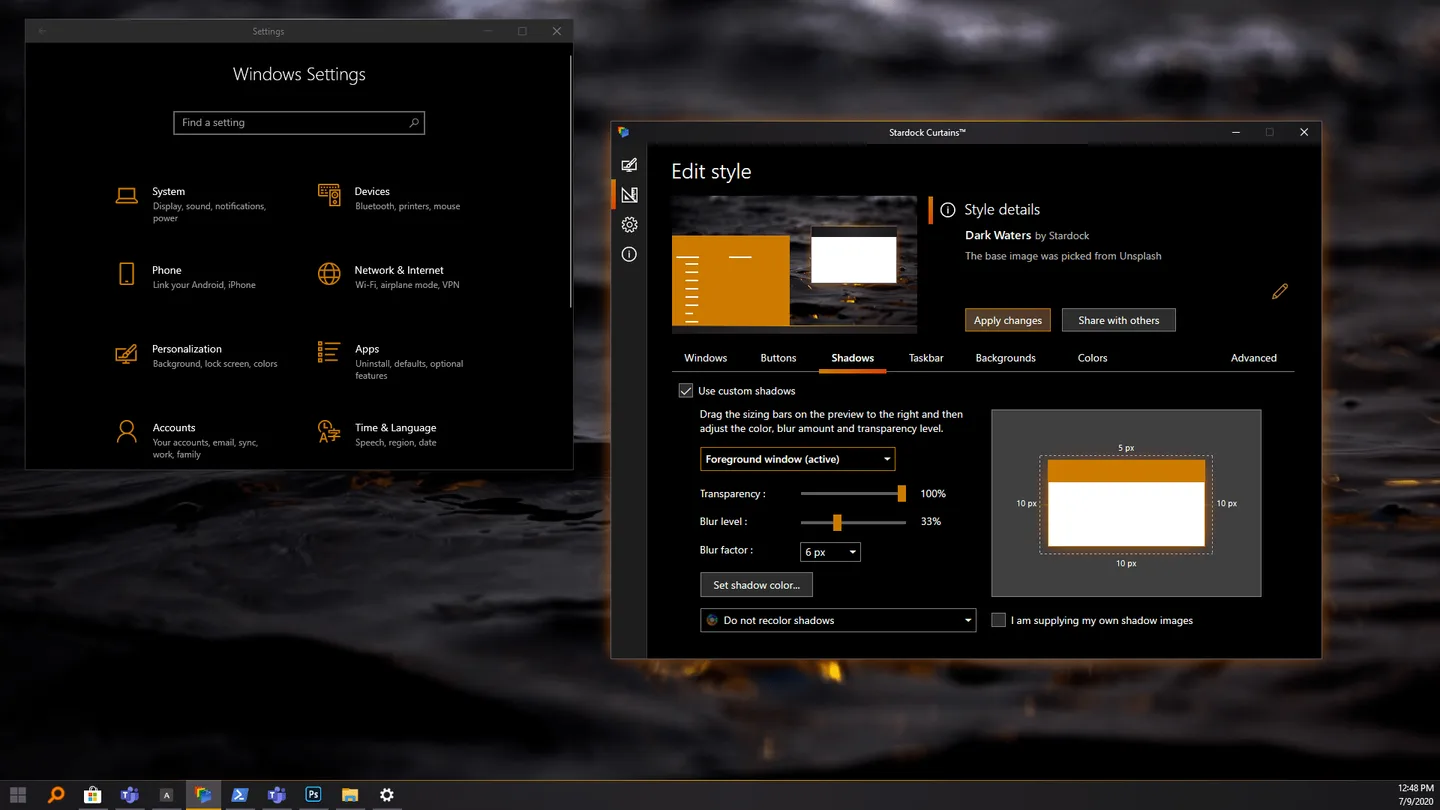
The pictured editor provides a concrete example of the available workflow: its Shadows tab shows a choice of foreground window state, transparency and blur controls, a shadow-color control and an Apply changes button. Use that image to judge whether the editor covers the detail you want to customize; it documents the publisher’s interface, not a tested sequence on your own machine.
What the style-editor screenshot shows
The screenshot shows Curtains in Edit style mode with the Dark Waters style. The Shadows tab is selected, with controls for transparency, blur level, blur factor and shadow color. Windows Settings appears alongside it, making the relationship between editor controls and desktop appearance visible.
This is an official product-gallery image optimized into local WebP sizes, not a reconstructed interface or a claim that the software was installed for this page. The image’s desktop artwork remains separately owned; the screenshot’s own credit to Unsplash is preserved as context, not treated as a license for unrestricted reuse.
Windows 11 is expressly unsupported
Check the operating system before choosing a style. The publisher specifies 64-bit Windows 10 version 1809 or later. Its official Steam listing states directly that Curtains does not support Windows 11 and also excludes ARM processors. An appearance resembling a newer Windows release does not change those requirements.
The store recommends considering WindowBlinds instead for Windows 11 users. That recommendation is a different-product decision, not a compatibility mode or workaround for Curtains. This page does not suggest shell patching, undocumented system changes or an unverified way to make Curtains support an excluded platform.
Publisher and Steam terms are not a universal free download
Curtains is commercial software. Stardock’s own product navigation offers a free-trial route and a purchase route, while Steam offers a separate paid distribution. No trial duration or region-dependent price is asserted here. The main action opens the official publisher page so you can inspect the currently offered terms.
Steam specifically lists Stardock SAS activation with a limit of one concurrent machine and a Stardock account requirement for uploading custom styles. Those are identified as Steam-distribution terms rather than silently extended to every possible purchase channel. Creating a style locally and uploading it to a service should not be assumed to have identical account requirements.
Choose by appearance scope, not a theme preview alone
Curtains suits mode-based colors, buttons and style authoring on a supported Windows 10 PC. The key questions are whether your target apps support Windows appearance modes and whether the editor exposes the visual details you want to change. A striking screenshot is not evidence that every window on your own desktop will respond identically.
The sources establish features and platform exclusions, not benchmark results or a successful local installation. They do not establish an exact installation or undo sequence, so no reboot, uninstall or automatic restoration promise is made here. Before acquiring Curtains, check the official distribution requirements and instructions for the channel you select.
Product images
Sources
References used for this listing. Retrieval dates do not indicate hands-on testing.
More in utilities
View category ↗
1.1.1.1 with WARP 2026.8.2115.0
Encrypt traffic from your Mac to Cloudflare’s network with WARP, or use DNS-only mode for encrypted DNS queries to the 1.1.1.1 resolver.
1.1.1.1 with WARP 2026.8.2115.0
Encrypt traffic between your Windows PC and Cloudflare, or use encrypted DNS only, with the free 1.1.1.1 with WARP app.


3uTools 9.12.005
Manage iPhone and iPad photos, music, apps and backups from Windows with 3uTools, a free utility that also includes device checks and firmware flashing tools.