

Utilities macOS
Stats for macOS
Monitor CPU, memory, disk, network and battery activity from the macOS menu bar with Stats, a free, open-source system monitor.
What is Stats?
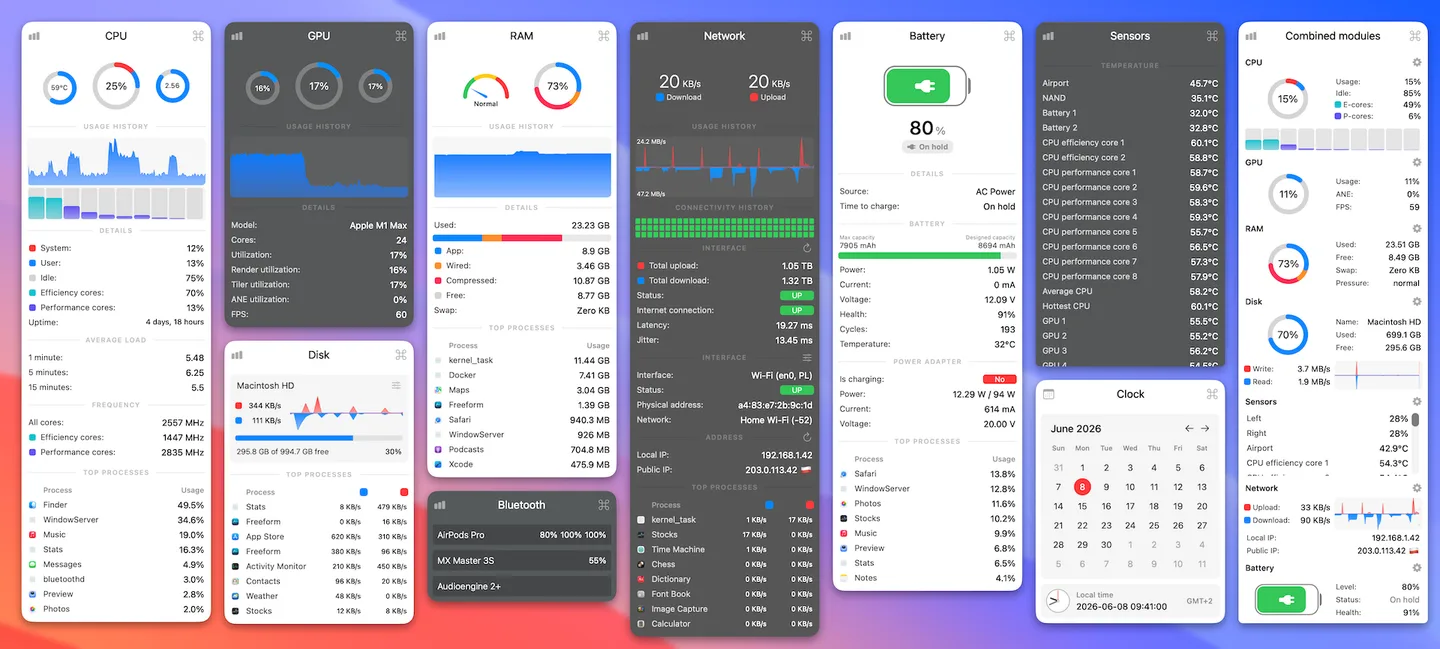
Stats puts system readings in your Mac's menu bar so you can check resource use without keeping a separate monitoring window open. Its modules cover CPU and GPU utilization, memory, disks, network traffic and battery information. Popup panels show graphs and more detailed readings, while sensor, Bluetooth and clock modules extend the same menu-bar approach to temperatures, connected devices and multiple time zones.
It suits checking which processes are using resources or watching network activity while you work. Enable the modules you need rather than treating every available reading as essential: the publisher notes that periodic monitoring has an energy cost and identifies Sensors and Bluetooth as particularly demanding modules.
The current publisher requirements are macOS 12 Monterey or newer, with stable macOS releases only. The linked package is the publisher's Stats.dmg release asset for version 3.0.23. On macOS 26, Stats may need explicit permission under System Settings → Menu Bar before its icons appear. Fan control remains in legacy mode and receives no updates or fixes; do not choose Stats primarily for maintained fan-control support.
What it offers
- View CPU, GPU and memory utilization through menu-bar widgets and popup panels.
- Track disk activity, network usage and battery information.
- Inspect sensor readings such as temperature, voltage and power.
- Display Bluetooth device information and a multiple-time-zone clock.
Good to know
- Requires macOS 12 Monterey or newer; beta versions of macOS are not supported.
- Fan control is a legacy feature with no updates or fixes from the maintainer.
- Monitoring itself uses resources; the publisher identifies Sensors and Bluetooth as particularly demanding modules.
Product images
Sources
References used for this listing. Retrieval dates do not indicate hands-on testing.
- Stats — publisher README and application screenshots ↗Retrieved
- Stats release metadata — v3.0.23 ↗Retrieved
- Stats MIT License ↗Retrieved
More in utilities
View category ↗
1.1.1.1 with WARP 2026.8.2115.0
Encrypt traffic from your Mac to Cloudflare’s network with WARP, or use DNS-only mode for encrypted DNS queries to the 1.1.1.1 resolver.
1.1.1.1 with WARP 2026.8.2115.0
Encrypt traffic between your Windows PC and Cloudflare, or use encrypted DNS only, with the free 1.1.1.1 with WARP app.


3uTools 9.12.005
Manage iPhone and iPad photos, music, apps and backups from Windows with 3uTools, a free utility that also includes device checks and firmware flashing tools.