

Utilities Windows
StrokeIt for Windows
Control Windows with mouse gestures using StrokeIt: draw a shape while holding the right mouse button to trigger an assigned action. The Home download is for personal use only.
- Operating system
- Windows; publisher release note discusses Windows 95 through Windows 7
- Architecture
- Not specified on the publisher pages checked
- Download package
- English Home EXE installer
Windows 10/11 compatibility is unconfirmed. Publisher screenshot is historical and its release version is unspecified.
Link checked · Download guidance
What is StrokeIt?
StrokeIt turns mouse-drawn shapes into commands on Windows. Hold the right mouse button, draw a recognized gesture and release it to invoke the associated action. It is intended for people who prefer a mouse movement to repeatedly choosing a command from a menu. The publisher says the recognition engine comes pretrained for more than 80 gestures.
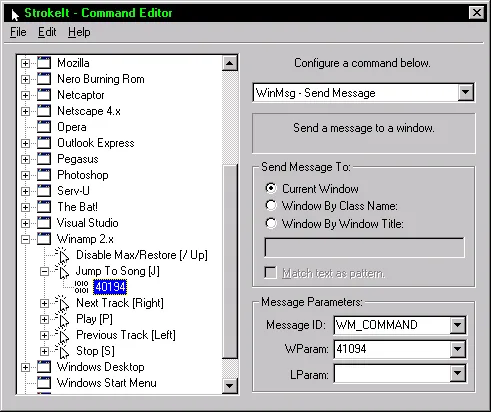
The command editor provides a way to configure actions, while the publisher's gallery also shows a gesture trainer and preferences window. To interrupt a gesture already in progress, left-click. Holding Control temporarily disables gesture handling; the tray icon also provides a way to disable StrokeIt.
This entry links to the publisher's English StrokeIt 0.9.7 Home EXE, labelled Personal Use Only. Business users need the separately offered trial or an appropriate license. Do not assume that the Pro edition's advertised Lua scripting and extra mouse-button support are included in Home.
The publisher's release note discusses Windows 95 through Windows 7. The sources checked here do not establish Windows 10 or Windows 11 compatibility, so this is not a verified recommendation for those systems. The screenshot is the publisher's historical command-editor image; its exact release version is not identified.
What it offers
- Trigger assigned actions by drawing recognized shapes with the mouse.
- Use a recognition engine pretrained for more than 80 mouse gestures, according to the publisher.
- Configure commands through the command editor; publisher screenshots also show a gesture trainer and preferences.
- Temporarily disable gestures with Control, or cancel a gesture in progress with a left-click.
Good to know
- The linked Home package is labelled for personal use only; it is not a free business-use download.
- Windows 10 and Windows 11 compatibility is unconfirmed by the publisher pages checked; the release note discusses Windows 95 through Windows 7.
- Lua scripting and support for 4/5-button mice are advertised for Pro, not established features of the linked Home edition.
Product images
Sources
References used for this listing. Retrieval dates do not indicate hands-on testing.
More in utilities
View category ↗
1.1.1.1 with WARP 2026.8.2115.0
Encrypt traffic from your Mac to Cloudflare’s network with WARP, or use DNS-only mode for encrypted DNS queries to the 1.1.1.1 resolver.
1.1.1.1 with WARP 2026.8.2115.0
Encrypt traffic between your Windows PC and Cloudflare, or use encrypted DNS only, with the free 1.1.1.1 with WARP app.

3uTools 9.12.005
Manage iPhone and iPad photos, music, apps and backups from Windows with 3uTools, a free utility that also includes device checks and firmware flashing tools.