

Development Windows
Sublime Text for Windows
Edit code, markup and prose with Sublime Text for Windows, using multiple selections, split views and project-aware completion. Free evaluation; paid license required for continued use.
- Operating system
- Windows 10 or later
- Architecture
- x64 (64-bit Intel/AMD)
- Download package
- EXE installer
Build 4215. Separate portable ZIP available from the publisher. Free evaluation; paid license required for continued use.
Link checked · Download guidance
What is Sublime Text?
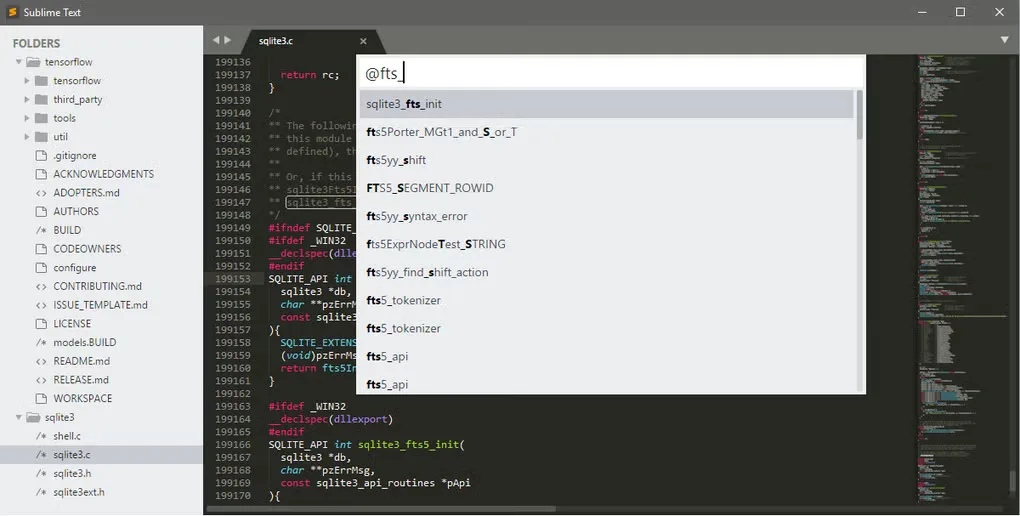
Sublime Text is a text editor for working on source code, markup and ordinary text. Multiple selections let you change repeated text in several places at once, while split views help you compare files without switching tabs. Goto Anything and definition navigation help you move through a project; context-aware completion draws suggestions from its existing code. Syntax support includes TypeScript, JSX and TSX.
This download is the Windows x64 EXE installer for Sublime Text 4, Build 4215. The publisher lists Windows 10 as the minimum for this release series and offers a separate portable ZIP. Sublime Text can be evaluated without an enforced time limit, but continued use requires a purchased license: it is not permanently free software.
What it offers
- Edit several occurrences at once with multiple selections.
- Display files side by side using split views and tab multi-select.
- Navigate files and symbols with Goto Anything and definition navigation.
- Use context-aware code completion and built-in TypeScript, JSX and TSX syntax support.
Good to know
- A paid license is required for continued use, even though the evaluation has no enforced time limit.
- This release series requires Windows 10 or later; the linked installer is x64, not a 32-bit package.
Product images
Sources
References used for this listing. Retrieval dates do not indicate hands-on testing.
More in development
View category ↗
010 Editor 17.0
Inspect and edit binary files on Mac with 010 Editor, a paid text and hex editor with Binary Templates, file comparison and a 30-day trial.
010 Editor 17.0
Inspect and edit binary files with 010 Editor for Windows, a text and hex editor with Binary Templates, file comparison and scripting. Includes a 30-day trial.
10x Editor
Edit and navigate C++ projects on Windows with a built-in parser, workspace search and Visual Studio project support. A paid license is required after the 30-day trial.