

Utilities Windows
SuperMailer for Windows
Create personalized HTML or plain-text newsletters on Windows with SuperMailer. Its desktop editor uses recipient fields and supports attachments; the free version is limited to 100 recipients.
- Operating system
- Windows 7, 8, 10 and 11; Windows Server 2008 and newer, according to the publisher
- Architecture
- x64 (64-bit)
- Download package
- EXE installer
Selected package supports German and English. Separate 32-bit and German-only installers are listed by the publisher.
Link checked · Download guidance
What is SuperMailer?
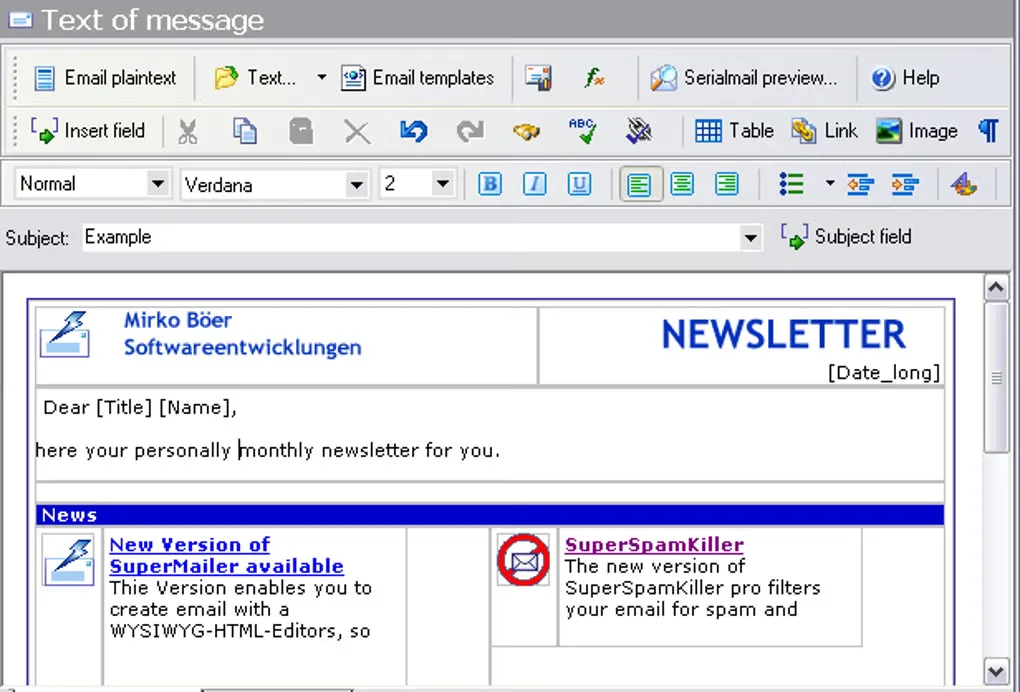
SuperMailer is a Windows desktop application for preparing and sending personalized newsletters and mail-merge email. Compose HTML messages in its WYSIWYG editor or use plain text, then insert recipient fields for names and other details. Recipient lists, message text and attachments are organized into projects stored on your computer.
You can import recipients from CSV files, Excel, Outlook or SQL databases. Messages can be sent through your email provider’s SMTP server, with other publisher-documented sending routes available. The application supports personalized attachments as well as standard file attachments.
The free version supports up to 100 recipients; larger lists require a paid license. The send-through-Outlook option needs classic Outlook because the new Outlook app does not expose the required COM automation interface. This entry links to the publisher’s 64-bit German/English Windows installer. The screenshot is a historical source-gallery view of the English message editor, not a verified capture of version 15.00.
What it offers
- Compose HTML newsletters in a WYSIWYG editor or write plain-text messages.
- Insert recipient fields to personalize individually sent emails.
- Import mailing lists from CSV, Excel, Outlook or SQL databases.
- Include standard attachments or recipient-specific personalized attachments.
- Organize newsletter projects locally and send through a provider’s SMTP server.
Good to know
- The free version is limited to 100 recipients; larger mailing lists require a paid license.
- Sending through Outlook requires classic Outlook; the new Outlook app cannot provide the required COM automation.
Product images
Sources
References used for this listing. Retrieval dates do not indicate hands-on testing.
More in utilities
View category ↗
1.1.1.1 with WARP 2026.8.2115.0
Encrypt traffic from your Mac to Cloudflare’s network with WARP, or use DNS-only mode for encrypted DNS queries to the 1.1.1.1 resolver.
1.1.1.1 with WARP 2026.8.2115.0
Encrypt traffic between your Windows PC and Cloudflare, or use encrypted DNS only, with the free 1.1.1.1 with WARP app.

3uTools 9.12.005
Manage iPhone and iPad photos, music, apps and backups from Windows with 3uTools, a free utility that also includes device checks and firmware flashing tools.