
Development Windows
SynapseDBA
Write SQL queries, browse database tables and manage connections with SynapseDBA for Windows. The free Community Edition includes a query builder and AI assistance; advanced tools require Pro.
- Operating system
- Windows; Softonic lists Windows 11
- Architecture
- 64-bit
- Download package
- EXE installer
Publisher identifies a Windows 64-bit package. Minimum Windows version is not specified in the publisher offering; macOS and Linux are listed as coming soon.
Link checked · Download guidance
What is SynapseDBA?
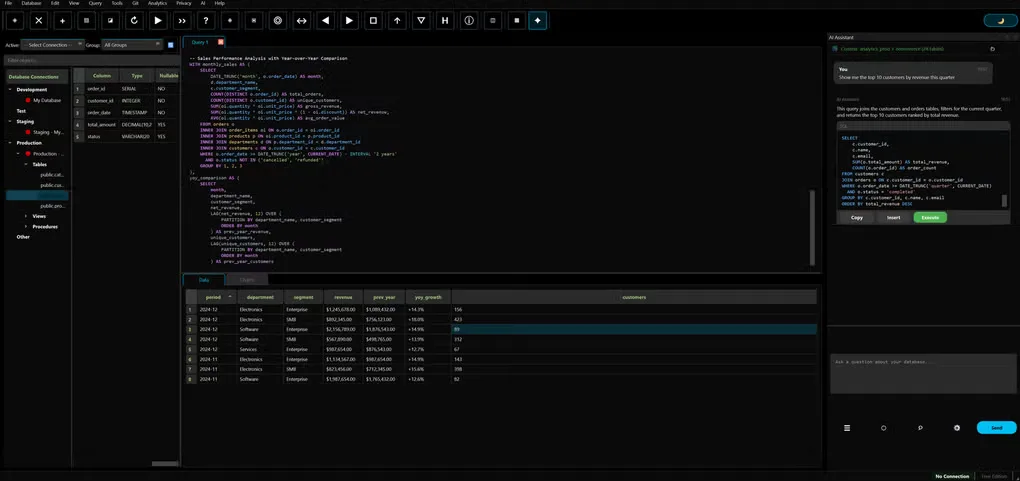
SynapseDBA is a database IDE for working with SQL and NoSQL systems from one desktop workspace. Its Community Edition combines a query editor, schema explorer, table data browser and visual query builder. The publisher lists connections for MySQL, PostgreSQL, SQL Server, Oracle and MongoDB, among others, plus SSH tunneling and SSL support.
The AI query assistant can turn natural-language requests into SQL using schema context. The publisher offers inference through Chutes.ai on the Bittensor network or locally through Ollama. Use the local Ollama option when you need local AI processing; the network-backed option is not the same as offline inference. These are publisher-described capabilities, not results of an installation or privacy audit.
The Windows 64-bit download is version 1.0.9. Community Edition is offered free for personal and commercial use without sign-up. ER diagrams, schema comparison, charts, performance monitoring and query history are listed as Pro features, so the free edition does not include the entire advertised toolset.
What it offers
- Manage multiple database connections with a schema explorer and table data browser.
- Write queries with SQL formatting, syntax highlighting and a visual query builder.
- Generate SQL from natural-language prompts with schema-aware AI assistance.
- Choose Chutes.ai network inference or local Ollama inference for the AI assistant.
- Use SSH tunneling and SSL connections with supported database systems.
Good to know
- ER diagrams, schema comparison, data visualization, performance monitoring and query history require the paid Pro edition.
- Offline AI uses the local Ollama option; Chutes.ai inference uses an external network service.
Product images
Sources
References used for this listing. Retrieval dates do not indicate hands-on testing.
- SynapseDBA - Download ↗Retrieved
- SynapseDBA - The Privacy-Focused Database IDE ↗Retrieved
More in development
View category ↗
010 Editor 17.0
Inspect and edit binary files on Mac with 010 Editor, a paid text and hex editor with Binary Templates, file comparison and a 30-day trial.
010 Editor 17.0
Inspect and edit binary files with 010 Editor for Windows, a text and hex editor with Binary Templates, file comparison and scripting. Includes a 30-day trial.
10x Editor
Edit and navigate C++ projects on Windows with a built-in parser, workspace search and Visual Studio project support. A paid license is required after the 30-day trial.