

Utilities Windows
SyncBackSE for Windows
Back up, mirror or synchronize Windows files to local drives, network folders and FTP servers with SyncBackSE, a paid utility with a 30-day trial.
- Operating system
- Windows 11, 10, 8, 7 and Vista; Windows Server 2008 onward, excluding Server Core
- Architecture
- 64-bit (x64)
- Download package
- EXE installer
Selected installer supports standard users or administrators. A separate 32-bit installer is available. SyncBackSE itself runs on Windows; access to other operating systems uses SyncBack Touch.
Link checked · Download guidance
What is SyncBackSE?
SyncBackSE backs up and synchronizes files between a Windows PC and local or external drives, network locations and FTP servers. Its profiles let you choose a one-way backup, a mirror or Intelligent Synchronization, which remembers the previous state of files to help decide how changes should be handled. Easy and Expert modes expose different levels of configuration.
Versioning keeps earlier copies of changed or deleted files; compression and encryption provide additional backup options. The program also supports copying open or locked files and simulated runs. These are publisher-described capabilities, not results of a hands-on test.
Choose the profile type deliberately: a mirror can delete destination files that no longer exist at the source, while synchronization can propagate deletions between locations. Enable and configure versioning if you need earlier copies. SyncBackSE is commercial software, not SyncBackFree, and continued use after the 30-day trial requires a license. Cloud-service integration and SFTP are among the additional capabilities offered in SyncBackPro rather than this edition.
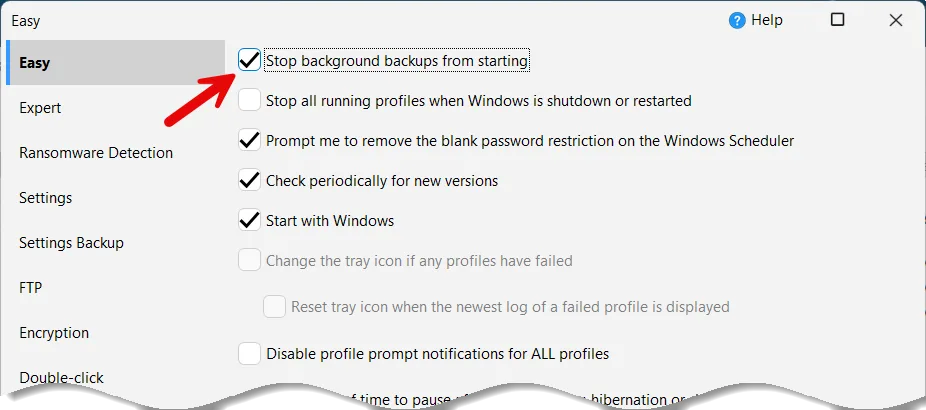
The linked download is the Windows 64-bit EXE installer for standard users or administrators. The screenshot shows the publisher's shared SyncBack settings interface used in its SyncBackSE upgrade guide; it is an annotated, partial settings view, not a capture of the current release running on this site.
What it offers
- Create backup, mirror and Intelligent Synchronization profiles for local drives, external drives, network folders and FTP servers.
- Keep previous versions of backup files and restore earlier copies.
- Compress and encrypt backups, and copy open or locked files.
- Configure profiles through Easy or Expert modes and preview operations with simulated runs.
Good to know
- The trial lasts 30 days; continued use requires a paid license. Business use requires a license per installation.
- Mirror and synchronization profiles can propagate deletions. Configure the profile and version retention before relying on those modes.
- Cloud-service integration and SFTP require SyncBackPro rather than SyncBackSE.
Product images
Sources
References used for this listing. Retrieval dates do not indicate hands-on testing.
- Download SyncBackSE - Backup Software for Windows ↗Retrieved
- SyncBackSE - easy Windows backup and sync software ↗Retrieved
- Backup, Mirror and Synchronize Profile Types ↗Retrieved
- Upgrade SyncBackSE to SyncBackPro - Features & Guide ↗Retrieved
- SyncBackSE publisher PAD application description ↗Retrieved
More in utilities
View category ↗
1.1.1.1 with WARP 2026.8.2115.0
Encrypt traffic from your Mac to Cloudflare’s network with WARP, or use DNS-only mode for encrypted DNS queries to the 1.1.1.1 resolver.
1.1.1.1 with WARP 2026.8.2115.0
Encrypt traffic between your Windows PC and Cloudflare, or use encrypted DNS only, with the free 1.1.1.1 with WARP app.

3uTools 9.12.005
Manage iPhone and iPad photos, music, apps and backups from Windows with 3uTools, a free utility that also includes device checks and firmware flashing tools.