

Utilities Windows
SyncBreeze for Windows
Synchronize folders, local disks and network shares with SyncBreeze for Windows. This download is the commercial Server edition for 64-bit Windows.
- Operating system
- Windows
- Architecture
- x64 (64-bit)
- Download package
- EXE installer — Server edition
Publisher offers separate 32-bit and Enterprise packages. This link is the 64-bit Server installer.
Link checked · Download guidance
What is SyncBreeze?
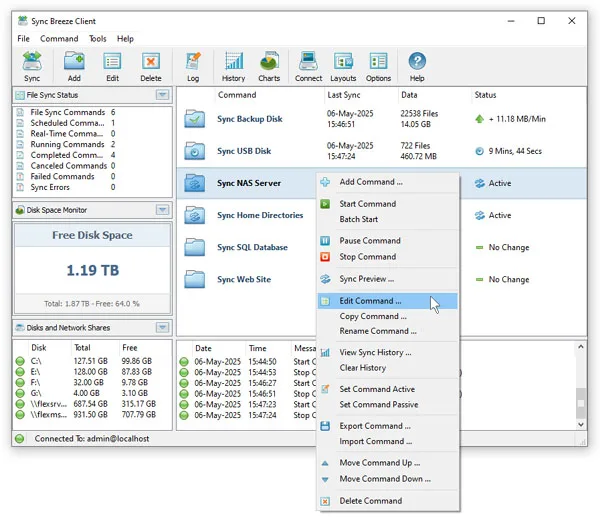
SyncBreeze synchronizes files between local disks, directories, network shares and NAS storage. Its one-way and two-way synchronization modes let administrators configure reusable commands for different folder pairs. The Server edition runs in the background as a service, with a client GUI and command-line utility for managing synchronization operations.
Use periodic synchronization for recurring jobs, file-matching rules to include or exclude file types, and directory exclusions to limit a job's scope. A preview mode lists proposed synchronization actions and lets you select which actions to perform. The publisher recommends streaming synchronization without a preview for large file systems containing millions of files.
The linked package is SyncBreeze Server 18.4.12 for Windows x64, not the Enterprise edition. Server is limited to 100 million files, 100 TB of disk space, 100 network shares and 100 synchronization commands. Real-time synchronization and the web-based management interface require Enterprise; do not assume every feature advertised for the product family is included in this download.
What it offers
- Configure one-way and two-way synchronization commands for disks, folders and network storage.
- Run synchronization in the background as a service, with periodic operations.
- Include or exclude file types with matching rules and exclude selected directories.
- Preview synchronization actions and select which actions to perform before running a job.
- Manage synchronization using the client GUI or command-line utility.
Good to know
- The Server edition is limited to 100 million files, 100 TB of disk space, 100 network shares and 100 synchronization commands.
- Real-time synchronization and web-based management are Enterprise-only features, not part of the linked Server edition.
- The publisher recommends streaming mode without preview for file systems containing millions of files.
Product images
Sources
References used for this listing. Retrieval dates do not indicate hands-on testing.
- SyncBreeze - File Synchronization ↗Retrieved
- SyncBreeze - File Synchronization - Downloads ↗Retrieved
- SyncBreeze - File Synchronization - Product Versions and Features ↗Retrieved
- SyncBreeze - File Synchronization - SyncBreeze GUI Screenshots ↗Retrieved
- SyncBreeze - File Synchronization - About ↗Retrieved
More in utilities
View category ↗
1.1.1.1 with WARP 2026.8.2115.0
Encrypt traffic from your Mac to Cloudflare’s network with WARP, or use DNS-only mode for encrypted DNS queries to the 1.1.1.1 resolver.
1.1.1.1 with WARP 2026.8.2115.0
Encrypt traffic between your Windows PC and Cloudflare, or use encrypted DNS only, with the free 1.1.1.1 with WARP app.


3uTools 9.12.005
Manage iPhone and iPad photos, music, apps and backups from Windows with 3uTools, a free utility that also includes device checks and firmware flashing tools.