

Utilities Windows
SyncFolders for Windows
Synchronize two folders or copy files for backup with SyncFolders, a free Windows utility with previews, filters and scheduled runs.
What is SyncFolders?
SyncFolders compares two folders, including their subfolders, and copies new or updated files in one or both directions. It works with folders on local disks, network locations and attached USB storage, making it useful for maintaining a second copy of a working folder or keeping two locations in step.
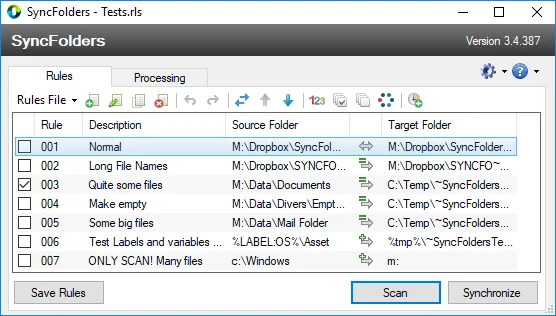
Rules define the source and target folders. Before synchronizing, you can preview the proposed operations and override individual actions. File and folder filters narrow the job, while Windows Task Scheduler integration and command-line operation support recurring runs. Comparison can use dates and sizes or file contents.
Choose synchronization rules carefully: SyncFolders can propagate deletions as well as copy changes. It offers options to send deleted or overwritten files to the recycle bin or a time-stamped history folder. The publisher also states that .NET Framework is required, including for portable use.
What it offers
- Copy new and updated files in one direction or synchronize changes in both directions, including subfolders.
- Preview planned synchronization operations and override proposed actions before applying them.
- Detect conflicts when a file has changed in both locations since the previous synchronization.
- Compare files by date and size or by content, and apply file and folder filters.
- Schedule synchronization through Windows Task Scheduler or run it from the command line.
Good to know
- .NET Framework is required, including when using the portable application.
- Synchronization can propagate deletions; review the preview and configure recycle-bin or history-folder handling for deleted and overwritten files.
Product images
Sources
References used for this listing. Retrieval dates do not indicate hands-on testing.
More in utilities
View category ↗
1.1.1.1 with WARP 2026.8.2115.0
Encrypt traffic from your Mac to Cloudflare’s network with WARP, or use DNS-only mode for encrypted DNS queries to the 1.1.1.1 resolver.
1.1.1.1 with WARP 2026.8.2115.0
Encrypt traffic between your Windows PC and Cloudflare, or use encrypted DNS only, with the free 1.1.1.1 with WARP app.


3uTools 9.12.005
Manage iPhone and iPad photos, music, apps and backups from Windows with 3uTools, a free utility that also includes device checks and firmware flashing tools.