
Utilities Windows
SysInfo Email Migration Tool
Migrate mailboxes between supported services or export email to local files with SysInfo Email Migration Tool for Windows, a commercial utility with a limited demo.
- Operating system
- Windows 11, 10, 8.1, 8, 7 and Windows Server 2008/2012, as listed by publisher
- Architecture
- Publisher lists 64-bit Windows; installer architecture not independently inspected
- Download package
- EXE installer
Publisher lists 4 GB RAM (8 GB recommended) and 1 GB minimum disk space. A separate macOS download exists; this entry links only to the Windows demo.
Link checked · Download guidance
What is SysInfo Email Migration Tool?
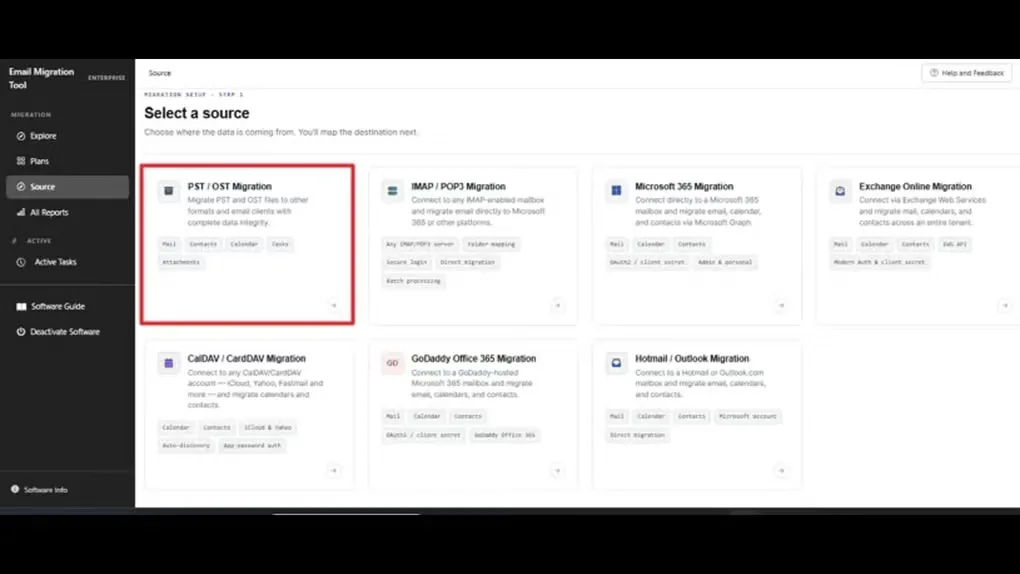
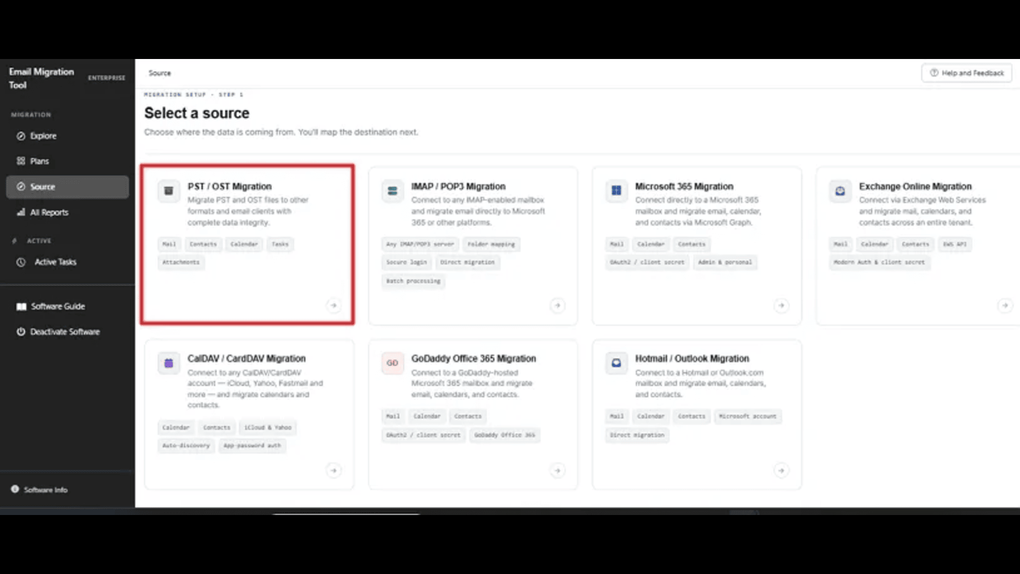
SysInfo Email Migration Tool moves mailbox data from supported accounts and local PST or OST files. It is intended for changing email providers, coordinating account migrations and keeping offline mailbox exports. IMAP/POP3 accounts can be loaded individually or through CSV for batch migration. Microsoft 365, GoDaddy Office-based and Hotmail/Outlook accounts use the authentication options available for that source.
Available destinations depend on the source, rather than every format being available for every migration. The publisher lists PST and PDF output or Office 365 migration for PST/OST sources. IMAP/POP3 sources have a wider local export list, including MBOX, EML, MSG, JSON and CSV, plus supported cloud destinations. Microsoft 365, GoDaddy and Hotmail sources have their own destination lists. Date, item and attachment filters help select what to transfer, while the task dashboard and All Reports show progress and recorded outcomes.
The free download is an evaluation edition, not an unrestricted free license. Check the source-specific demo allowance before planning a transfer: the publisher gives conflicting descriptions of the IMAP limit. POP3 is restricted to Inbox migration. Cloud migrations also require the appropriate account authorization or administrator credentials; a download alone does not provide access to mailboxes.
What it offers
- Read PST/OST files or connect to supported IMAP/POP3, Microsoft 365, GoDaddy Office-based and Hotmail/Outlook sources.
- Import account details through CSV for batch IMAP/POP3 migration.
- Export to source-dependent local formats or migrate to supported cloud destinations.
- Apply available date, item-type, duplicate and attachment filters before migration.
- Monitor active tasks and review migrated, skipped or failed items in All Reports.
Good to know
- Commercial software with a limited demo: the comparison table lists 100 items per folder for PST/OST and IMAP/POP3, but the free-version prose says 100 emails for IMAP. Confirm the applicable IMAP allowance with the publisher.
- The Microsoft 365, GoDaddy Office-based and Hotmail/Outlook demo is limited to one full user; POP3 supports Inbox migration only.
- Supported destinations, authentication methods and filters vary by source. Cloud accounts require the relevant access permissions.
Product images
Sources
References used for this listing. Retrieval dates do not indicate hands-on testing.
More in utilities
View category ↗
1.1.1.1 with WARP 2026.8.2115.0
Encrypt traffic from your Mac to Cloudflare’s network with WARP, or use DNS-only mode for encrypted DNS queries to the 1.1.1.1 resolver.
1.1.1.1 with WARP 2026.8.2115.0
Encrypt traffic between your Windows PC and Cloudflare, or use encrypted DNS only, with the free 1.1.1.1 with WARP app.

3uTools 9.12.005
Manage iPhone and iPad photos, music, apps and backups from Windows with 3uTools, a free utility that also includes device checks and firmware flashing tools.