
Utilities Windows
SysTools SQL Recovery
Scan damaged SQL Server MDF and NDF files, preview recoverable database objects, and export selected data with SysTools SQL Recovery for Windows. The demo has export limits.
- Operating system
- Windows 11 (64-bit); Windows 10, 8 and 7 (32/64-bit); Windows Server 2025, 2022, 2019, 2016, 2012 R2 and 2008
- Architecture
- Publisher lists 32-bit and 64-bit Windows support; installer architecture is not specified
- Download package
- EXE installer (demo)
Requires .NET Framework 4.5 or later, 4 GB RAM and 100 MB free disk space. Publisher instructs running as administrator. SQL Server is not required locally for scanning.
Link checked · Download guidance
What is SysTools SQL Recovery?
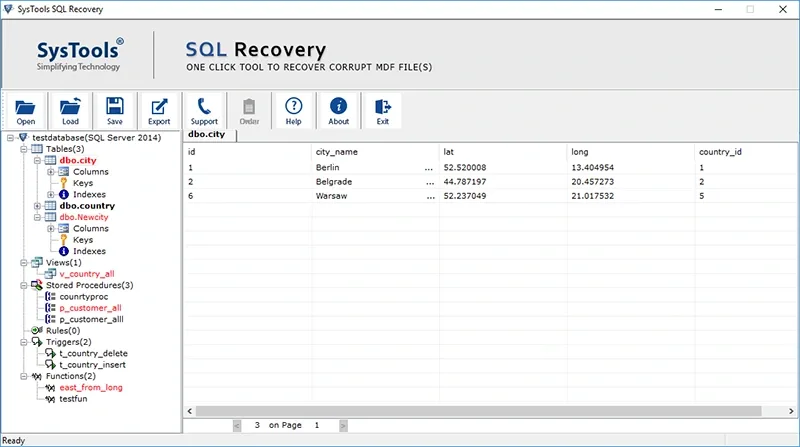
SysTools SQL Recovery is a Windows database-repair utility for administrators working with damaged SQL Server MDF files and their associated NDF files. It offers Quick and Advanced scan modes, automatic or manual database-version selection, and a tree of recoverable tables, views, triggers, functions and stored procedures for inspection before export. These are publisher-described capabilities, not independently tested recovery results.
Recovered objects can be exported to a new or existing SQL Server database, compatible SQL scripts, or CSV table data. You can select individual objects and choose schema only or schema with data. Scanning does not require SQL Server installed locally, so script export is an option when no local server is available. The publisher lists support for SQL Server versions from 2000 through 2025.
The free demo is not unrestricted recovery software: its export allowance is 25 records per table and five other database objects. Full export requires a paid license. The tool handles one primary database file at a time, with multiple associated secondary files. Its guide warns that an existing-database export can overwrite contents; use the destination selection deliberately.
What it offers
- Scan MDF files and associated NDF files using Quick or Advanced mode.
- Preview database tables, views, triggers, functions, rules and stored procedures before export.
- Export selected objects to SQL Server, compatible SQL scripts or CSV table data.
- Choose schema-only export or include both schema and data.
- Save a scan session as an STR file and reload it later.
Good to know
- The demo exports only 25 records per table and five other database objects; unrestricted export requires a paid license.
- Only one primary database file can be scanned at a time, although multiple associated NDF files can be included.
- Exporting into an existing SQL Server database can overwrite contents, according to the publisher guide.
Product images
Sources
References used for this listing. Retrieval dates do not indicate hands-on testing.
More in utilities
View category ↗
1.1.1.1 with WARP 2026.8.2115.0
Encrypt traffic from your Mac to Cloudflare’s network with WARP, or use DNS-only mode for encrypted DNS queries to the 1.1.1.1 resolver.
1.1.1.1 with WARP 2026.8.2115.0
Encrypt traffic between your Windows PC and Cloudflare, or use encrypted DNS only, with the free 1.1.1.1 with WARP app.


3uTools 9.12.005
Manage iPhone and iPad photos, music, apps and backups from Windows with 3uTools, a free utility that also includes device checks and firmware flashing tools.