

Utilities macOS
Tailscale for macOS
Connect your Mac to remote computers and private services with a WireGuard-based mesh VPN. The standalone macOS app supports device access, exit nodes and opt-in Taildrop file transfers.
- Operating system
- macOS Ventura 13.0 or later
- Architecture
- Not independently verified for the selected package
- Download package
- PKG installer; standalone GUI app
Separate Mac App Store and CLI-only variants exist. Do not install the App Store and standalone editions together.
Link checked · Download guidance
What is Tailscale?
Tailscale connects your Mac to a private network of authenticated devices called a tailnet. It suits reaching a home server, accessing work infrastructure or connecting computers across different networks without setting up manual port forwarding. Connections use WireGuard-based encryption, while MagicDNS lets you address devices by name.
This download is the publisher’s standalone macOS GUI app in a PKG installer, not the Mac App Store edition or the separate open-source command-line distribution. It requires macOS Ventura 13.0 or later. Onboarding includes approving the VPN configuration and signing in through a supported identity provider.
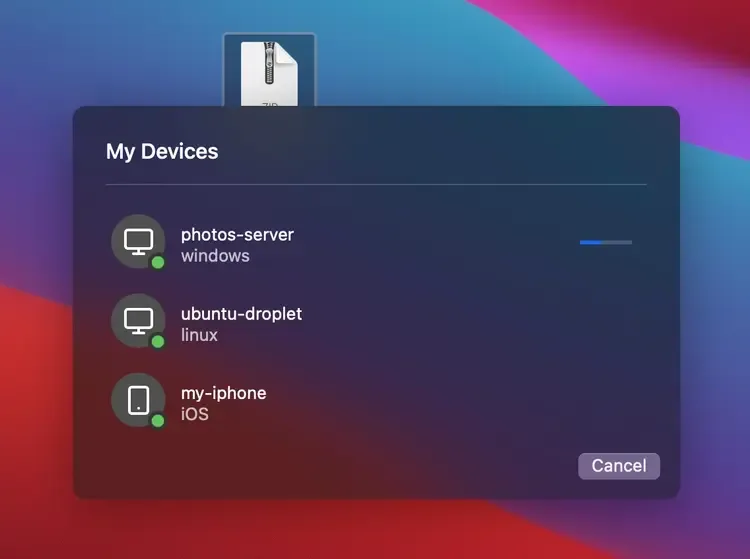
Tailscale does not route ordinary public internet browsing through the tailnet by default. Configure and select an exit node when you need that behavior. Its optional Taildrop feature can send files between your own devices, but the publisher still labels it public alpha and requires enabling it for the network. The screenshot shows the publisher’s Mac file-transfer example, not a test performed for this entry.
What it offers
- Connect authenticated devices across networks using a WireGuard-based private mesh network.
- Reach tailnet devices by name with MagicDNS.
- Select an exit node to route public internet traffic through another configured device.
- Send files between your own devices using opt-in Taildrop, currently in public alpha.
Good to know
- Setup requires signing in with a supported identity provider and approving the macOS VPN configuration.
- Public internet traffic does not use Tailscale by default; an exit node must be configured and selected.
- Taildrop is public alpha and limited to your own personal devices; other users’ devices and tagged nodes are not supported.
- Do not run the standalone and Mac App Store variants together: this can prevent the Tailscale extension from launching.
Product images
Sources
References used for this listing. Retrieval dates do not indicate hands-on testing.
- Tailscale for Mac - Download ↗Retrieved
- Download | Tailscale ↗Retrieved
- Install Tailscale on macOS ↗Retrieved
- What is Tailscale? ↗Retrieved
- Three ways to run Tailscale on macOS ↗Retrieved
- Exit nodes (route all traffic) ↗Retrieved
- Taildrop ↗Retrieved
- Tailscale pricing ↗Retrieved
- Tailscale Packages - stable track ↗Retrieved
- Terms of Service · Tailscale ↗Retrieved
More in utilities
View category ↗
1.1.1.1 with WARP 2026.8.2115.0
Encrypt traffic from your Mac to Cloudflare’s network with WARP, or use DNS-only mode for encrypted DNS queries to the 1.1.1.1 resolver.
1.1.1.1 with WARP 2026.8.2115.0
Encrypt traffic between your Windows PC and Cloudflare, or use encrypted DNS only, with the free 1.1.1.1 with WARP app.

3uTools 9.12.005
Manage iPhone and iPad photos, music, apps and backups from Windows with 3uTools, a free utility that also includes device checks and firmware flashing tools.