

Utilities Windows
TaskbarX for Windows
Center Windows 10 taskbar icons, choose alignment animations and change taskbar styling with the portable TaskbarX utility.
This opens the official acquisition page, not a verified installer file.
Publisher page reviewed · Download guidance
What is TaskbarX?
TaskbarX controls the position of Windows 10 taskbar icons. Icons can move to the center or a custom offset when applications are added or removed, with configurable animation styles and speeds or instant movement. It also offers transparent, blur and acrylic taskbar appearances.
The developer distributes a free portable edition through GitHub Releases and describes the paid Microsoft Store edition as functionally identical, with easier installation and automatic updates. The project is archived and read-only, which matters more than a third-party page presenting it as a new Windows 11 customization tool.
TaskbarX is built for Windows 10. The official README and Store listing say native Windows 11 builds newer than 10.0.22621.1265 do not work; older native Windows 11 support was restricted to background styling. The action opens the official release page rather than a newly verified archive.
What it offers
- Center taskbar icons or set an offset relative to the center.
- Choose among documented animation styles, set animation speed or disable movement animations.
- Apply transparent, blur or acrylic taskbar styling and adjust color/transparency.
- Configure primary/secondary taskbars, multiple monitors and vertical taskbars.
- Use the Configurator to control startup scheduling and stop the utility.
Good to know
- Officially supports Windows 10; current native Windows 11 taskbars are outside its documented support.
- Repository archived June 12, 2025; active maintenance is not claimed.
- Windows 10 version 1709 and lower may have taskbar-styling problems. Windows 7 is unsupported and Windows 8 is untested/unsupported.
- Store removal may leave a startup scheduled task that must be removed separately.
TaskbarX changes icon alignment, not the Start menu
TaskbarX keeps taskbar application icons centered or at a position offset from the center. It updates that arrangement as icons are added or removed, giving a dock-like layout without claiming to replace the Windows Start menu or create an entire new desktop shell.
Movement can be animated using the documented selection of styles and a chosen speed, or made instant by selecting no animation. If alignment is the goal, this distinction lets you avoid treating an animation effect as an essential part of the workflow.
Styling and multi-monitor options
The official README lists transparent, blur and acrylic taskbar styles, along with color and transparency controls. Centering can be configured for primary or secondary taskbars, and the project documents vertical-taskbar support and multiple-monitor use. These are settings for the supported Windows 10 taskbar, not proof that Windows 11 exposes the same underlying behavior.
Taskbar segments and Start-button-related controls also appear in the project’s feature list. Their presence does not override the platform exclusions. If an arrangement depends on a specific taskbar layout, check it against the project’s own requirements before assuming a desktop screenshot describes your operating system.
Configure alignment, then decide whether it should run at startup
On supported Windows 10, the free portable release is the no-install route documented by the developer. Open the Configurator to choose alignment or a center-relative offset, then choose whether movement should be animated. Select the documented none animation option if you want icons to move instantly; transparent, blur and acrylic are separate appearance choices, not prerequisites for centering.
Treat Apply as a startup decision as well as a settings action: the developer says it creates a scheduled task with a three-second delay. If startup timing is the problem, the documented remedy is to increase that delay to about ten seconds through Taskschedule. This is the publisher’s procedure, not a setup sequence tested for this guide.
For a portable update, the documented order is Stop TaskbarX in the Configurator, then replace the old files with the new release files. For removal, remove the startup task before deleting the application files, as described below. Stopping centering and removing its scheduled launch are different actions.
Why this is not a current Windows 11 taskbar recommendation
The developer says TaskbarX is built for Windows 10. Its README and Microsoft Store description specifically warn that native Windows 11 versions newer than build 10.0.22621.1265, from February 2023, do not work. Before that cutoff, native Windows 11 use was limited to background-style changes rather than the full Windows 10 feature set.
An older 1.7.8.0 release note mentions a Windows 11 22H2 dual-screen fix. That historical note should not be read as continuing compatibility with later Windows 11 versions. The newer explicit platform warning takes precedence. This page does not turn the README’s mention of third-party shell patching into an installation recommendation.
Choose the portable release or the Store route deliberately
The current developer product page links GitHub Releases as the free portable distribution, with no installation required. It describes the Microsoft Store edition as functionally identical and donation-based, with easier installation and automatic updates. The official release page is the download destination here, not a third-party installer mirror.
The repository is archived and read-only, with the owner’s archive date shown as June 12, 2025. This page therefore does not describe TaskbarX as actively maintained or promise future compatibility fixes. An available release is evidence of distribution, not of ongoing development.
Startup scheduling is part of setup and removal
The developer documents Apply in the Configurator as creating a startup scheduled task. The Taskschedule tab allows changing its delay when startup timing needs adjustment. This matters because a portable program can still have a startup entry even though its application files are kept in an ordinary folder.
For removal, follow the documented sequence: use Stop TaskbarX to restore icons to the left, remove its task through the Taskschedule tab, then delete the program files. The Store edition has a documented caveat: removal may leave the scheduled task behind. The developer describes removing the TaskbarX or FalconX entry from Task Scheduler Library in that situation.
The Configurator screenshot and evidence limits
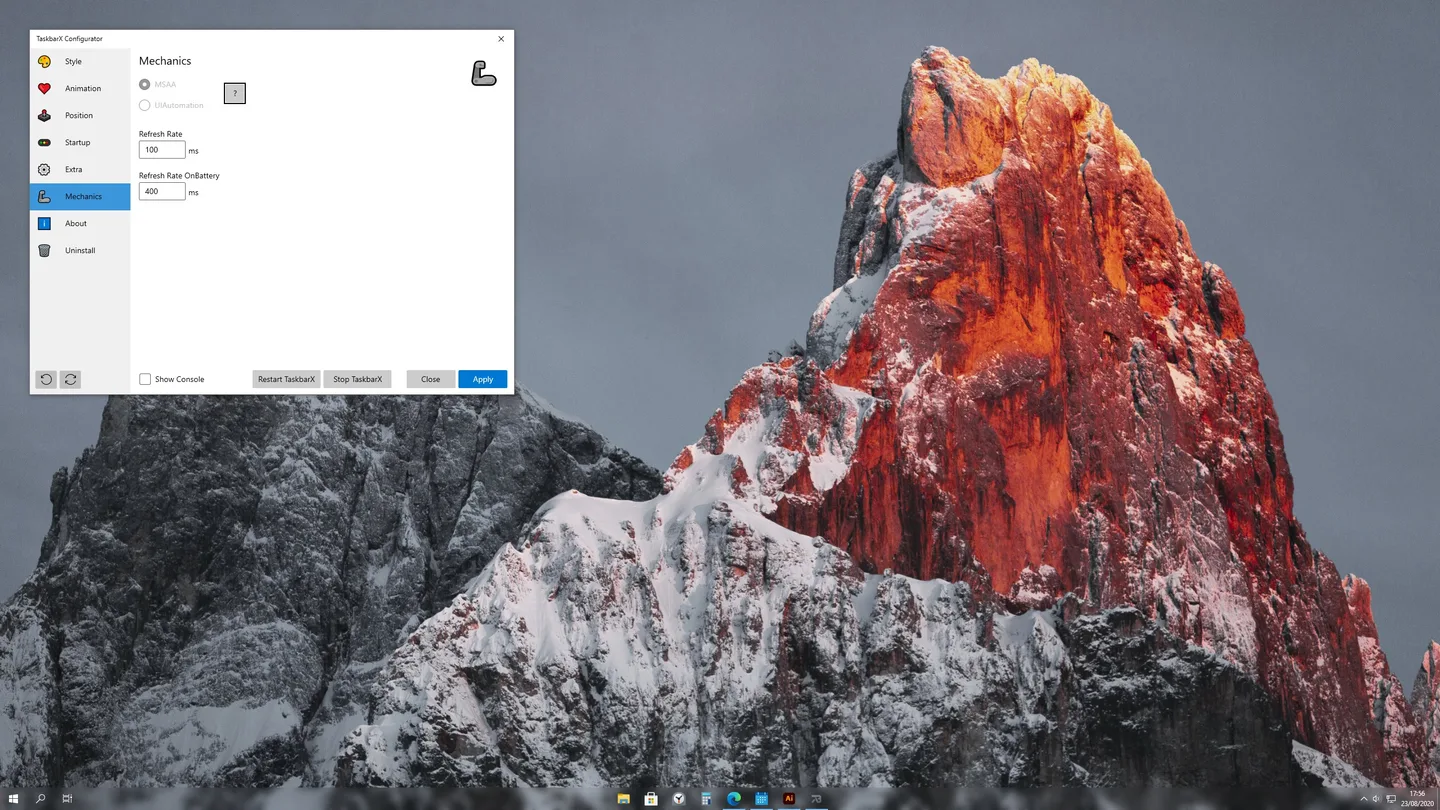
The official Store screenshot shows the real TaskbarX Configurator with the Mechanics tab selected, normal and battery refresh-rate controls, navigation to Style, Animation, Position and Startup, and Stop TaskbarX and Apply buttons. A centered taskbar appears along the bottom of the desktop.
The image was optimized from the Store’s actual full-size screenshot, not from a decorative hero montage or a narrow taskbar-only strip. It demonstrates the interface, not a test on the current Windows build. No installer was fetched, no program was run and no CPU or memory-performance measurement is claimed.
Product images
Sources
References used for this listing. Retrieval dates do not indicate hands-on testing.
- TaskbarX official README — features, platform warnings and removal ↗Retrieved
- TaskbarX — current official developer product page ↗Retrieved
- TaskbarX 1.7.8.0 — official release and assets page ↗Retrieved
- TaskbarX official releases feed ↗Retrieved
- TaskbarX — official Microsoft Store description and screenshot metadata ↗Retrieved
More in utilities
View category ↗
1.1.1.1 with WARP 2026.8.2115.0
Encrypt traffic from your Mac to Cloudflare’s network with WARP, or use DNS-only mode for encrypted DNS queries to the 1.1.1.1 resolver.
1.1.1.1 with WARP 2026.8.2115.0
Encrypt traffic between your Windows PC and Cloudflare, or use encrypted DNS only, with the free 1.1.1.1 with WARP app.

3uTools 9.12.005
Manage iPhone and iPad photos, music, apps and backups from Windows with 3uTools, a free utility that also includes device checks and firmware flashing tools.