

Utilities macOS
TeamViewer for macOS
Access remote computers and provide support with TeamViewer for Mac. This entry links to the full client DMG; free use is limited to personal, non-commercial activity.
Version 15.83.3 · Direct publisher file
Link checked · Download guidance
What is TeamViewer?
TeamViewer for Mac lets you connect to remote devices to provide support or access your own computers. The full client supports incoming and outgoing connections, rather than serving only as a temporary receive-support module. Support sessions can use invitation links, and devices can be connected and managed from the home screen.
Choose the full client when you need to provide support. QuickSupport is a separate module for people receiving attended assistance; Host is a separate option for setting up unattended access. The download here is the publisher’s TeamViewer.dmg full client, not QuickSupport, Host, or TeamViewer Meeting.
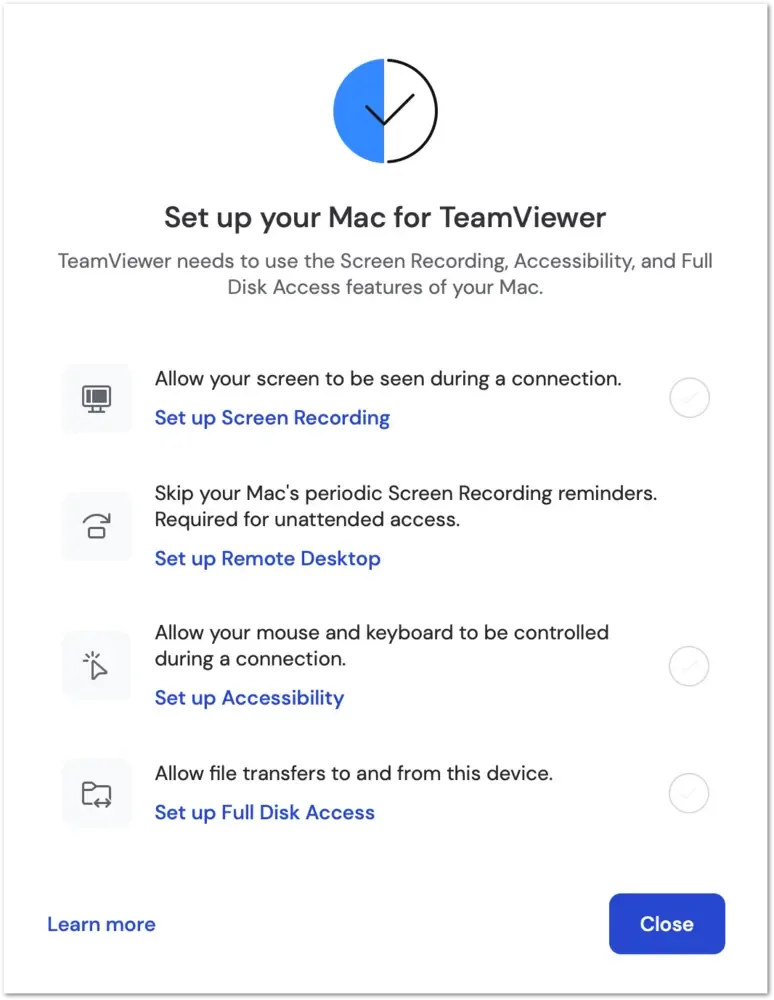
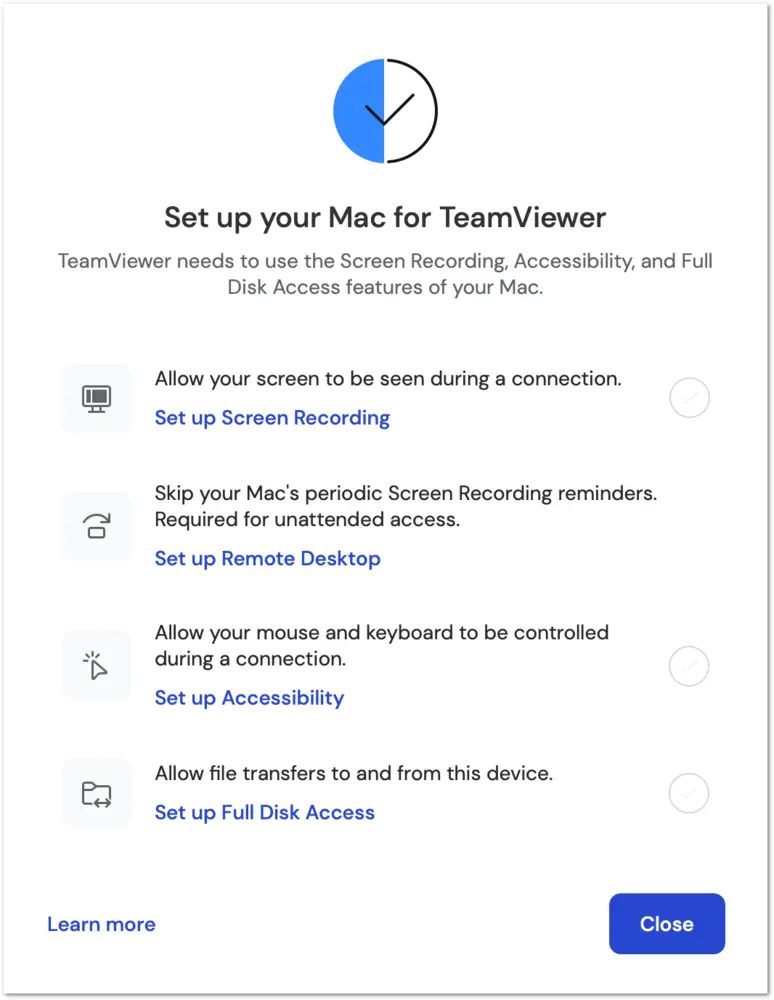
On a Mac receiving remote control, macOS permissions determine what the remote user can see and do. Screen Recording enables screen viewing, Accessibility enables mouse and keyboard control, and Full Disk Access enables file access for transfers. The publisher also documents a Remote Desktop permission for unattended access. Review the setup dialog through Help > Check system access; TeamViewer cannot grant these permissions itself or grant them through a remote TeamViewer connection.
The free license covers personal devices and help for friends and family. Work-related use, client support, and organizational use require a commercial license. Version 15.83.3 was listed on the publisher’s Mac download portal when checked; the unversioned download URL can change, and the installer was not downloaded or tested.
What it offers
- Establish incoming and outgoing remote connections with the full client.
- Provide remote support using session invitation links.
- Connect and add devices from the home screen.
- Review Mac screen-viewing, input-control, and file-access permissions through Help > Check system access.
Good to know
- Free use is personal only; work-related, organizational, and revenue-generating activity requires a commercial license.
- A Mac receiving control needs locally granted macOS permissions. Without them, screen viewing, mouse and keyboard control, or file transfer may be restricted; TeamViewer cannot grant the permissions remotely.
Product images
Sources
References used for this listing. Retrieval dates do not indicate hands-on testing.
- macOS download | TeamViewer ↗Retrieved
- Download the latest version of TeamViewer for Mac ↗Retrieved
- Remote control a Mac ↗Retrieved
More in utilities
View category ↗
1.1.1.1 with WARP 2026.8.2115.0
Encrypt traffic from your Mac to Cloudflare’s network with WARP, or use DNS-only mode for encrypted DNS queries to the 1.1.1.1 resolver.
1.1.1.1 with WARP 2026.8.2115.0
Encrypt traffic between your Windows PC and Cloudflare, or use encrypted DNS only, with the free 1.1.1.1 with WARP app.

3uTools 9.12.005
Manage iPhone and iPad photos, music, apps and backups from Windows with 3uTools, a free utility that also includes device checks and firmware flashing tools.