

Utilities Windows
TekWiFi for Windows
Inspect WiFi connection details, diagnose network access problems and configure PEAP authentication with TekWiFi for Windows.
- Operating system
- Windows Vista, 7, 8, 10 and 11; Windows Server 2008–2022
- Architecture
- Not specified on the consulted publisher pages
- Download package
- ZIP archive
Publisher requirements: WiFi interface, at least 4 GB RAM, .NET Framework 4.0 Client Profile or later, and 4 MB installation disk space. Architecture and installed behavior were not tested.
Link checked · Download guidance
What is TekWiFi?
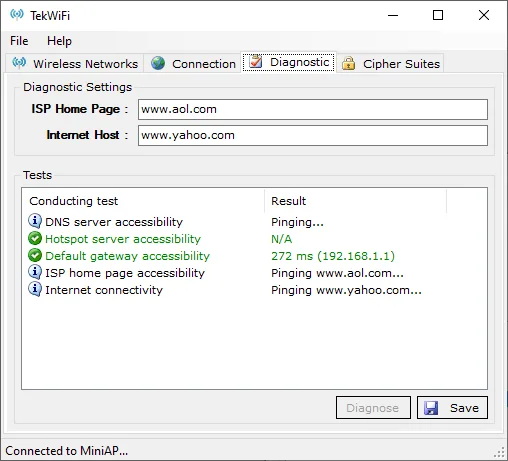
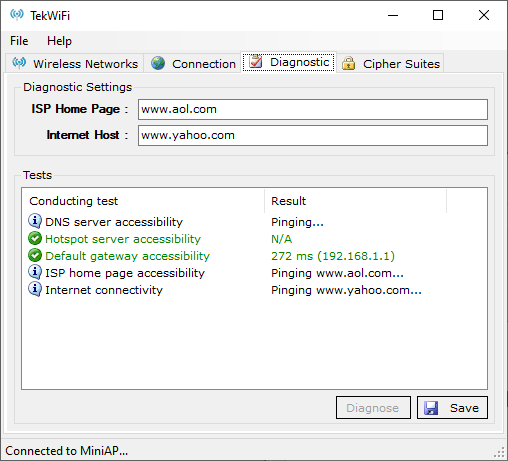
TekWiFi is a Windows WiFi connection and diagnostic utility from KaplanSoft. It lists nearby wireless networks and shows the connected network’s assigned IP address, default gateway and DNS servers. Its diagnostic view checks access to DNS servers, the gateway, a hotspot and configured Internet destinations, with results that can be saved to a text file.
For networks using PEAP authentication, TekWiFi provides client-side automatic provisioning. It can also detect when hotspot login is needed and configure cipher-suite priorities and the TLS version used by PEAP and EAP-TLS.
The publisher requires a WiFi interface, at least 4 GB of RAM and Microsoft .NET Framework 4.0 Client Profile or later. The linked publisher package is a ZIP archive. License terms and processor architecture are not stated on the consulted product and support pages; check the publisher’s terms before deployment.
What it offers
- List available wireless networks and view the connected network’s IP address, gateway and DNS servers.
- Diagnose network access by pinging DNS servers, the default gateway, a hotspot and configured Internet destinations.
- Save diagnostic results to a text file.
- Configure PEAP client authentication and detect whether hotspot login is required.
- Adjust cipher-suite priorities and select TLS 1.0, 1.1 or 1.2 for PEAP and EAP-TLS.
Good to know
- Requires a WiFi interface, at least 4 GB of RAM and Microsoft .NET Framework 4.0 Client Profile or later, according to the publisher.
- The publisher’s listed TLS choices for PEAP and EAP-TLS are 1.0, 1.1 and 1.2; TLS 1.3 support is not documented on the consulted pages.
Product images
Sources
References used for this listing. Retrieval dates do not indicate hands-on testing.
More in utilities
View category ↗
1.1.1.1 with WARP 2026.8.2115.0
Encrypt traffic from your Mac to Cloudflare’s network with WARP, or use DNS-only mode for encrypted DNS queries to the 1.1.1.1 resolver.
1.1.1.1 with WARP 2026.8.2115.0
Encrypt traffic between your Windows PC and Cloudflare, or use encrypted DNS only, with the free 1.1.1.1 with WARP app.

3uTools 9.12.005
Manage iPhone and iPad photos, music, apps and backups from Windows with 3uTools, a free utility that also includes device checks and firmware flashing tools.