
Development macOS
TeXstudio for macOS
Write LaTeX documents on Mac with command completion, reference checking and an integrated PDF viewer. TeXstudio is free and open source; a separate LaTeX system is required.
- Operating system
- macOS 14 or later, according to the publisher download table
- Architecture
- Apple Silicon (publisher-labelled M1 build)
- Download package
- ZIP archive
Selected download is osx-m1.zip; a separate osx.zip is available. The homepage banner instead lists macOS 13+; that discrepancy remains unresolved.
Link checked · Download guidance
What is TeXstudio?
TeXstudio is a LaTeX editor for writing structured documents with equations, citations and cross-references. Syntax highlighting, command completion and assistants for tables, images and formulas help you work in the source, while the integrated PDF viewer shows the compiled document. Structure navigation and inline checking help track sections, references and errors as a project grows.
TeXstudio is an editor, not a complete LaTeX distribution: install a LaTeX system separately to compile documents. This entry links to the publisher’s TeXstudio 4.9.9 ZIP for Apple Silicon, labelled M1. The publisher also offers a separate Mac ZIP without the M1 label. Its download table specifies macOS 14 or later, while the homepage download banner says 13 or later; compatibility with macOS 13 has not been resolved here.
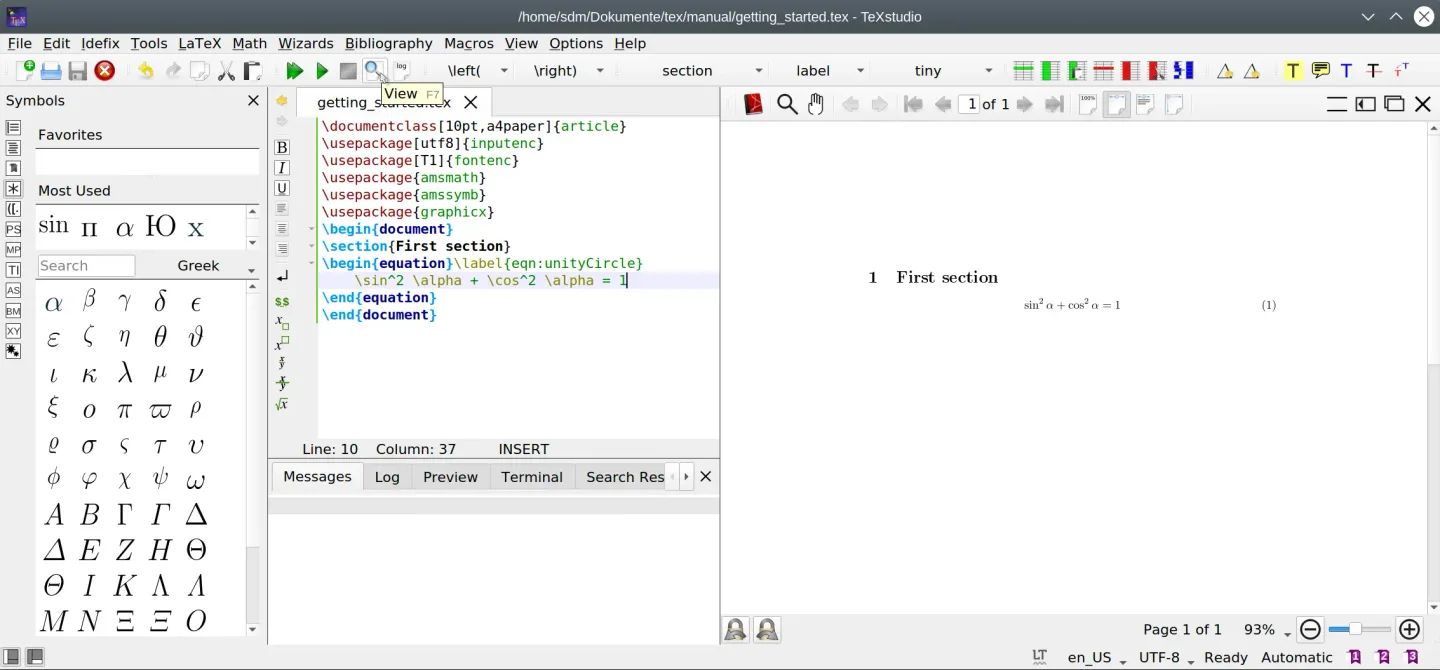
The screenshot comes from the official manual and shows the shared editor and PDF workflow on Linux, not a captured Mac installation.
What it offers
- Complete LaTeX commands, references and bibliography entries as you type.
- Use syntax highlighting, code folding and a structure view to navigate documents.
- Insert mathematical symbols and generate table, image or formula code with assistants.
- Read compiled output in the integrated PDF viewer with source-to-PDF synchronization.
- Check spelling and references, and inspect LaTeX errors and warnings in the editor.
Good to know
- A separate LaTeX system is required for compilation; TeXstudio does not include one.
- The publisher lists conflicting macOS minimums: 13+ in its download banner and 14+ in its download table. macOS 13 support is unconfirmed here.
- The publisher warns that macOS may refuse to open the application as an unidentified developer.
Product images
Sources
References used for this listing. Retrieval dates do not indicate hands-on testing.
- TeXstudio for Mac - Download ↗Retrieved
- TeXstudio - A LaTeX editor ↗Retrieved
- Getting started - TeXstudio 4.9.9 documentation ↗Retrieved
- Release 4.9.9 · texstudio-org/texstudio ↗Retrieved
More in development
View category ↗
010 Editor 17.0
Inspect and edit binary files on Mac with 010 Editor, a paid text and hex editor with Binary Templates, file comparison and a 30-day trial.
010 Editor 17.0
Inspect and edit binary files with 010 Editor for Windows, a text and hex editor with Binary Templates, file comparison and scripting. Includes a 30-day trial.
10x Editor
Edit and navigate C++ projects on Windows with a built-in parser, workspace search and Visual Studio project support. A paid license is required after the 30-day trial.