

Utilities Windows
Text Grab for Windows
Copy text from screenshots, images and otherwise unselectable screen regions with Text Grab, an open-source Windows OCR utility with tools for cleaning the results.
Version 4.16.0 · Direct publisher file
Link checked · Download guidance
What is Text Grab?
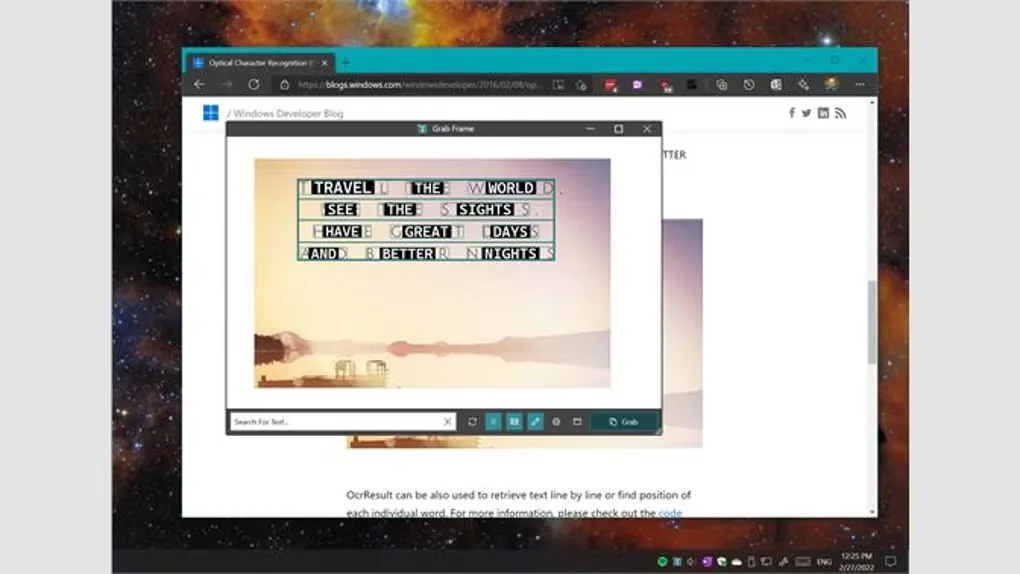
Text Grab extracts text that you can see but cannot easily select. Use Full-Screen Grab to select a screen region and copy recognized words to the clipboard, or keep a movable Grab Frame over the material you are reading. It is useful for taking text out of images, PDFs, videos and application windows without retyping it. The publisher documents Windows 10 or later for features using the Windows OCR API.
The Edit Text Window helps turn captured text into usable content: trim whitespace, remove duplicate lines, change case, find and replace, or extract values with regular expressions. Plain-text, spreadsheet-style and markdown modes support different cleanup tasks. Quick Simple Lookup is a separate mode for recalling saved phrases and other frequently reused text.
This entry links to the free GitHub developer EXE for version 4.16.0, not the paid Microsoft Store edition. The developer build requires manual version management and does not include the Store edition's AI features or automatic updates. OCR can make mistakes, and recognition through the built-in Windows OCR engine depends on installed language packs. Review extracted text before using it in documents or structured data.
What it offers
- Select a screen region with Full-Screen Grab and copy recognized text to the clipboard.
- Position a movable Grab Frame over text for repeated capture and search.
- Clean captured text with find and replace, case conversion, duplicate-line removal and regular-expression extraction.
- Work with plain-text, spreadsheet-style or markdown views in the Edit Text Window.
- Recall saved phrases, URLs and other snippets with Quick Simple Lookup.
Good to know
- The free GitHub developer build lacks the paid Microsoft Store edition's AI features and automatic updates.
- OCR is not error-free; the publisher recommends adjusting the Grab Frame size and position to improve results.
- Windows OCR features require Windows 10 or later, and recognized languages depend on installed Windows language packs.
Product images
Sources
References used for this listing. Retrieval dates do not indicate hands-on testing.
- Text Grab - Download — Windows product page and screenshot gallery ↗Retrieved
- Text Grab — Copy any text you can see ↗Retrieved
- TheJoeFin/Text-Grab — publisher README and license ↗Retrieved
- Release v4.16.0 — TheJoeFin/Text-Grab ↗Retrieved
- Text Grab v4.16.0 — exact publisher asset links ↗Retrieved
- JoeFin Apps — publisher product directory ↗Retrieved
More in utilities
View category ↗
1.1.1.1 with WARP 2026.8.2115.0
Encrypt traffic from your Mac to Cloudflare’s network with WARP, or use DNS-only mode for encrypted DNS queries to the 1.1.1.1 resolver.
1.1.1.1 with WARP 2026.8.2115.0
Encrypt traffic between your Windows PC and Cloudflare, or use encrypted DNS only, with the free 1.1.1.1 with WARP app.

3uTools 9.12.005
Manage iPhone and iPad photos, music, apps and backups from Windows with 3uTools, a free utility that also includes device checks and firmware flashing tools.