
Utilities Windows
Thumbcache Viewer
Extract and preview thumbnail images from Windows thumbcache and iconcache databases, export entry details to CSV, and map cache hashes to file paths.
- Operating system
- Windows Vista, 7, 8, 8.1, 10 and 11
- Architecture
- 64-bit (x64)
- Download package
- ZIP archive — graphical program
Visual C++ 2008 runtime required. A separate 32-bit package and a separately versioned CMD edition are available from the publisher.
Link checked · Download guidance
What is Thumbcache Viewer?
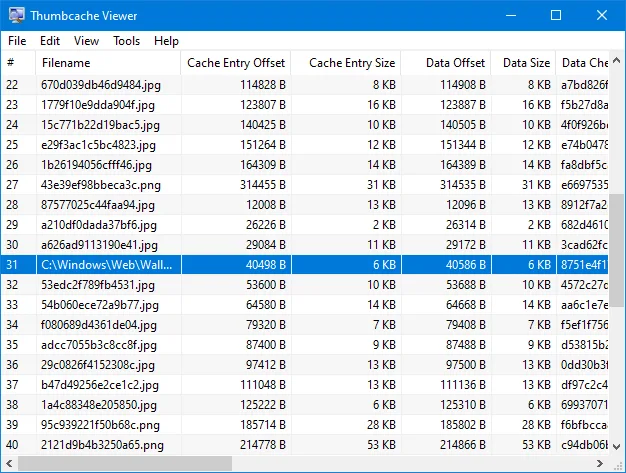
Thumbcache Viewer opens the thumbcache_*.db and iconcache_*.db databases used by Windows to store image previews. Its graphical interface lists cache entries and their sizes, offsets and checksums. Select an image entry to preview it in a separate window, save thumbnails, or export the entry list to CSV for further inspection. The publisher also documents command-line options for opening databases and saving images or CSV files.
This entry links to the 64-bit ZIP of the graphical program, version 1.0.4.0, released on October 25, 2023. The separately offered Thumbcache Viewer CMD has its own version and download; its HTML-report options are not claimed for this package.
Cache hashes can be mapped to file paths by scanning directories or using a Windows Search database. Directory scanning must run on the computer that generated the cache. Thumbs.db is a different format: the publisher directs users to Thumbs Viewer for those files. The Visual C++ 2008 runtime library is required.
What it offers
- Preview image entries from thumbcache_*.db and iconcache_*.db databases in a separate window.
- Save thumbnail entries and export database entry details to CSV.
- Verify CRC-64 header and data checksums and highlight mismatches.
- Map cache entry hashes to file paths using directory scans or Windows Search database information.
- Hide zero-byte entries or remove entries from the displayed list without modifying the database.
Good to know
- Does not target Thumbs.db files; the publisher recommends its separate Thumbs Viewer for that format.
- Mapping file paths by scanning directories must be performed on the same computer that generated the cache database.
- Requires the Visual C++ 2008 runtime library.
- Mapping Windows 11 Windows.db files requires running on Windows 11 or supplying an appropriate sqlite3.dll; Windows.edb mapping requires the same or a newer Windows version than the database source.
Product images
Sources
References used for this listing. Retrieval dates do not indicate hands-on testing.
More in utilities
View category ↗
1.1.1.1 with WARP 2026.8.2115.0
Encrypt traffic from your Mac to Cloudflare’s network with WARP, or use DNS-only mode for encrypted DNS queries to the 1.1.1.1 resolver.
1.1.1.1 with WARP 2026.8.2115.0
Encrypt traffic between your Windows PC and Cloudflare, or use encrypted DNS only, with the free 1.1.1.1 with WARP app.

3uTools 9.12.005
Manage iPhone and iPad photos, music, apps and backups from Windows with 3uTools, a free utility that also includes device checks and firmware flashing tools.