

Development Windows
Tinn-R for Windows
Edit R scripts and send code to R with Tinn-R, a Windows editor with syntax highlighting, an object explorer and support for Knitr and Sweave documents.
Version 9.00.05.01 · Direct publisher file
Link checked · Download guidance
What is Tinn-R?
Tinn-R is a Windows text editor and graphical interface for the R language. It lets you write a script and send a file, selected text, a block or individual lines to the R interpreter. Its object explorer provides selection and filtering, while syntax highlighting, macros and customizable snippets support editing work.
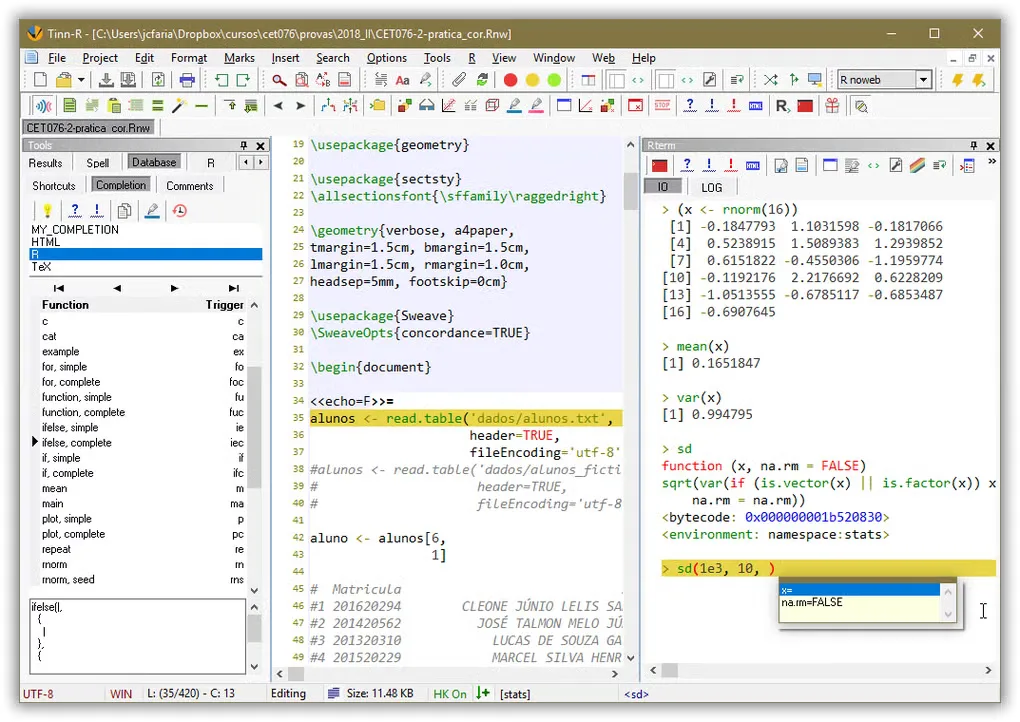
For reproducible documents, the publisher lists RNOWEB support with Knitr and Sweave, alongside basic LaTeX support. The download linked here is the publisher's 9.00.05.01 Windows setup EXE; the publisher also offers a separate portable ZIP. The screenshot illustrates the editor and Rterm interface, but its exact application version is not identified.
Before using this release as an R GUI/IDE, install the rlang package in R: the publisher warns that the svSocket/svMisc dependency chain will otherwise prevent the integration from working as intended. Licensing also needs attention. Although the About page describes the project as GPL/open source, the current License page specifies a requested 30-day trial, paid annual licenses and a free educational license that must be requested and renewed annually. Do not assume the downloadable binary provides unrestricted free use.
What it offers
- Send a file, selection, block or line of code to the R interpreter.
- Browse R objects with selection and filtering in the object explorer.
- Edit with syntax highlighting, macros and customizable XML-based snippets.
- Work with RNOWEB documents using Knitr or Sweave and basic LaTeX support.
- Use a project-management interface and customizable shortcuts.
Good to know
- R integration requires the rlang package to be installed beforehand, according to the release notes.
- The publisher's License page requires a requested trial or annual license; the free educational license also needs annual renewal. Its GPL/open-source About description does not clarify these binary licensing requirements.
Product images
Sources
References used for this listing. Retrieval dates do not indicate hands-on testing.
- Tinn-R — official Windows download and release notes ↗Retrieved
- Tinn-R — official editor features ↗Retrieved
- Tinn-R — About and publisher screenshot gallery ↗Retrieved
- Tinn-R — publisher license requirements ↗Retrieved
- Tinn-R: Editor - GUI for R Language and Environment — Windows listing and screenshot gallery ↗Retrieved
More in development
View category ↗
010 Editor 17.0
Inspect and edit binary files on Mac with 010 Editor, a paid text and hex editor with Binary Templates, file comparison and a 30-day trial.
010 Editor 17.0
Inspect and edit binary files with 010 Editor for Windows, a text and hex editor with Binary Templates, file comparison and scripting. Includes a 30-day trial.
10x Editor
Edit and navigate C++ projects on Windows with a built-in parser, workspace search and Visual Studio project support. A paid license is required after the 30-day trial.