
Utilities Windows
TopMostFriend
Keep a Windows application window above others with TopMostFriend, a free, open-source tray utility with a window menu and configurable global hotkey.
- Operating system
- Publisher lists Windows XP Service Pack 3 and newer
- Architecture
- Not specified by the publisher download page
- Download package
- Windows executable (.exe)
Requires .NET Framework 4.0. The publisher's legacy requirements do not establish testing on current Windows versions.
Link checked · Download guidance
What is TopMostFriend?
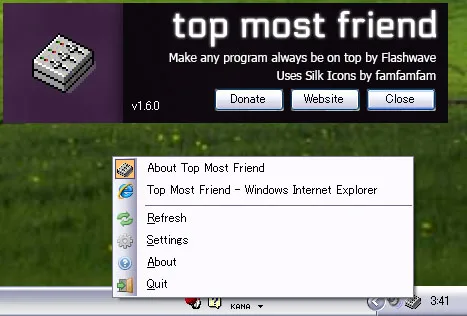
TopMostFriend toggles a window's always-on-top status so it can stay above other windows. Right-click its notification-area icon to choose an open window, or assign a global hotkey to toggle the window that currently has focus. It suits keeping a reference window visible while working in another application.
The tray menu includes a refresh action for reloading the window list. A title blacklist can hide unwanted entries from that list, but it does not restrict the hotkey. Settings also let you omit the window list if you only use the keyboard shortcut.
Some windows require administrator privileges before their always-on-top status can be changed. The publisher lists Windows XP Service Pack 3 or newer with .NET Framework 4.0, and dates version 1.6.0 to July 9, 2021. That legacy compatibility statement is not confirmation of testing on current Windows releases.
What it offers
- Toggle always-on-top status for an open window from the system-tray menu.
- Configure a global hotkey for the currently focused window.
- Refresh the window list without dismissing the menu.
- Hide window-title matches from the menu using an editable blacklist.
Good to know
- Some windows require administrator privileges to change their always-on-top status.
- The title blacklist filters the menu only; it does not affect the hotkey.
- The publisher's listed requirements are Windows XP SP3 or newer and .NET Framework 4.0; current Windows compatibility has not been independently verified here.
Product images
Sources
References used for this listing. Retrieval dates do not indicate hands-on testing.
More in utilities
View category ↗
1.1.1.1 with WARP 2026.8.2115.0
Encrypt traffic from your Mac to Cloudflare’s network with WARP, or use DNS-only mode for encrypted DNS queries to the 1.1.1.1 resolver.
1.1.1.1 with WARP 2026.8.2115.0
Encrypt traffic between your Windows PC and Cloudflare, or use encrypted DNS only, with the free 1.1.1.1 with WARP app.

3uTools 9.12.005
Manage iPhone and iPad photos, music, apps and backups from Windows with 3uTools, a free utility that also includes device checks and firmware flashing tools.