

Utilities Windows
TrafficMonitor for Windows
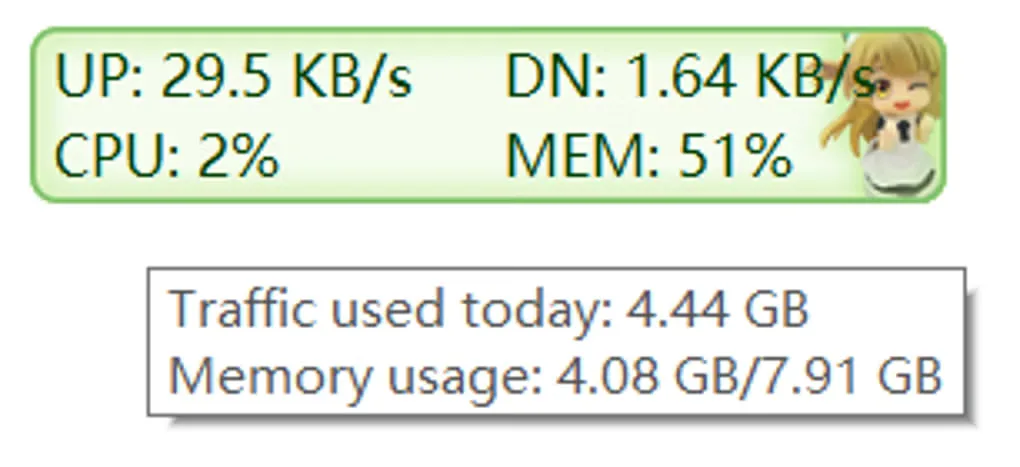
See upload and download speeds, CPU usage and RAM usage in a floating window or the Windows taskbar. This download is TrafficMonitor 1.86 Lite for x64 Windows.
- Operating system
- Windows; publisher documentation covers Windows 10 and Windows 11
- Architecture
- x64
- Download package
- ZIP archive (Lite edition)
This link selects x64 Lite. Separate x86 and ARM64EC archives are available. Lite does not require administrator privileges according to the publisher; a Visual C++ runtime dependency is documented.
Link checked · Download guidance
What is TrafficMonitor?
TrafficMonitor keeps network transfer rates and resource usage visible while you work. Its floating window shows upload and download speeds, with CPU and RAM information available through the context menu. You can also enable a taskbar display, choose its displayed items and select which network connection to monitor. Historical traffic statistics help you review data usage rather than just the current transfer rate.
The display is configurable: change skins, fonts, text colors and speed units to suit your desktop. The publisher documents a plug-in system for additional information. The linked package is the x64 Lite ZIP for version 1.86; separate x86 and ARM64EC packages are listed on the same publisher release page.
Lite 1.86 includes GPU and disk utilization but not built-in temperature monitoring. The publisher says temperature monitoring has moved to a separate Hardware Monitor plug-in and that future releases will only provide Lite. Windows 11 taskbar integration also has a documented limitation: the monitor can overlap icons when the taskbar is full. This is a configurable desktop monitor, not a guarantee that every taskbar layout or hardware sensor will work without adjustment.
What it offers
- Display upload and download speeds, CPU usage and RAM usage in a floating window or taskbar display.
- Select a network adapter automatically or manually and view network connection details.
- Review historical traffic statistics and customize skins, fonts, colors and speed units.
- Use the plug-in system for additional monitoring items; Lite 1.86 also includes GPU and disk utilization.
Good to know
- Lite has no built-in temperature monitoring; the publisher directs users who need it to a separate Hardware Monitor plug-in.
- On Windows 11, the taskbar display can overlap icons when the taskbar is full; the publisher reports no current fix for that layout.
- The program depends on the Microsoft Visual C++ runtime; a missing MSVC or MFC DLL requires the corresponding runtime.
Product images
Sources
References used for this listing. Retrieval dates do not indicate hands-on testing.
More in utilities
View category ↗
1.1.1.1 with WARP 2026.8.2115.0
Encrypt traffic from your Mac to Cloudflare’s network with WARP, or use DNS-only mode for encrypted DNS queries to the 1.1.1.1 resolver.
1.1.1.1 with WARP 2026.8.2115.0
Encrypt traffic between your Windows PC and Cloudflare, or use encrypted DNS only, with the free 1.1.1.1 with WARP app.

3uTools 9.12.005
Manage iPhone and iPad photos, music, apps and backups from Windows with 3uTools, a free utility that also includes device checks and firmware flashing tools.