
Utilities Windows
TSPrint Client
Print from a remote desktop or terminal server to a printer on your Windows workstation. TSPrint Client receives jobs from the separately installed TSPrint Server.
- Operating system
- Windows 11 and Windows 10; publisher also lists older Windows client and Windows Server versions
- Architecture
- x64 and ARM64 in the current Windows installers
- Download package
- EXE installer
Install on the local workstation. TSPrint Server is a separate remote-host installation. The publisher also offers an MSI package for managed deployment.
Link checked · Download guidance
What is TSPrint Client?
TSPrint Client is the local Windows component of Terminalworks' remote desktop printing system. Install the client on the computer you connect from and TSPrint Server on the remote host you print from. The server creates virtual printers and sends compressed print jobs through the remote desktop connection; the client receives them and prints to a locally installed printer, including USB, network and wireless devices.
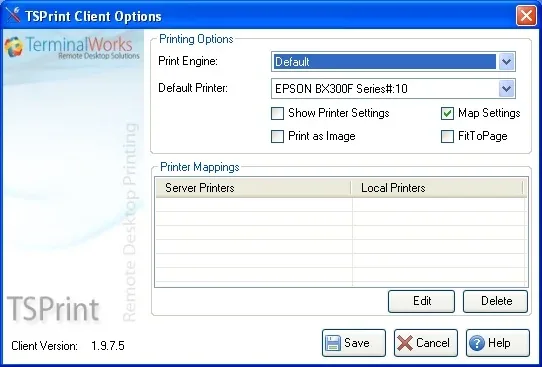
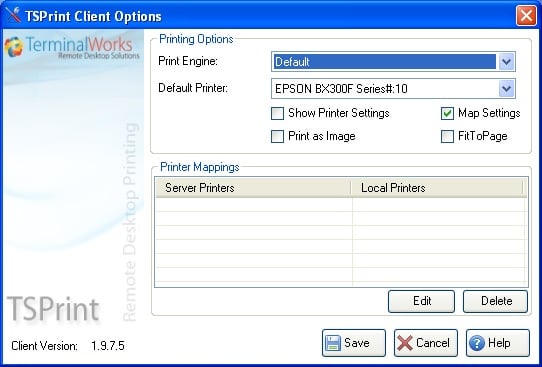
Client options let you select a default printer, display printer settings before printing and map remote printing preferences to the local device. Print as Image and FitToPage provide alternatives for font or margin problems. Dynamic redirection can expose selected local printers in the remote session, subject to the server's settings.
This client is not a standalone replacement for the server component. The complete TSPrint system is commercially licensed, with a publisher-offered 25-day trial. Print as Image can produce larger jobs and take longer to print. The screenshot is a historical publisher support illustration showing client version 1.9.7.5; it does not show the current 3.2.4.34 interface.
What it offers
- Receive remote print jobs through the remote desktop connection and send them to locally installed printers.
- Choose a default printer and show printer settings before a job prints.
- Map remote printer preferences to the local printer or use local preferences instead.
- Use Print as Image and FitToPage when adjusting font rendering or page margins.
- Select local printers for dynamic redirection when the server permits client-controlled settings.
Good to know
- Requires TSPrint Server on the remote host as well as TSPrint Client on the local workstation; the client alone does not provide the complete printing system.
- The complete TSPrint system requires commercial licensing after the 25-day trial.
- Print as Image increases print-job size and can lengthen printing time.
- Server settings take precedence over client selections for dynamic printer redirection.
Product images
Sources
References used for this listing. Retrieval dates do not indicate hands-on testing.
- TSPrint Client - Download — protected browser observation ↗Retrieved
- Download TSPrint to Print from your Terminal Server | Terminalworks ↗Retrieved
- Remote Desktop Printing - TSPrint | Terminalworks ↗Retrieved
- TSPrint Tech Support Page | Terminalworks — client options ↗Retrieved
- Terminalworks Blog | TSPrint 3.0 What's New? — historical feature explanation ↗Retrieved
- TSPrint Usage Guide — client options and two-part installation ↗Retrieved
More in utilities
View category ↗
1.1.1.1 with WARP 2026.8.2115.0
Encrypt traffic from your Mac to Cloudflare’s network with WARP, or use DNS-only mode for encrypted DNS queries to the 1.1.1.1 resolver.
1.1.1.1 with WARP 2026.8.2115.0
Encrypt traffic between your Windows PC and Cloudflare, or use encrypted DNS only, with the free 1.1.1.1 with WARP app.

3uTools 9.12.005
Manage iPhone and iPad photos, music, apps and backups from Windows with 3uTools, a free utility that also includes device checks and firmware flashing tools.