
Utilities Windows
TurnedOnTimesView for Windows
View Windows startup and shutdown history with TurnedOnTimesView, a portable freeware utility that derives computer activity periods from event logs.
- Operating system
- Windows 2000 through Windows 10, as listed by the publisher
- Architecture
- 32-bit and 64-bit Windows supported; executable architecture not independently inspected
- Download package
- ZIP archive containing a portable executable
No installation or additional DLL files required according to the publisher. Windows 11 compatibility is not confirmed; some log access requires administrator rights.
Link checked · Download guidance
What is TurnedOnTimesView?
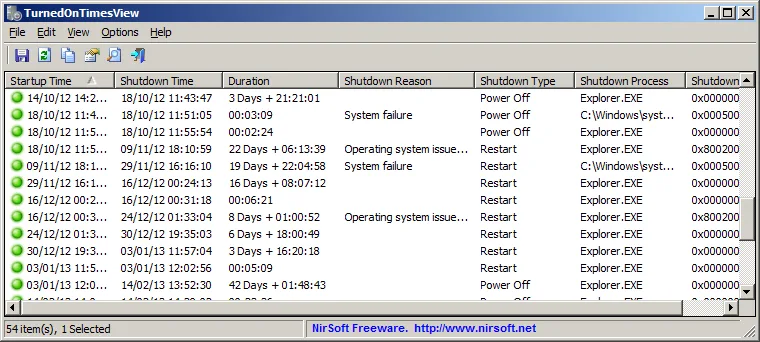
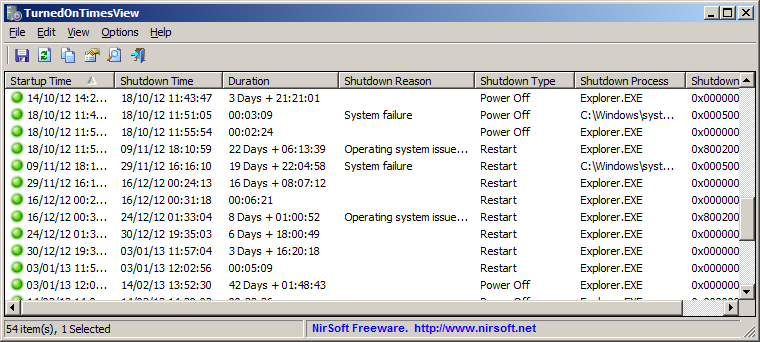
TurnedOnTimesView reads Windows event logs to show when a computer was turned on and off. Its table brings together startup time, shutdown time, duration and available shutdown details, including the reason, type and process. It is useful for reviewing recorded activity without manually matching individual events in Event Viewer.
You can inspect the local computer, query remote computers when your account has permission to read their event logs, or select an event-log folder on an external disk. Results can be copied to the clipboard or exported to CSV, tab-delimited text, HTML or XML. Command-line export options support saving reports without using the table interactively. The publisher distributes the utility in a ZIP package and says it needs no installation or additional DLL files.
The displayed periods are reconstructed from recorded events, not a guaranteed record of physical power state. False positives are possible; an abrupt power loss can leave the shutdown time unknown, and clearing the system event log removes the history the program relies on. Sleep and resume events can also count as off/on transitions unless that option is disabled in Advanced Options. The publisher lists Windows 2000 through Windows 10 with 32-bit and 64-bit support; this entry does not claim verified Windows 11 compatibility.
What it offers
- Display startup time, shutdown time, duration and available shutdown reason, type, process and code in one table.
- Read local event logs, permitted remote-computer logs or an event-log folder on an external disk.
- Copy selected rows to the clipboard or export reports to CSV, tab-delimited text, HTML and XML.
- Use command-line export and sorting options, or configure whether sleep/resume events count as off/on transitions.
Good to know
- Event-based detection can produce false positives; unexpected power loss can leave the shutdown time unknown, and cleared event logs cannot supply the missing history.
- Remote access requires permission to read the target computer's event log. Crash-related shutdown information and reading local archive logs can require administrator rights.
- The publisher's compatibility list ends at Windows 10; Windows 11 support is not established by this source.
Product images
Sources
References used for this listing. Retrieval dates do not indicate hands-on testing.
More in utilities
View category ↗
1.1.1.1 with WARP 2026.8.2115.0
Encrypt traffic from your Mac to Cloudflare’s network with WARP, or use DNS-only mode for encrypted DNS queries to the 1.1.1.1 resolver.
1.1.1.1 with WARP 2026.8.2115.0
Encrypt traffic between your Windows PC and Cloudflare, or use encrypted DNS only, with the free 1.1.1.1 with WARP app.

3uTools 9.12.005
Manage iPhone and iPad photos, music, apps and backups from Windows with 3uTools, a free utility that also includes device checks and firmware flashing tools.