

Utilities Windows
UltraISO for Windows
Create, edit and convert ISO disc images with UltraISO for Windows, a paid utility with a size-limited free trial.
Version 9.7.6.3860 · Direct publisher file
Link checked · Download guidance
What is UltraISO?
UltraISO works with CD and DVD image files rather than just the files inside an ordinary folder. You can build an ISO from local files, extract content from an existing image, or add, delete and rename items inside it. It also creates images from physical discs and handles boot information for bootable CD/DVD projects.
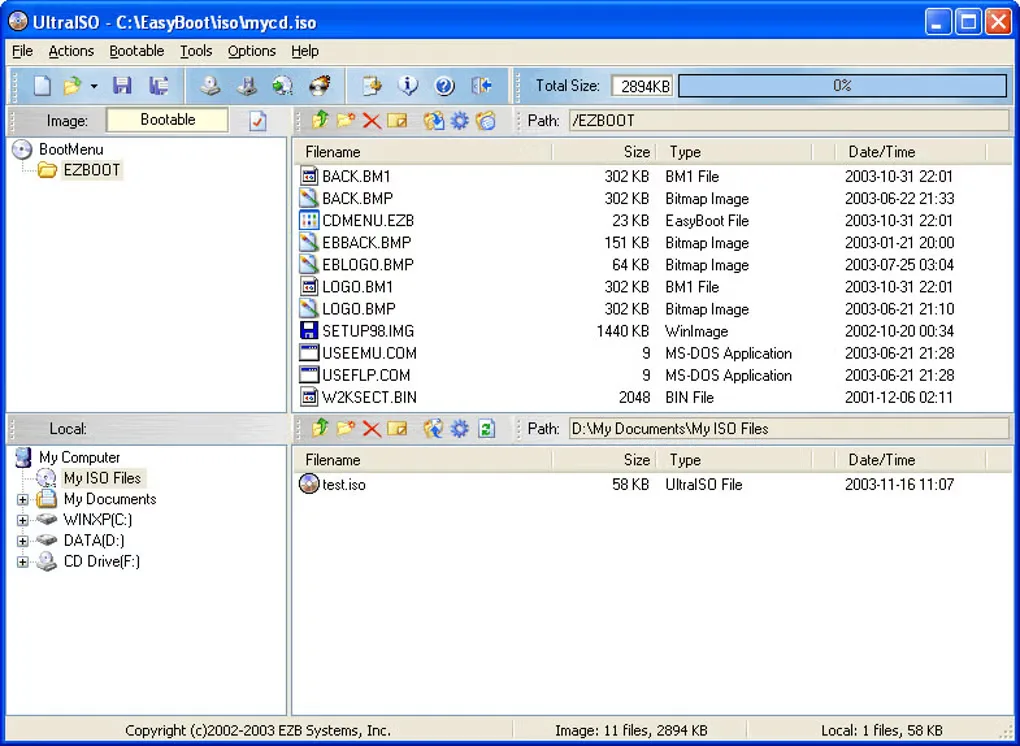
Its split workspace separates the image contents from your local files, with drag-and-drop support for assembling a project. Supported input formats include ISO, BIN, NRG, ISZ and DMG; the publisher documents conversion to standard ISO. This makes it useful for working with disc images received in different formats without treating every format as interchangeable.
The download is the publisher's trial, not a free unrestricted edition. Registration removes the startup dialog and the 300 MB document limit. The publisher lists Windows 10 and earlier Windows versions; Windows 11 compatibility has not been established from the publisher pages used here. The screenshot is a historical publisher-interface example supplied through Softonic, not proof of the downloaded build's current appearance.
What it offers
- Create an ISO image from files and folders on your computer.
- Extract files and folders, or add, delete and rename content inside an ISO image.
- Create CD/DVD images from physical discs while retaining boot information.
- Open supported disc-image formats such as BIN, NRG, ISZ and DMG and convert them to ISO.
- Arrange image contents and local files in a split workspace with drag-and-drop support.
Good to know
- The unregistered trial has a 300 MB document limit and a startup dialog; paid registration removes these restrictions.
- The publisher's system requirements and FAQ list Windows versions through Windows 10; Windows 11 compatibility is not confirmed by those sources.
Product images
Sources
References used for this listing. Retrieval dates do not indicate hands-on testing.
More in utilities
View category ↗
1.1.1.1 with WARP 2026.8.2115.0
Encrypt traffic from your Mac to Cloudflare’s network with WARP, or use DNS-only mode for encrypted DNS queries to the 1.1.1.1 resolver.
1.1.1.1 with WARP 2026.8.2115.0
Encrypt traffic between your Windows PC and Cloudflare, or use encrypted DNS only, with the free 1.1.1.1 with WARP app.

3uTools 9.12.005
Manage iPhone and iPad photos, music, apps and backups from Windows with 3uTools, a free utility that also includes device checks and firmware flashing tools.