

Utilities Windows
UltraUXThemePatcher for Windows
Enable third-party Windows visual styles by patching system theme files. UltraUXThemePatcher backs up originals, but its publisher warns that file changes can cause serious Windows problems.
- Operating system
- Publisher lists Windows XP through Windows 11; release 4.6.1 names Windows 11 26H2
- Architecture
- 32-bit and 64-bit (publisher statement)
- Download package
- Publisher product page with its own download control
Theme compatibility is separate and Windows-build-specific. No independent installation or build testing performed; ARM-native support is not established.
This opens the official acquisition page, not a verified installer file.
Publisher page reviewed · Download guidance
What is UltraUXThemePatcher?
UltraUXThemePatcher changes Windows system theme files so that third-party visual styles can be activated. It is an enabling patcher, not a theme editor or a bundled theme collection. The visual style itself comes from a separate author and must match the Windows version where it will be used.
The publisher describes support from Windows XP through Windows 11 on 32-bit and 64-bit systems. The official page lists version 4.6.1 and specifically describes Windows 11 26H2 support. That is a publisher statement, not an independently exercised compatibility result, and it does not make older themes compatible with newer builds.
This approach modifies system files. The publisher explicitly warns about unexpected problems or a total breakdown of Windows. Backups and an uninstall path exist, but they are not a guarantee that every failure will be recoverable through a normal desktop session. The link opens the official product page, where its own download control is provided; no direct installer URL or binary verification is claimed.
What it offers
- Enable third-party visual styles by modifying Windows theme system files.
- Back up original system files for restoration through uninstall.
- Use the publisher’s stated 32-bit and 64-bit Windows distributions.
- Follow publisher-documented return-to-standard-theme and uninstall recovery guidance.
Good to know
- System-file modifications can cause unexpected problems or a total breakdown of Windows, according to the publisher.
- Themes made for older Windows versions may be incompatible with newer Windows versions.
- Windows updates can leave patched files unsupported or affect login and Explorer behavior.
- Silent installation is disabled by the publisher.
- The publisher’s Windows 10 FAQ calls for themes supporting 200% DPI on 4K or higher-resolution monitors; patcher support alone does not establish theme suitability.
What the patcher changes, and what it does not
UltraUXThemePatcher enables third-party visual styles by modifying system theme files. Its purpose is not to design a theme, supply a wallpaper library or make every Windows interface look a particular way. You still need a separately obtained visual style whose author supports your Windows version.
That separation matters when diagnosing a result: an installed patcher and an incompatible theme are different problems. The official FAQ says themes for older Windows versions are not compatible with the latest Windows version and directs theme-specific problems to the theme author. Do not treat a successful patch as evidence that an unrelated theme is suitable.
Match the Windows build and theme separately
The publisher lists a broad Windows XP-to-11 range and both 32-bit and 64-bit versions. Its current 4.6.1 notes explicitly mention Windows 11 26H2 and Insider releases 29671 and later. These are the publisher’s published scope, not a promise for every future cumulative update, Insider build or third-party theme.
Before deciding to patch, compare your exact Windows release with the patcher’s current notes and the visual style author’s requirements. A general Windows 11 label is insufficient to establish that a theme intended for another build will work. This page does not infer ARM-native support from a general 64-bit statement.
Display scaling is another theme requirement, not something the patcher resolves by itself. In its Windows 10 black-screen-and-reboot FAQ, the publisher calls for themes supporting 200% DPI when using a 4K or higher-resolution monitor. Check that requirement with the theme author rather than treating a patcher version number as evidence of high-DPI suitability.
Plan installation around the theme, not an unattended wrapper
Start with two separate checks: the patcher’s release notes must cover your Windows release, and the chosen theme must support that release and display setup. The publisher asks users to read the FAQ before proceeding because the installation changes system files. If that level of modification is unacceptable, stop before patching rather than expecting an optional non-patching mode.
Use the official product page to obtain the publisher’s distribution. Its acquisition control is a POST form, so this page deliberately links to the product page instead of presenting an invented executable URL. The publisher requests donations from regular users; the served product page states no store purchase or account requirement. This is an official acquisition-page link, not a binary download checked by SoftGalaxy.
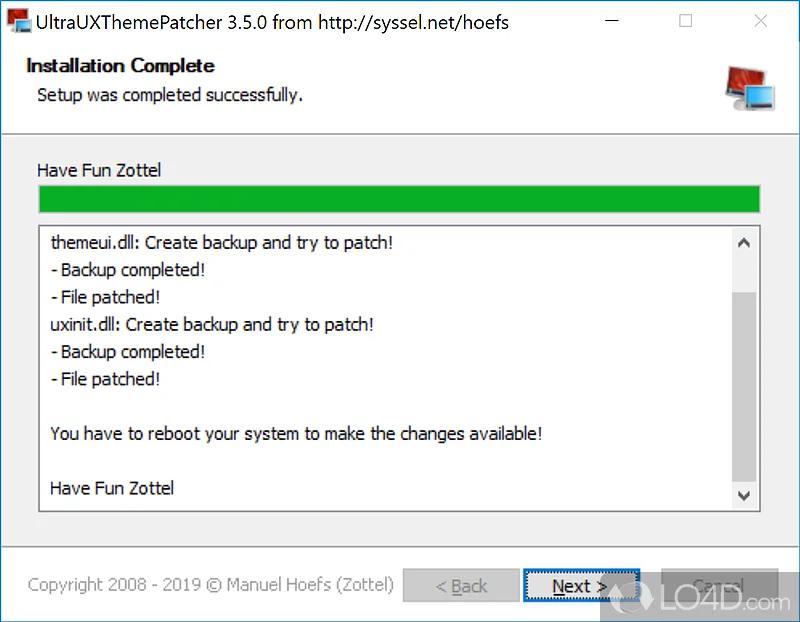
The publisher explicitly disabled silent installation. Do not plan an unattended deployment around a wrapper that expects silent switches to work. The historical screenshot shows a backup/patch log and a reboot notice, but it is not a current-version installation walkthrough; the installer was not downloaded or run for this guide.
The system-file risk is central, not an afterthought
The official warning includes unexpected problems and total Windows breakdown. The FAQ documents concrete failure classes: unsupported files after a major update, login failures when a third-party theme is active, Explorer problems and black-screen recovery complications. Those examples explain why this utility is not equivalent to changing a wallpaper or selecting a normal built-in theme.
The patcher’s backup behavior is useful, but backup files do not ensure that you can reach the normal Windows uninstall interface after every problem. If you are unwilling to modify system files, the publisher says this is not the right solution. Its FAQ points to SecureUxTheme as a different approach; that reference is not a blanket safety or compatibility endorsement.
Use the publisher’s order for undoing changes
For a complete undo while Windows is usable, the publisher’s first step is to select a standard Windows theme. Only then should UltraUXThemePatcher be removed through the software uninstall interface so that its saved originals are restored. Uninstalling while a third-party visual style remains active can create boot problems.
The FAQ also addresses an update-related login failure by using a profile that is not using a third-party theme, uninstalling the patcher there and restarting. For post-uninstall black screens it identifies Fast Startup/FastBoot as a possible complication and warns that a repair installation or complete reinstallation can be necessary. These are documented contingencies, not a guarantee of recovery or a personalized repair procedure.
Use the official source and read the image correctly
The acquisition link opens Manuel Hoefs’s product page, not a third-party mirror or a checked executable. Its served HTML offers a download through a POST form; no such form was submitted during this research. The release and compatibility facts come from the publisher rather than a mirror’s safety badge or older version label.
The screenshot is a genuine historical setup UI from a source gallery and is explicitly labeled 3.5.0. It illustrates the backup/patch log and restart-based workflow. The success message belongs to that source image; it is not a claim that this publication installed or tested UltraUXThemePatcher 4.6.1.
Product images
Sources
References used for this listing. Retrieval dates do not indicate hands-on testing.
More in utilities
View category ↗
1.1.1.1 with WARP 2026.8.2115.0
Encrypt traffic from your Mac to Cloudflare’s network with WARP, or use DNS-only mode for encrypted DNS queries to the 1.1.1.1 resolver.
1.1.1.1 with WARP 2026.8.2115.0
Encrypt traffic between your Windows PC and Cloudflare, or use encrypted DNS only, with the free 1.1.1.1 with WARP app.


3uTools 9.12.005
Manage iPhone and iPad photos, music, apps and backups from Windows with 3uTools, a free utility that also includes device checks and firmware flashing tools.