

Utilities Windows
UNetbootin for Windows
Create a bootable Linux USB drive from Windows with UNetbootin. Choose a supported distribution to download or supply a Linux ISO you already have.
- Operating system
- Windows; specific supported versions not established by the cited publisher homepage
- Architecture
- Not specified in the cited publisher homepage
- Download package
- Windows EXE executable
The official Windows link selects unetbootin-windows-702.exe. No installation or runtime compatibility test was performed.
Link checked · Download guidance
What is UNetbootin?
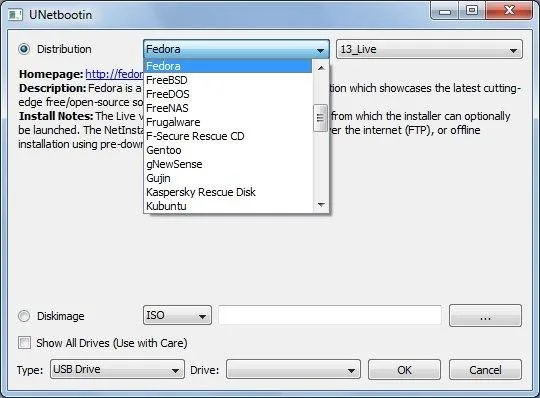
UNetbootin prepares bootable Live USB drives for Linux distributions such as Ubuntu and Fedora. On Windows, it offers two starting points: select a distribution from its built-in list, or choose a Linux ISO file already on your computer. You then select the target drive. The publisher also documents a Hard Disk mode that adds a UNetbootin entry to the Windows boot menu.
It is not a general-purpose Windows installation-media creator. The publisher warns that non-Linux ISO files use a different boot mechanism and should not be expected to work. Even a Linux ISO may need extra boot options or modifications, and some distributions do not support USB booting. If a built-in distribution download fails, the documented alternative is to obtain the ISO from that distribution's website and select it with the Diskimage option.
The linked Windows executable is release 702. The screenshot is a historical publisher image illustrating the distribution selector and USB-drive controls; its old distribution entries are not a promise of current image availability. Specific Windows-version and processor-architecture support are not established by the cited homepage.
What it offers
- Create bootable Live USB media for supported Linux distributions.
- Select a distribution for UNetbootin to download or provide a local Linux ISO through Diskimage.
- Choose a USB Drive target; the publisher also documents a separate Hard Disk install mode.
- Load supported system utilities as well as Linux distributions.
Good to know
- Non-Linux ISO files use a different boot mechanism; do not expect this tool to create Windows installation media.
- Not every Linux ISO works as-is: some distributions lack USB boot support or require extra boot options or modifications.
- Built-in distribution downloads can fail; the publisher recommends supplying an ISO obtained directly from the distribution instead.
Product images
Sources
References used for this listing. Retrieval dates do not indicate hands-on testing.
More in utilities
View category ↗
1.1.1.1 with WARP 2026.8.2115.0
Encrypt traffic from your Mac to Cloudflare’s network with WARP, or use DNS-only mode for encrypted DNS queries to the 1.1.1.1 resolver.
1.1.1.1 with WARP 2026.8.2115.0
Encrypt traffic between your Windows PC and Cloudflare, or use encrypted DNS only, with the free 1.1.1.1 with WARP app.

3uTools 9.12.005
Manage iPhone and iPad photos, music, apps and backups from Windows with 3uTools, a free utility that also includes device checks and firmware flashing tools.