
Utilities Windows
Uninstall Tool for Windows
Uninstall Windows programs, review leftover files and registry entries, trace installations and manage startup apps with CrystalIDEA's paid utility and 30-day trial.
- Operating system
- Windows 11, 10, 8.1, 8 and 7
- Architecture
- 32-bit and 64-bit Windows, native support
- Download package
- EXE installer
Publisher lists native 32/64-bit support and requires administrator privileges. This link is the standard setup, not the separately licensed portable ZIP.
Link checked · Download guidance
What is Uninstall Tool?
Uninstall Tool brings program removal, installation tracing and startup management into one Windows utility. Its app list can be filtered as you type, while separate groups distinguish desktop apps, system components, hidden entries and Microsoft Store apps. For programs that cannot be removed with their standard uninstaller, it offers Force Removal; batch removal handles multiple selected apps.
Uninstall Wizard scans for leftover files and registry entries after a program's own uninstaller runs, or as part of Force Removal. You can review the results and deselect items before removal. Files that are still in use can be scheduled for deletion at the next Windows reboot. Install Tracker records file-system and registry changes during installation, and Startup Manager controls apps that launch with Windows.
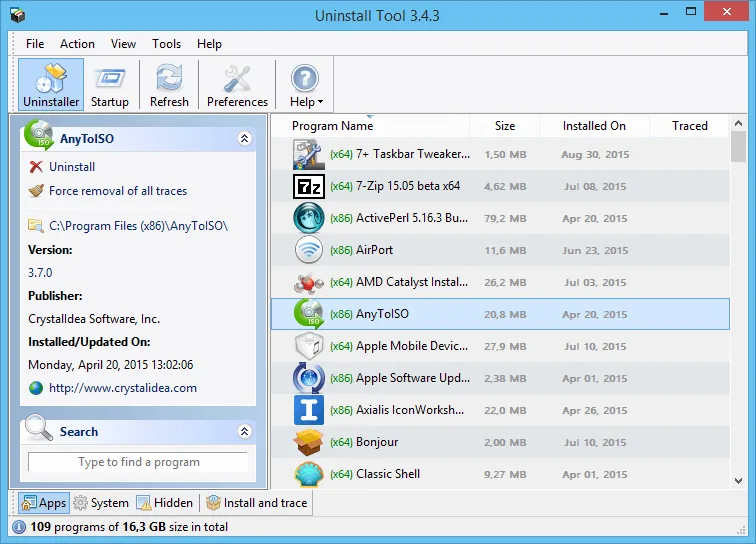
This is commercial software, not an unlimited free uninstaller. The evaluation lasts 30 days, and the trial's Uninstall Wizard does not delete app leftovers: those results can be saved for removal after purchase. Administrator privileges are required. The publisher screenshot below illustrates the older 3.4.3 interface, not the appearance of the linked 3.8.2 release.
What it offers
- Review leftover files and registry entries with Uninstall Wizard; deselect items before removal in the licensed app.
- Use Force Removal for apps that cannot be removed with their standard uninstaller, or select multiple apps for batch removal.
- Record installation changes to files and registry entries with Install Tracker.
- Find programs by typing in the filtered app list and browse separate app groups.
- Manage apps that start with Windows through Startup Manager.
Good to know
- The 30-day trial does not remove app leftovers through Uninstall Wizard; purchase is required for that cleanup.
- Administrator privileges are required, and files still in use may need a Windows reboot before deletion.
- Install Tracker uses a kernel-mode tracing driver; its tracing service can be deselected during setup.
Product images
Sources
References used for this listing. Retrieval dates do not indicate hands-on testing.
- Uninstall Tool - Download — passive browser product page ↗Retrieved
- Download Uninstall Tool — publisher setup ↗Retrieved
- Uninstall Tool — publisher features and screenshot ↗Retrieved
- Uninstall Tool Support — system requirements ↗Retrieved
- Uninstall Wizard — leftover review and delayed removal ↗Retrieved
- Uninstall Tool Release Notes ↗Retrieved
- Uninstall Tool End-user License Agreement ↗Retrieved
More in utilities
View category ↗
1.1.1.1 with WARP 2026.8.2115.0
Encrypt traffic from your Mac to Cloudflare’s network with WARP, or use DNS-only mode for encrypted DNS queries to the 1.1.1.1 resolver.
1.1.1.1 with WARP 2026.8.2115.0
Encrypt traffic between your Windows PC and Cloudflare, or use encrypted DNS only, with the free 1.1.1.1 with WARP app.

3uTools 9.12.005
Manage iPhone and iPad photos, music, apps and backups from Windows with 3uTools, a free utility that also includes device checks and firmware flashing tools.