
Utilities Windows
Universal Document Converter
Convert printable documents to PDF, JPEG, TIFF or PNG with Universal Document Converter, a Windows virtual printer with reusable conversion settings.
What is Universal Document Converter?
Universal Document Converter turns a document's printed output into a PDF or image file. Open the document in its usual application, choose Universal Document Converter as the printer, and print to create the output file. This workflow suits exporting reports, spreadsheets, presentations or drawings without using a separate conversion tool for each source format.
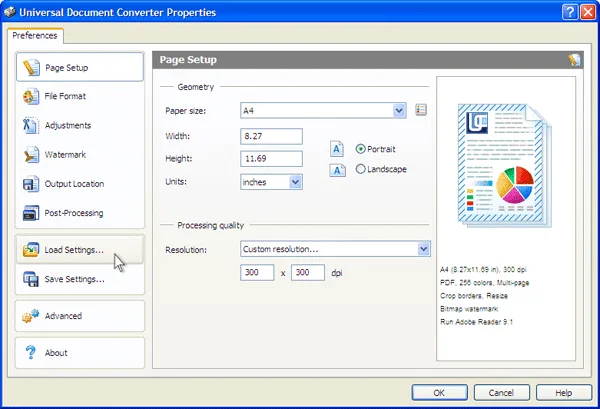
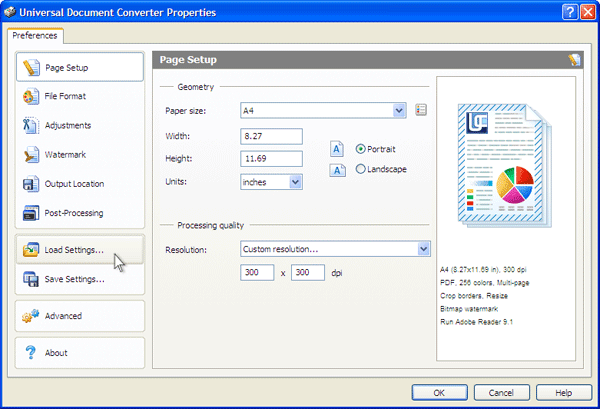
Its printer properties let you set page size, orientation and output resolution. Reusable profiles save conversion settings in XML files, so you can load a configuration for a recurring task rather than enter it again. The publisher also documents text or graphic watermarks and automatic cropping or resizing.
The source document still needs an installed application that can open and print it; the virtual printer does not replace that application. Softonic identifies the Windows product as a trial, while the publisher sells user licenses. The linked publisher EXE has been checked with a HEAD request only, not installed or functionally tested. A current package version and specific Windows release compatibility are not established by the sources used here.
What it offers
- Create PDF, JPEG, TIFF, PNG, GIF, DCX and BMP output through a virtual printer.
- Configure page size, portrait or landscape orientation, and output resolution.
- Load and save XML profiles to reuse conversion settings.
- Add text or graphic watermarks and use automatic cropping or resizing.
Good to know
- Requires separate software capable of opening and printing each source document.
- Trial software with paid user licenses offered by the publisher; not described here as freeware.
- The unversioned publisher download was not installed or tested; its current version and compatibility with specific Windows releases are unconfirmed.
Product images
Sources
References used for this listing. Retrieval dates do not indicate hands-on testing.
- Universal Document Converter - Download ↗Retrieved
- Universal Document Converter - convert to PDF with ease! ↗Retrieved
- Product Overview - Universal Document Converter ↗Retrieved
- Supported Formats - Universal Document Converter ↗Retrieved
- Using Profiles - Universal Document Converter ↗Retrieved
- Page Setup - Universal Document Converter ↗Retrieved
- Order Full Featured Version - Universal Document Converter ↗Retrieved
More in utilities
View category ↗
1.1.1.1 with WARP 2026.8.2115.0
Encrypt traffic from your Mac to Cloudflare’s network with WARP, or use DNS-only mode for encrypted DNS queries to the 1.1.1.1 resolver.
1.1.1.1 with WARP 2026.8.2115.0
Encrypt traffic between your Windows PC and Cloudflare, or use encrypted DNS only, with the free 1.1.1.1 with WARP app.

3uTools 9.12.005
Manage iPhone and iPad photos, music, apps and backups from Windows with 3uTools, a free utility that also includes device checks and firmware flashing tools.