

Utilities Windows
Universal Theme Patcher for Windows
A legacy third-party visual-style patcher for Windows XP, Vista and 7-era systems, with per-file patch and restore controls—not a Windows 11 theme tool.
- Operating system
- Legacy Windows XP, Vista and Windows 7-era systems; exact author confirmations include Vista SP2 RTM 18005 and Windows 7 build 7100
- Architecture
- Historical x86 (32-bit) and x64 (64-bit) variants
- Download package
- Official author download index linking legacy ZIP packages
No Windows 10/11 support established. Historical build-specific author reports are not tests of modern systems or every Windows 7 update.
This opens the official acquisition page, not a verified installer file.
Publisher page reviewed · Download guidance
What is Universal Theme Patcher?
Universal Theme Patcher is deepxw’s older utility for modifying Windows theme-related system files so third-party visual styles can be used. It is a prerequisite tool, not a theme pack, wallpaper gallery or editor. Its interface reports file versions, platform, checksums and patch status, with separate Patch and Restore controls for individual files.
The author’s download index lists version 1.5.0.22, build 20090409. Contemporary documentation covers 32-bit and 64-bit Windows XP, Vista and Windows 7-era systems; the author separately confirmed Vista SP2 RTM file version 6.0.6002.18005 and Windows 7 pre-release build 7100. These specific historical confirmations do not establish compatibility with all later service packs, Windows 10 or Windows 11. The word Universal in the name must not be treated as an unlimited compatibility claim.
Unlike an in-memory theme enabler, this utility changes files on disk. The historical gHacks walkthrough describes automatic backups before patching, per-file restoration, administrator rights for Vista/7 patch or restore operations and a restart for changes to take effect. Those instructions are retained as attributed legacy guidance, not as a locally tested repair method. The outbound link opens the author’s own download index; the old mirrors have not been certified as current binaries.
What it offers
- Enables third-party visual styles by modifying theme-related Windows system files.
- Shows per-file version, platform, checksum and patched status.
- Offers independent Patch and Restore controls for each displayed system file.
- Historical documentation describes automatic backup creation before file patching.
- Provides x86 and x64 variants for the documented legacy Windows systems.
- Version 1.5.0.22 supports external language files and recognition of files modified by another patch.
Good to know
- Legacy scope: Windows XP, Vista and Windows 7-era documentation; no Windows 8, 10 or 11 compatibility is established.
- Changes system files on disk and requires a restart in the historical workflow.
- Author says Unknown patched status means the patch cannot work for that file.
- The official index links historical mirrors; this entry verifies the source page, not current mirror availability or installer contents.
Universal is a product name, not modern Windows support
Universal Theme Patcher belongs to the XP, Vista and Windows 7 customization era. The author’s retained download entry lists V1.5.0.22, build 20090409. The historical gHacks review explicitly limits the reviewed tool to Windows 7 or older. There is no source basis here for recommending it as a Windows 10 or Windows 11 patcher.
The author separately reports success with Vista SP2 RTM file version 6.0.6002.18005 and Windows 7 build 7100, both x86 and x64. These are precise historical claims. Windows 7 build 7100 is a pre-release build, so that post must not be relabelled as proof for all Windows 7 releases and later servicing updates.
What the patcher enables
The purpose is to allow third-party Windows visual styles by changing the system files that enforce the theme restriction. It does not create a visual style or provide a library of finished themes. The theme and the enabling tool therefore have separate version requirements.
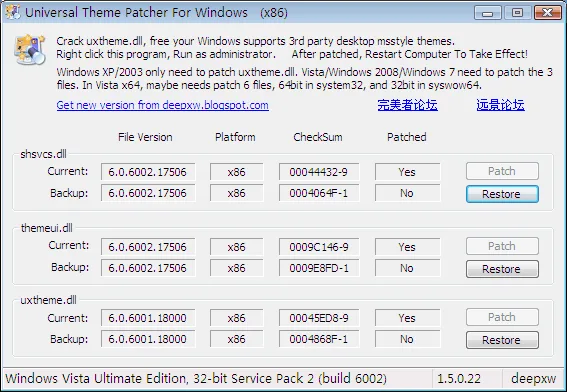
The historical review distinguishes XP, where one file is patched, from Vista and Windows 7, where three files are involved. The retained x86 screenshot shows current and backup information for theme-related DLLs. That file-level interface is different from a theme browser, even though both are part of a larger customization workflow.
Architecture and patch status are separate decisions
The historical documentation names UniversalThemePatcher-x86.exe for 32-bit Windows and UniversalThemePatcher-x64.exe for 64-bit Windows. The author’s 1.5.0.22 notes also discuss letting the x86 tool handle 32-bit files in SysWOW64. That note describes a specific file architecture case, not a general invitation to mix executables on an unsupported system.
Before any operation, the interface reports version, platform, checksum and patched state. The author explains that Unknown status means the patch cannot work for that file. A recognised No or Yes status concerns the patcher’s file recognition; it is not a malware scan or a guarantee that a separately chosen visual style will work.
What the historical walkthrough actually says
The gHacks walkthrough describes a portable utility that can be run after downloading and unpacking, with a language choice before the detailed file list. On a documented legacy build, its described sequence is to run the matching x86 or x64 executable, choose the interface language, open the file list and use the individual Patch controls for recognised files. The author’s Unknown-status warning remains a reason not to proceed. Vista and Windows 7 require administrator execution for patching or restoring, and the machine must be restarted for changes to take effect. These are attributed historical instructions, not an installation or compatibility test performed for this entry.
No package was downloaded or executed for this research. The page’s link leads to the author’s own download index, whose ZIP links are old mirrors. It is not a direct-download certification, and the displayed build date is not a statement that those mirrors are currently maintained.
Recovery: per-file Restore and the limits of backup claims
The historical walkthrough says the program creates a backup before patching and allows each system file to be restored independently. The screenshot corroborates the visible arrangement: Current and Backup rows, patched status and Restore buttons for individual files. These are concrete recovery controls, not a generic promise that every failure can be reversed.
Use the documented Restore mechanism for the matching backed-up file rather than manually substituting an unrelated DLL from another Windows build. The source also says administrator rights and restart apply to restoring on Vista and Windows 7. No guarantee is made that a missing backup, inaccessible session or unsupported modern system can be repaired through those controls.
Do not confuse it with other theme enablers
The gHacks article’s March 2018 update distinguishes Universal Theme Patcher from UxStyle and Ultra UX Theme Patcher. It describes UxStyle as changing files in memory for Windows 8.1 or older, and Ultra UX Theme Patcher as a disk-file patcher offered for Windows 10 at that time. Those are historical comparisons, not current build-support recommendations. The article explicitly limits the Universal Theme Patcher reviewed below its update to Windows 7 or older; another product’s support list does not extend this tool’s compatibility.
The author announced release of the patch-engine source in May 2009 and allowed its reuse in projects. That announcement does not establish the exact licence of every redistributed binary, and it does not grant rights to the third-party screenshot. This entry keeps source-code availability, binary distribution and image rights separate.
Read the DLL rows, not just the Windows build label
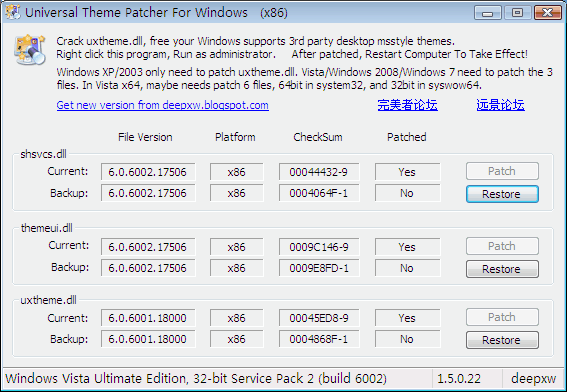
The retained screenshot is the x86 application on Windows Vista Ultimate Edition, 32-bit Service Pack 2, build 6002; it is not a Windows 7 screenshot despite its source filename. The bottom-right application version is 1.5.0.22. Three groups show shsvcs.dll, themeui.dll and uxtheme.dll, each with Current and Backup rows, a checksum, patch status and its own controls.
In this captured state the Current rows say Yes and the Backup rows say No; Patch is disabled and Restore is available. The displayed shsvcs.dll and themeui.dll versions are 6.0.6002.17506, while uxtheme.dll is 6.0.6001.18000. Those visible DLL versions are different from the author’s separate Vista SP2 RTM report for file version 6.0.6002.18005. Treat the image as evidence of the interface and this historical state, not as a reproduction of that exact support report or a guarantee for another machine.
Product images
Sources
References used for this listing. Retrieval dates do not indicate hands-on testing.
More in utilities
View category ↗
1.1.1.1 with WARP 2026.8.2115.0
Encrypt traffic from your Mac to Cloudflare’s network with WARP, or use DNS-only mode for encrypted DNS queries to the 1.1.1.1 resolver.
1.1.1.1 with WARP 2026.8.2115.0
Encrypt traffic between your Windows PC and Cloudflare, or use encrypted DNS only, with the free 1.1.1.1 with WARP app.

3uTools 9.12.005
Manage iPhone and iPad photos, music, apps and backups from Windows with 3uTools, a free utility that also includes device checks and firmware flashing tools.