

Utilities Windows
USB Device Tree Viewer for Windows
Inspect USB controllers, hubs and connected devices in a tree view, with device descriptors, drive letters and COM ports. This freeware Windows utility links hardware connections to detailed device information.
- Operating system
- Windows 8 and higher
- Architecture
- x64
- Download package
- ZIP archive
Selected download is x64; separate Win32 and ARM64 packages are publisher-listed. Some speed and USB4 details require newer Windows versions.
Link checked · Download guidance
What is USB Device Tree Viewer?
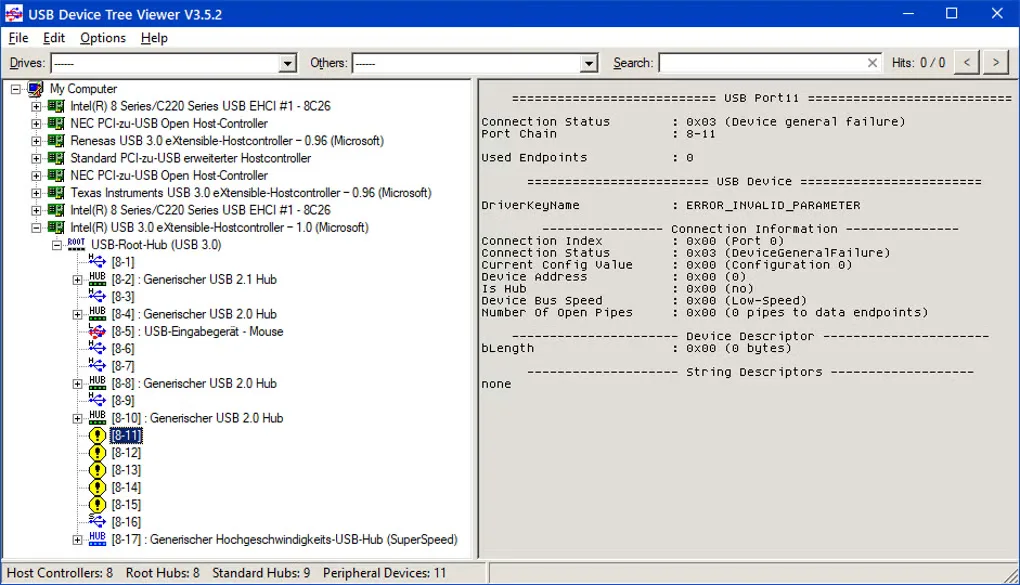
USB Device Tree Viewer, also called UsbTreeView, maps USB host controllers, hubs and attached devices into a navigable tree. Select a device to inspect its connection details and decoded descriptors, or use the drive and device lists to locate hardware in a crowded setup. It combines USB information with Windows Device Management data so child devices, drive letters and COM ports can be identified together.
The utility can save and read XML reports, display descriptor hex dumps, and offer safe-removal, device-restart and port-restart commands. Its search targets identifiers such as device IDs, drive letters and volume names rather than every word in the details pane.
The linked download is the publisher's x64 ZIP for Windows 8 and higher; separate Win32 and ARM64 packages are available from the publisher. Version 4.8.0 is listed with an 18 October 2026 release date. Some information depends on Windows: 10 or 20 Gbit/s SuperSpeedPlus reporting requires Windows 11 24H2 or later, and USB4 information in 4.8 is described as incomplete and experimental. The gallery image illustrates the older V3.5.2 interface, not the current release.
What it offers
- Explore USB controllers, hubs, connected devices and child devices in a tree.
- Match USB devices with Windows Device Management details, including drive letters and COM ports.
- Inspect decoded USB descriptors and optional descriptor hex dumps.
- Save and read XML reports and search by device ID, drive letter or volume name.
- Access safe-removal, device-restart and USB port-restart commands.
Good to know
- The current release requires Windows 8 or higher; the publisher identifies 4.6.4 as the last release for Windows XP through Windows 7.
- Search is not full-text, and its XML reports are not compatible with Microsoft's USBView reports.
- Reporting 10 or 20 Gbit/s SuperSpeedPlus speeds requires Windows 11 24H2 or later; USB4 information is incomplete and experimental.
Product images
Sources
References used for this listing. Retrieval dates do not indicate hands-on testing.
More in utilities
View category ↗
1.1.1.1 with WARP 2026.8.2115.0
Encrypt traffic from your Mac to Cloudflare’s network with WARP, or use DNS-only mode for encrypted DNS queries to the 1.1.1.1 resolver.
1.1.1.1 with WARP 2026.8.2115.0
Encrypt traffic between your Windows PC and Cloudflare, or use encrypted DNS only, with the free 1.1.1.1 with WARP app.

3uTools 9.12.005
Manage iPhone and iPad photos, music, apps and backups from Windows with 3uTools, a free utility that also includes device checks and firmware flashing tools.