
Utilities Windows
USB Drive Letter Manager
Assign preferred letters to USB drives and avoid conflicts with network mappings using USBDLM, a Windows service configured through an INI file.
- Operating system
- Windows XP through Windows 11; Windows Server 2003 through 2022, as listed by the publisher
- Architecture
- x64
- Download package
- ZIP archive
This link selects the x64 ZIP, not the separate Win32 or MSI packages. Extract the archive and register the service with administrator privileges; configure custom rules in USBDLM.INI.
Link checked · Download guidance
What is USB Drive Letter Manager?
USB Drive Letter Manager (USBDLM) controls which drive letters Windows assigns to removable storage. It can choose from a preferred list, apply rules based on a drive's label, USB port or other criteria, and keep USB drives from taking letters used by the current user's network or subst drives. This is useful when removable drives need predictable paths rather than whichever local letter Windows chooses.
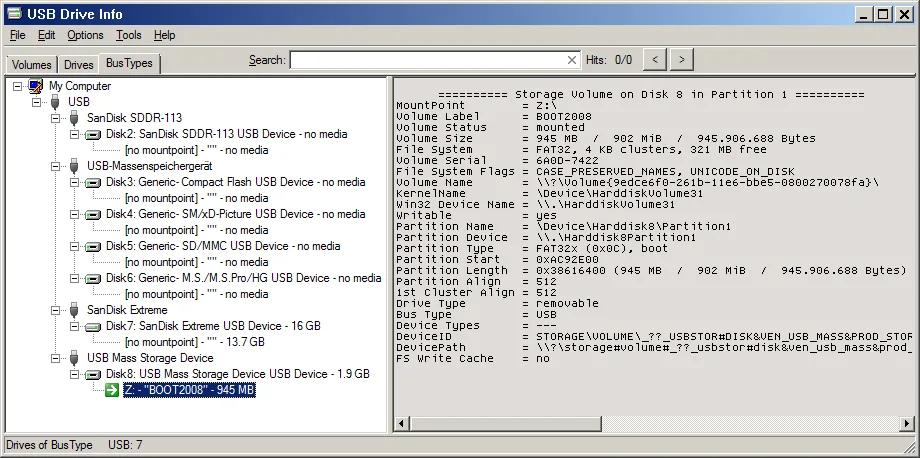
USBDLM runs as a Windows service. Its default behavior handles network-letter conflicts; custom assignments and other rules are configured in USBDLM.INI. It can also hide empty card-reader letters until media is inserted and display a notification showing the assigned letter. The accompanying USB Drive Info utility provides a visual view of volumes, drives and connection types; the screenshot shows that companion utility, not a graphical USBDLM settings editor.
The linked package is the publisher's x64 ZIP archive, not a one-click installer. The publisher documents extracting the archive and registering the service with administrator privileges. USBDLM addresses drive-letter assignment, not underlying Windows USB detection or hardware problems. Private and qualifying educational use is free; other use requires a per-computer licence after a 30-day evaluation.
What it offers
- Choose preferred USB drive letters using rules such as volume label, USB port, drive type or active user.
- Resolve conflicts with network and subst drive letters used by the currently logged-on user.
- Remove drive letters from empty card-reader slots until media is inserted.
- Show drive-arrival notifications with assigned letters or mount points.
- Inspect volumes, drives and bus types with the accompanying USB Drive Info utility.
Good to know
- Cannot fix underlying Windows USB-drive detection or hardware problems.
- Custom assignment rules require editing USBDLM.INI; the ZIP package requires manual extraction and service registration with administrator privileges.
- Free use is limited to private and qualifying educational use; other use needs a per-computer licence after 30 days.
Product images
Sources
References used for this listing. Retrieval dates do not indicate hands-on testing.
- USB Drive Letter Manager - USBDLM ↗Retrieved
- USBDLM Help ↗Retrieved
- USB Drive Info ↗Retrieved
More in utilities
View category ↗
1.1.1.1 with WARP 2026.8.2115.0
Encrypt traffic from your Mac to Cloudflare’s network with WARP, or use DNS-only mode for encrypted DNS queries to the 1.1.1.1 resolver.
1.1.1.1 with WARP 2026.8.2115.0
Encrypt traffic between your Windows PC and Cloudflare, or use encrypted DNS only, with the free 1.1.1.1 with WARP app.


3uTools 9.12.005
Manage iPhone and iPad photos, music, apps and backups from Windows with 3uTools, a free utility that also includes device checks and firmware flashing tools.