
Utilities Windows
USBDriveLog for Windows
View USB drive connection history on Windows 10 and 11, including device details and plug/unplug times, with NirSoft's standalone freeware utility.
- Operating system
- Windows 10 and Windows 11
- Architecture
- 32-bit and 64-bit systems supported by the publisher
- Download package
- ZIP archive; standalone USBDriveLog.exe
No installation required. Earlier Windows versions are unsupported; the required event log channels must be enabled.
Link checked · Download guidance
What is USBDriveLog?
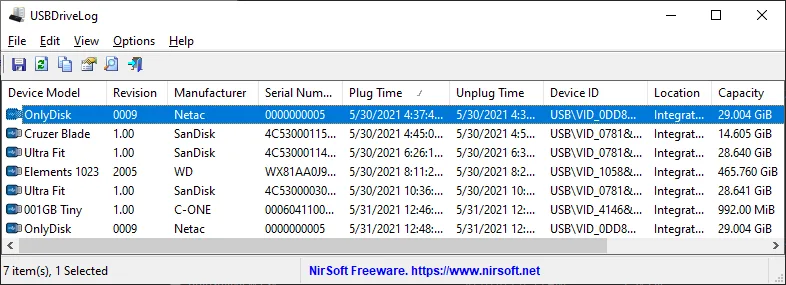
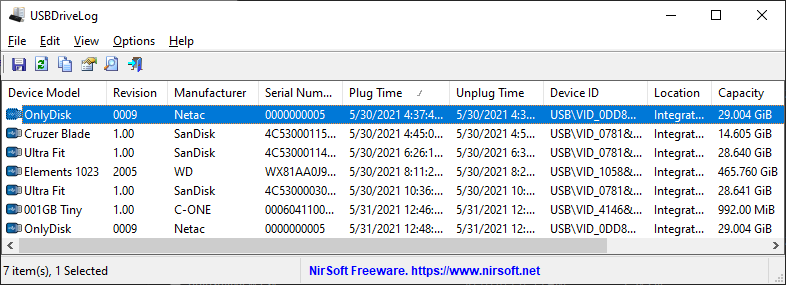
USBDriveLog reads Windows event logs to show when USB drives were connected and disconnected. Its table includes device model, manufacturer, serial number, capacity and connection times, making it useful for reviewing USB drive activity without manually inspecting individual event records. The publisher distributes it as a ZIP download containing a standalone executable that does not require installation.
You can inspect the current computer, read event logs from an external Windows drive, or connect to a remote computer when you have permission to read its logs. Selected rows can be copied to a spreadsheet or exported to CSV, tab-delimited text, HTML, XML or JSON. Command-line export options are also documented.
The history depends on the Microsoft-Windows-Partition/Diagnostic and Microsoft-Windows-Storsvc/Diagnostic event log channels. If these channels are disabled, USBDriveLog does not display the USB drive log. Earlier Windows versions are unsupported because they lack the required channels.
What it offers
- Display USB drive models, manufacturers, serial numbers, capacities and plug/unplug times in a table.
- Read the local computer's logs, an external Windows event-log folder, or a permitted remote computer.
- Export selected entries to CSV, tab-delimited text, HTML, XML or JSON, or copy them to a spreadsheet.
- Use documented command-line options to export and sort log entries.
Good to know
- Requires Windows 10 or Windows 11; earlier Windows versions lack the required event log channels.
- USB drive history is not displayed if the required Partition/Diagnostic and Storsvc/Diagnostic event log channels are disabled.
- Reading a remote computer's event logs requires permission on that computer.
Product images
Sources
References used for this listing. Retrieval dates do not indicate hands-on testing.
More in utilities
View category ↗
1.1.1.1 with WARP 2026.8.2115.0
Encrypt traffic from your Mac to Cloudflare’s network with WARP, or use DNS-only mode for encrypted DNS queries to the 1.1.1.1 resolver.
1.1.1.1 with WARP 2026.8.2115.0
Encrypt traffic between your Windows PC and Cloudflare, or use encrypted DNS only, with the free 1.1.1.1 with WARP app.

3uTools 9.12.005
Manage iPhone and iPad photos, music, apps and backups from Windows with 3uTools, a free utility that also includes device checks and firmware flashing tools.