

Utilities Windows
UxStyle for Windows
A discontinued Windows theme-signature utility that loads a service and kernel driver in memory; use its legacy support boundaries, not modern Windows claims.
- Operating system
- Historical README: XP, Vista, 7, 8, 8.1, Windows 10 Technical Preview and contemporary Server editions
- Architecture
- Historical x86 and x64 build targets
- Download package
- Official archived GitHub pre-release page; asset suitability must be checked there
Known unresolved Windows 10 Creators Update-and-later issues. No Windows 11 compatibility or current supported installer is asserted.
This opens the official acquisition page, not a verified installer file.
Publisher page reviewed · Download guidance
What is UxStyle?
UxStyle is a legacy utility for enabling third-party Windows visual styles. Its author describes a small system service and a kernel driver that relax theme-signature requirements in memory, without changing the theme files on disk. It is an enabling component rather than a theme collection, wallpaper application or visual-style editor.
The important fact today is the project’s status. The official repository is archived, and the README says UxStyle will not be updated. It explicitly warns about known compatibility issues with Windows 10 Creators Update and later that will not be resolved. A download still being listed on another site does not override that warning. Windows 11 compatibility is not established.
The author’s historical support list names Windows XP, Vista, 7, 8 and 8.1, several contemporary Windows Server editions, Whistler/Threshold development versions and Windows 10 Technical Preview. Those are historical project targets, not a promise that one retained installer works on all of them. Community Edition 0.2.4.2 is marked as a pre-release on GitHub. Its release notes fix a crash-causing incorrect patch on Windows 10 x64 targets, which further shows why build and version matching matter.
What it offers
- Relaxes Windows theme signature requirements to enable third-party customization.
- Uses a system service and kernel driver loaded into memory rather than patching theme files on disk.
- Provides public source code under GPL-3.0 in the archived official repository.
- Retains historical build instructions and release notes for x86 and x64 targets.
Good to know
- Discontinued: the official README says UxStyle will not be updated.
- Known unresolved compatibility issues affect Windows 10 Creators Update and later; Windows 11 support is not established.
- The listed 0.2.4.2 Community Edition is a pre-release, not a modern supported release.
- UxStyle does not supply the third-party visual styles themselves; a theme needs its own compatibility assessment.
Read the author’s archived-project warning first
The official README states that UxStyle is in read-only mode, will not be updated, and has known compatibility issues with Windows 10 Creators Update and above. It also says those issues will not be resolved. That warning takes priority over a download portal’s recent page-update date or broad Windows category label.
For a Windows 11 search, the useful answer is therefore not an installation recipe. The sources examined do not establish Windows 11 support. For Windows 10 Creators Update and later, the author reports known unresolved compatibility issues, not a claim that a small configuration change restores support.
What UxStyle changes, and what it does not supply
UxStyle is a theme-signature enabler. The author explains that a small system service and kernel driver are loaded into memory, where they remain until reboot, and says no file-system changes are made by that mechanism. This describes the theme-signature modification, not a promise that installing the service and driver leaves no files on disk. It distinguishes the mechanism from older patchers that replace or modify theme DLLs on disk.
That mechanism does not make UxStyle a visual-style designer or a collection of ready-made skins. A separate third-party theme supplies the visual design, and its compatibility is a separate question. An in-memory implementation also does not remove the author’s stated operating-system limitations.
Separate historical targets from a supported installer
The README names XP, Vista, 7, 8 and 8.1, Server 2003, 2008, 2008 R2, 2012 and 2012 R2, plus development-era Whistler, Threshold and Windows 10 Technical Preview targets. Windows 10 Technical Preview is a specific historical context, not shorthand for all releases of Windows 10.
The build instructions contain x86 and x64 projects for service, driver and installer components. That is evidence about source build targets. It is not sufficient to certify one downloaded release asset across every listed operating system, especially when code-signing and later Windows changes affect driver loading.
Check the Windows target before choosing a theme workflow
The first decision is whether the machine belongs to the historical support scope at all. Compare its Windows release and architecture with the original project information and the particular release you are considering. Do not turn the README’s broad historical list into a claim that Community Edition 0.2.4.2 supports every listed system. On Windows 10 Creators Update or later, the unresolved-issues warning is a reason to stop rather than follow an older theme tutorial.
If researching a matching legacy system, keep three components separate: UxStyle enables unsigned visual styles, a separate theme supplies their appearance, and the Windows version determines whether either is applicable. A theme described for Windows 7 or 8.1 does not acquire Windows 10 compatibility merely because the same enabler name appears in a guide. The retained sources do not establish a current supported theme-installation sequence, so this guide does not supply one.
The official README’s step-by-step material is a developer build procedure using Visual Studio 2013, Windows 8.1 SDK/WDK and WiX 3.8. It includes manual signing and separate service, driver and installer targets. Those instructions are not an end-user installer walkthrough; running the source build steps is not a substitute for establishing operating-system and package compatibility.
What the Community Edition release actually establishes
The official 0.2.4.2 release is labelled Pre-release. Its notes describe a kernel-driver correction for an incorrect patch applied to Windows 10 x64 targets that caused crashes, plus installer build and removal-logic fixes. Those are specific changes to historical software, not a new support commitment.
The outbound link opens the exact official GitHub release page, not a checked installer binary. Inspect the release identity and README warning before choosing any legacy asset. The retained evidence does not establish a purchase, subscription or store-account requirement, and this entry makes no installation-success claim. No installer or archive body was downloaded for this revision.
Why the screenshot is labelled historical
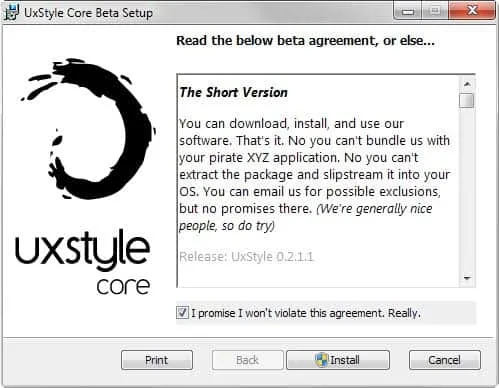
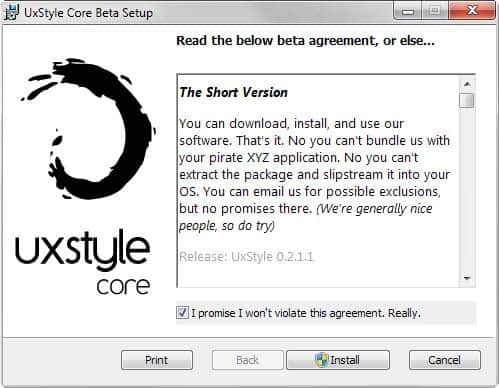
The retained image shows UxStyle Core Beta Setup and an agreement screen identifying release 0.2.1.1. It is a genuine application installer interface from the gHacks article, but it is older than the linked Community Edition release. Its controls are not proof of the 0.2.4.2 installer flow.
In particular, the older agreement visible in the screenshot should not be treated as the licence for the archived source repository. The repository lists GPL-3.0; this entry keeps software licensing, old interface text and third-party screenshot rights distinct.
Do not substitute an invented recovery procedure
The README’s statement that components reside in memory until reboot explains their lifetime, not a complete uninstall or recovery process. The release note about installer service/driver removal is also not a user-facing rollback guide. No supported emergency recovery sequence was established from the official materials examined.
This entry therefore does not prescribe disabling security protections, replacing system DLLs, applying unrelated registry commands or restarting into an assumed repaired state. A system already affected by an incompatible theme needs recovery guidance appropriate to that exact system and software version, not an unsupported generic UxStyle fix.
Product images
Sources
References used for this listing. Retrieval dates do not indicate hands-on testing.
More in utilities
View category ↗
1.1.1.1 with WARP 2026.8.2115.0
Encrypt traffic from your Mac to Cloudflare’s network with WARP, or use DNS-only mode for encrypted DNS queries to the 1.1.1.1 resolver.
1.1.1.1 with WARP 2026.8.2115.0
Encrypt traffic between your Windows PC and Cloudflare, or use encrypted DNS only, with the free 1.1.1.1 with WARP app.

3uTools 9.12.005
Manage iPhone and iPad photos, music, apps and backups from Windows with 3uTools, a free utility that also includes device checks and firmware flashing tools.